[release] RK Launcher 0.3 Beta

We're certainly getting there Radu!

Pleasently surpised by it's unexepcted release and

even more pleasently surprised by the fact that now we can finally add shortcuts to your Dock.

[Request:] could you enable the option to alter the directory for costum (.png) icons?

Because, now one has to copy all the .png's I want to use for shortcuts on your Dock

from the directory I use for AveDesk etc to your RKLauncher/icon directory.

The next step would be the ability to drag AveDesklet's to the dock & Vice-versa to the desktop.

For what I understand we can now use the Y'z dock-desklets?

Your Alpha release allready made me un-ditch the dock and this beta release makes met hold on to

this Return of the Dock ( ...-ahum- Launcher ;)) to my desktop.

#261794

Excellent work!

A few issues:

-Slow (much slower than Y'z Dock on my machine) I have an Athlon 64 3000+ and an Nvidia 6600GT and the dock seems to get less than 30 FPS in some instances where Y'z gets 100+.

-Zoomed icons look blockier than Y'z Dock

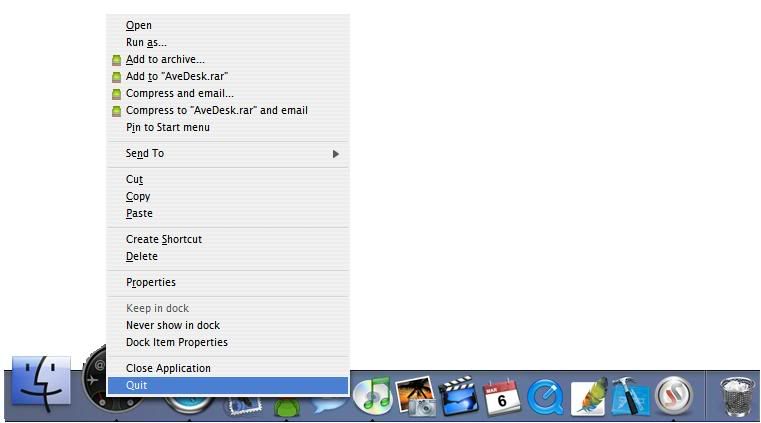
-I would like to be able to Left Click Hold and select Quit from the menu (perhaps see the context menu for that application.

-Same Instance doesn't seem to work for me with Firefox.

-Windows+D or another hotkey hide the dock until the hotkey is pressed again

-When minimizing Winamp the main player goes to minimize, but the playlist window doesn't go along with it.

Keep up the great work, this is an awesome debut.

-Bryce

#261796

very nice dock.

one suggestion though.

could a list of ignore apps be added?

when i select the option "Show New Applications" i get an icon for background apps,

that i really don't need to see running.

keep up the good work.

Just right click and tell it it ignor that app.

PS Great work RK

#261797

it's perfect! Thanx Raduking

#261799

-Slow (much slower than Y'z Dock on my machine) I have an Athlon 64 3000+ and an Nvidia 6600GT and the dock seems to get less than 30 FPS in some instances where Y'z gets 100+.
I know Y'z did have an integrated benchmark for this, but how do you know RK's=30fps?

My AMD64 3500+ & Gf6600 setup is quite similiar to yours but I don't experiance the slowness you seem to get hindered by. How many icons do you have on the Dock?

[i wonder] Can the Trash sublabel slow the Dock (just like folder sublabels do on AveDesk?)

-I would like to be able to Left Click Hold and select Quit from the menu (perhaps see the context menu for that application.

Why would you want that? Right click on docked items allready gives context menu, doesn't it?

Your request would mean an extra action for achieving the same result.

-Windows+D or another hotkey hide the dock until the hotkey is pressed again

I like this idea very much. Sometimes I experiment with autohide, but it seems to hinder me on a regular basis by popping up when I'm working around the bottom of my active window.

Cuurently I use WindowFx to make my windows not maximising to bottom of desk, to that they do not hinder my dock and vice versa. This works, but is not so efficient window-size-wise (is this a word?) so a hotkey would be much better. I've allready gotten used to this implemented feature in AveDesk 1.2 with the F9 key.

[request] May I suggest another F-key for show/hide dock on next version of RKLauncher?

#261804

-Zoomed icons look blockier than Y'z Dock

-Windows+D or another hotkey hide the dock until the hotkey is pressed again

what icons? for me its 1:1 like in y'z

do u know what windows+D do? its shows ur desktop, use windows+M instead or make dock always on top, btw same thing happens to y'z

#261805

Hi all, first, great job raduking !!! your dock is the best i ever seen. love the way new apps appear in the dock, but is there a way to remember settings for these items ? (the name and custom icon).

#261814

Very Very Nice Release.

Memory usage got slightly larger but not too big of a deal.

Heres a couple of things that I think needs fixed/added.

when used with kkmenu(exe haven't tried docklet) the dock still fights the list when on always on top.

(so kkmenu only flashes on the screen if mouse is left on the dock)

Hotspots on edge of where the dock is to bring dock to front if dock isn't always on top.

(similar to the showing it when its hidden. but will bring it to the top regardless)

UI for list of items set to never show in the dock.

(incase you set it to never show you don't have to go into the conf to change it.)

keep up the good work can't wait to see the improvements on the next release!

This version is a big step up from 2nd alpha!

#261816

nice work

uve done a great job

#261817

I run to my PC to try it ! :) looking awesome, thanks a lot :)

/aviel

#261818

Omg! Best Dock Ever!! :)

#261825

You can already select quit from right click, look here:

http://img.photobucket.com/albums/v494/FLCI/72dda4f0.jpg

#261828

cool work, incredible app... and is only a beta version :o

Thanks ;)

#261840

What a fantastic dock that I have alreay used ! I really like this one. I'd really appreciate raduking's dock. And i give some suggestions below :

1, Whether the dock can include more options for us to select?

2, Just like WinOSX , if u install it in ur XP OS , it can make ur XP OS like Mac as possible as it could,esp the dock wouldnt cover the applications when u open full screen. just like dock of mac.

3, Can u make the dock use both of the background YZ & OD ?

Hope raduking improve it as better as it could !

#261842

gonna have a look at this later (setting up an htpc at the moment). looking good though!

#261845

You are the man raduking..

Best Dock application ever.

keep up the good work

#261848

Great dock but I would like to see it using yz docklets and objectdock docklets. Not many people are making Yzdocklets anymore. And that would make it compatible with ave desklets also.

#261856

drat. i'm so stupid to post a new thread....................i'm so embarressed. just wondering. can objectdock docklets be used and how? i only see three docklets in the docklet window even though i moved every single docklet of objectdock into the folder. great friggan release.

#261864

Also noticed some Yz Docklets dont display in the add docklets section.

#261875

i made some y'z docklet appear after renaming their folder and removing 'spaces' in their names

#261876

You can convert Y'z dock backgrounds to RK dock backgrounds pretty easily. I know this is a popular theme, so I converted it myself. It's the "real panther OSX 10.3" background.

Just remember, I didn't create it, I just converted it.

z Dock.zip

Attachment: z Dock.zip

#261879

i made some y'z docklet appear after renaming their folder and removing 'spaces' in their names

your right that did work for some. any luck with objectdock docklets?

#261902

Post your comments on how I converted. :) I want to feel special too!

#261903

^^^^

well, ok. why not. but maybe in a seperate thread. this on is about launcher and when somebody wants to search for backgrounds,... she/he must not search an multi-pages-thread.

#261906

Absolutely amazing. Even after reading all the rave reviews it still beat my expectations. You have to try it yourself to fully understand.

As for a feature request, or maybe someone can point in the right direction, is there a way to limit the size of maximized windows. I'm pretty sure desktop X has this, but i don't want to run that just for that feature. I don't have access to a mac, but it appeared that the dock can force all windows to not overlap it?

Thanks for the hard work!

#261908