[release] Pinstripe Thunderbird

Originally posted by d-shade@Aug 5 2004, 10:00 AM

the links work for the theme...

http://www.aqua-soft.org/board/index.php?s...ndpost&p=199171

that should be the latest ver of the theme

<{POST_SNAPBACK}>

Thanks, I got it. I must have somehow missed that page out.

#198747

Ok, so I got theme and it is installed and looking great. I just have a couple of issues:

Firstly, the tutorial I was reading mentions the following files -

Originally posted by "Bicet"

9.CLOSE THUNDERBIRD

downoload from HERE messenger.dtd

go to c:\Program Files\Thunderbird\chrome

and open with winrar (or winzip) en-us-mail.jar

Navigate to locale\en-US\messenger and put inside the file just downloaded

10.CLOSE THUNDERBIRD

Download THIS and THAT files

go to c:\Program Files\Thunderbird\chrome

and open with winrar (or winzip) en-us-mail.jar

Navigate to locale\en-US\global and put inside the two files just downloaded

11.Download those icons from HERE

unpack in c:\Program Files\Thunderbird\chrome\icons\default\

12. CLOSE THUNDERDBIRD

Download this file from HERE

Unrar it in:

C:\Documents and Settings\Bicet\Application Data\Thunderbird\Profiles\default\(Something like this)9p1b68fw.slt\chrome\

Finally your thunderbird should look like this:

None of those links are working. Do I actually need those files and if so is there anywhere I can get them?

Secondly, I'm also seeing this which was a couple of posts up-

post-18476-1088608477_thumb.jpg

someone mentioned it was to do with an XP theme but I'm using Win98. I sthere any way to change the colour? I've looked in tree.css but I'm not sure what bit I need to change.

#198803

Ok, I worked out HOW to change it, I just can't seem to get the right colour, could you tell me what colour you were using in that image marke?

#198808

So when can we excpect a new version that works with 1.0? ^^;

#234749

So when can we excpect a new version that works with 1.0? ^^;
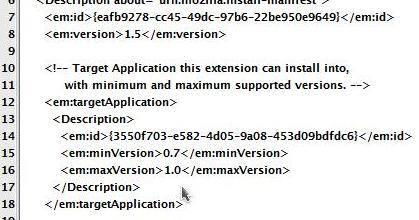
You can open up the jar-file with winrar and edit the install.rdf.

Delete the 0.9 and put 1.0 in it. Worked for me.

post-11725-1102441154_thumb.jpg

SS12072004182714.jpg

#234778

I couldnt find the install.rdf file... where abouts is it?

#234806

I can upload a updated version if ya want to? it's full of bugs, but if ya want it..

#234863

Oh yes, that would be a great idea......

Go ahead Magnus, we all want it!

;);)

#234865

sorry about it taking so long, I totaly forgot it, hehe, here ya go, as I said it's full of bugs, but you guys can fix the bugs and rerealese it if ya want.. www.iconandtheblackroses.org/stuff/pinstripe-3.jar

#235636

I couldnt find the install.rdf file... where abouts is it?
sky_guy's tip works perfect, the install.rdf file is immediately inside your pinstripe.jar file, just open the .jar file in WinRar and it's right there. Extract it somewhere, open it in Notepad, change the 0.9 to 1.0, save, copy it back into the archive and install the theme, works perfect!

#235783

ok, I have fixed ALL the bugs now, grab it here www.iconandtheblackroses.org/stuff/pinstripe-3.jar.

#235902

Thanks for your hard work magbi9..err...Magnus! :D

#235905

Many thanks Magnus - this is a top theme and I was lost without it

#235925

such an excellent tb theme, im glad you updated it :D

thanks a lot :)

#235962

:), shuld I update the current buttons with the back, farward and stop icons from firefox?

#235963

*UPDATE*

www.iconandtheblackroses.org/stuff/Thunderbird/Pinstripe.jar

udated:

-The old buttons to the new firefox once.

-New splitter dot, so u dont have to use any extensions to get that effect.

-Plus some bugs.

I'll write a new tutorial soon.

I'll update the Pinstripe theme for FireFox to, and make a new Tutorial for that aswell. I need some help with the theme though, I have a few problems, the font on the bookmark toolbar isnt bold, and when I make it bold it looks all ****ed up, I think it's wrong font, but I cant change it. and there are some bugs with the size of the urlbar when toolbar is in small mode. if someone want to help. add me to msn : magnus@iconandtheblackroses.org

#236015

linky no worky

#236022

linky no worky
works now, sorry..

#236026

Absolutely perfect skin. Thanks for the great work Magbi :-P

#236294

I'm downloading now Thunderbird and Pinstripe! Man it looks absolutly great!! THX ;)

#236334

No words to express my admiration. Thanks.

#236623

indeed, agreed. this is AWESOME. thanks a lot :)

#236626

love this theme!

would also love a matching version for firefox!

#236964

Great release!! Only a question: works with the newest Thunderbird 1.0?

#237073