
[release] Pinstripe Thunderbird

argh!!! :cry:

after installing enigmail for TB0.6 ( http://enigmail.mozdev.org/ ), the compose window looks pretty messed up.

Before I installed the extension, I switched to the default TB theme. Is it possible, that this problem occurs, because there is no image for the PGP icon? :dunno:

any help would be appreciated, since I really lovie this theme!

p.s. I have both s/mime and PGP installed

post-7972-1084142936_thumb.jpg

PGP.jpg
PGP.jpg

#159296

Originally posted by napes22@May 5 2004, 08:11 AM

is anyone else having the sort arrow error.  The pruple transparent color isnt transparent...i get a purple box with an arrow in the center.

glitch.jpg

I have the same probleme like u, when i used Milk20 vs... hope it will be correct in next release :rolleyes:

#159299

Originally posted by alohahappa@May 9 2004, 10:48 PM

argh!!!  :cry:

after installing enigmail for TB0.6 ( http://enigmail.mozdev.org/ ), the compose window looks pretty messed up.

Before I installed the extension, I switched to the default TB theme. Is it possible, that this problem occurs, because there is no image for the PGP icon?  :dunno:

any help would be appreciated, since I really lovie this theme!

p.s. I have both s/mime and PGP installed
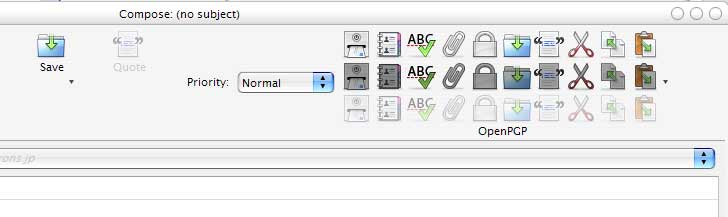
Please, can someone give me a help on this? :cry:

#163590

Can somebody please tell me how to change this icon to the default pinstripe skin icon

[ you know the grey one] please?

#165425

Post Removed.

Tarik - don't needlessly bump threads. If people are going to answer, they'll answer.

Do it again, and you'll receive an official warning.

--------------------

Stevie BM

#165546

the stickie with the tutorial is broken. the links don't work. can someone please post or send me the necessary files..ie: grippies, compact menu, and the skin itself. it'd be reallie helpful. Thanks

#166639

yep, i know i´m late. lol

wanted to check out this fantastc theme by following the pinned tutorial thread, but for real, most links are down, could someone plz plz plz with a piece of sugar on top update the links in that thread? because without it´s completly usless.

thanks :)

#167047

could someone please host the skin for this awesome port? the links don't work anymore. <_

#167171

Originally posted by Benjimanis@May 25 2004, 05:49 AM

could someone please host the skin for this awesome port? the links don't work anymore.  <_<

they work for me

#167271

Oh, but all the other links (Grippies and Compact Menu) arent working, and images arent working too, I would love that someone could give me a working link with the modded compact menu and Grippies please

#167364

can someone please tell me how to change this icon shown on the picture?

i tried reshacker but no luck :(

Thanks for your help

#167621

no one got the links? magbi, could you or bicet update the links in the sticky, they're all broken (images and files). i'd love to get this to work and use it. thanks

#167997

Originally posted by tarik@May 26 2004, 05:50 AM

can someone please tell me how to change this icon shown on the picture?

i tried reshacker but no luck :(

Thanks for your help

hey there you can change this icon (also the adressbook, composer) go into the Thunderbird Folder (from the program) and go forth to the tree like below.

-> Thunderbird\chrome\icons\default

here you'll find the icons you want to change

#168773

ignore that, found a workin link! :D

#169248

Do you guys know how to get Pinstripe work in Thundebird 0.7 (using the latest nightly right now 20040606) ? With the latest builds you can't install Pinstripe, cause they're using this new theme manager and some new artwork structure like in the latest Firefox builds.

Maybe our "theme genies" will update their skin ? Or perhaps Mozilla.org will implement Pinstripe as their default theme, like they do with Firefox (from todays build on). By the way, they call it Winstripes :blink:

cheers,

bM3w

#173728

Originally posted by bM3w@Jun 7 2004, 06:56 AM

Do you guys know how to get Pinstripe work in Thundebird 0.7 (using the latest nightly right now 20040606) ? With the latest builds you can't install Pinstripe, cause they're using this new theme manager and some new artwork structure like in the latest Firefox builds.

Maybe our "theme genies" will update their skin ? Or perhaps Mozilla.org will implement Pinstripe as their default theme, like they do with Firefox (from todays build on). By the way, they call it Winstripes  :blink:

cheers,

bM3w

The only solution is for it to be updated.

#175593

so hopefully they'll do it, cause 0.7 release ain't too far away and I expect many users to switch to the latest Thunderbird. But it's less fun without this wonderful port :rolleyes:

cheers,

bM3w

#175727

does anyone have the pinstripe.jar skin file? the links in the pinned topic are not working. if anyone can, please tell me where to get it, or even easier, PM it to me please. thanks a lot.

#176826

nevermind...just downloaded it from magbi's sig

#176828

Originally posted by bM3w@Jun 11 2004, 02:15 PM

so hopefully they'll do it, cause 0.7 release ain't too far away and I expect many users to switch to the latest Thunderbird. But it's less fun without this wonderful port  :rolleyes:

cheers,

bM3w

thunderbird 0.7 is out.. and i don't think the update to the skin is.. so i guess we are out of luck..

#177722

Updated to 0.7 :)

Just wondering if anyone plans to update the theme as well. It's an excellent port, and I'd really like to use it with 0.7

Thanks in advance to anyone who takes it on.

#178049

Here, here... I second the motion.

Just upgraded to 0.7, and Pinstripe's gone :(

If it was just a look thing it'd be fine, but the Pinstripe theme was actually more user-friendly than the default theme (IMHO anyway).

I'm almost scared to upgrade to Firefox 0.9 because of this...

#178235

Actually, Pinstripe has been updated for Firefox 0.9

Just check the other thread. :)

#178245

What other thread?

#178300

Originally posted by marsmayhem@Jun 17 2004, 11:43 AM

What other thread?

http://www.aqua-soft.org/board/index.php?showtopic=17141

has the pinstripe for 9..

i got it from there and modded it so the tabs on the bottom don't look all fugly..

#178303