Aqua-Soft Forums
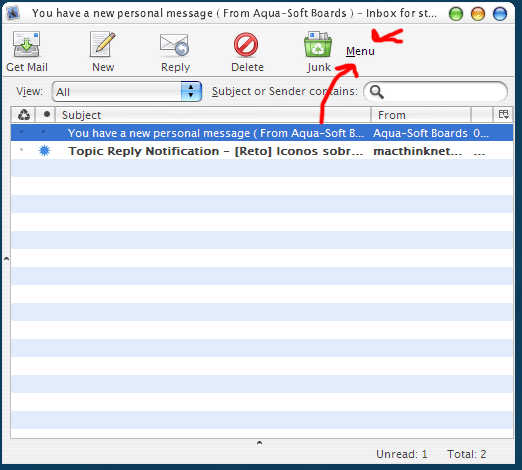
Originally posted by LoofyGun@Apr 28 2004, 04:58 AMAwesome skin, but i have a problem. I can't hide the menu in the compose window, is this a bug?
Read this thread carefully and you will find the answer
hint: silence
Originally posted by LoofyGun@Apr 28 2004, 04:58 AMAwesome skin, but i have a problem. I can't hide the menu in the compose window, is this a bug?
Read this thread carefully and you will find the answer
hint: silence
Originally posted by Tadis@Apr 28 2004, 05:06 PM@kenzo
de-select 'Use Standard TB Titlebar' & 'Show Folder Name'
Also you can leave the New Message indicator blank if you wish.
 thnks
thnks
Originally posted by jggame@Apr 28 2004, 09:29 AMIn pinstripe.jar\global\menu.css, first section add: margin-left: 18px !important; (suite your needs)
The best is replacing the \global\menu.css in thunderbird with the \global\menu.css of the firefox pinstripe theme, or you will get blank spaces in the menu entries at left.
The best is replacing the \global\menu.css in thunderbird with the \global\menu.css of the firefox pinstripe theme, or you will get blank spaces in the menu entries at left.
For those of us who don't have the Firefox Pinstripe Theme, could someone post the menu.css file, Firefox version?
That's awesome! Thanks for the zip!
Telmo and others who are having the same problem I found the error in the tree highlighting. Here is the code as it exists now in tree.css:
treechildren::-moz-tree-row(focus) {
 /*  background-color: Highlight; */
  background-color: #3874D1;
  color: #FFFFFF;
This causes the entire 'focused' tree - where the whole area is in focus - to have the blue background. Here is the updated code to get it to work.
treechildren::-moz-tree-row(focus) {
 color: #FFFFFF;
}
Then change the following line:
treechildren::-moz-tree-row(selected) {
  background-color: #D0D0D0;
}
to:
treechildren::-moz-tree-row(selected) {
  background-color: Highlight;
}
That should do the trick. Ohh and I am using Thunderbird version 0.6b (20040427)
Thanks a lot jggame, i've tried the second method and it works as intended.
Hi guys, this is a great Theme.
I have just a little problem : i can't resize the Account Settings window, in order to show the button for example to select my signature file .... 
That's all ...
I forgot to thank magbi9 for releasing this beautifully done theme. Thanks so much! This is the best one I've ever seen.
thanx bicet & magbi9 for theming thunderbird -
as the other ones mentioned i also have a problem in speed - it takes to long to bear - and a s a user of proteo´s and bicet´s theme i stay to it until the german 0.6 release is ready - i was announced for ~ 10´th ov may -
but nevertheless - perfect theme - nice modded
thnx guys 
Originally posted by haul@Apr 29 2004, 02:48 PMthanx bicet & magbi9 for theming thunderbird -
as the other ones mentioned i also have a problem in speed - it takes to long to bear - and a s a user of proteo´s and bicet´s theme i stay to it until the german 0.6 release is ready - i was announced for ~ 10´th ov may -
but nevertheless - perfect theme - nice modded
thnx guys
@haul: I suggest trying a nightly of Thunderbird... that fixed the speed problem for me.
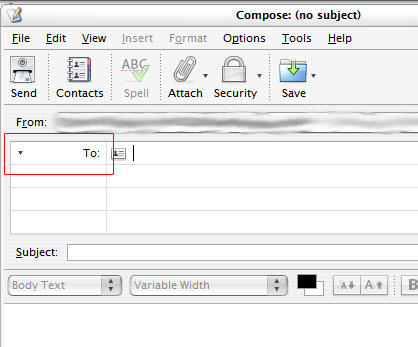
is this a bug that is fixable (the big gap)? i tried the fix from jggame on page 4 to no avail. other than this, this theme is just perfect. thanks!
edit: and while im at it, here is a small change i made that may help other people. if you have a windows theme that has white text highlighting (for selected text) and you want it black (like when you select a message), then in global/tree.css change
treechildren::-moz-tree-cell-text(selected, focus) {
  /* color: HighlightText; */
  color: #FFFFFF;
}
to
treechildren::-moz-tree-cell-text(selected, focus) {
  /* color: HighlightText; */
  color: #000000;
}

Oh snap! Good stuff you guys.
Great job :woot:
Yo, man - beacuse of you i've thrown away Outlook Express and moved to Thunderbird.
T H A N K S M A N !!!!!!!!!!!!!
Will this work with the latest 0.6 RC?
For those who want it, the official new thunderbird icon in 128x128 ico format!
Originally posted by kenzo@Apr 27 2004, 10:28 PMOn milk2 msstyle theme, anyone have this bug like me ?
I'm also using Milk2 as my Visual Style but don't have this bug BTW.
Awesome Theme! I installed it for TB0.6 and everything is working (so far  ) . It also looks just perfect with the pinstripe theme for FB.
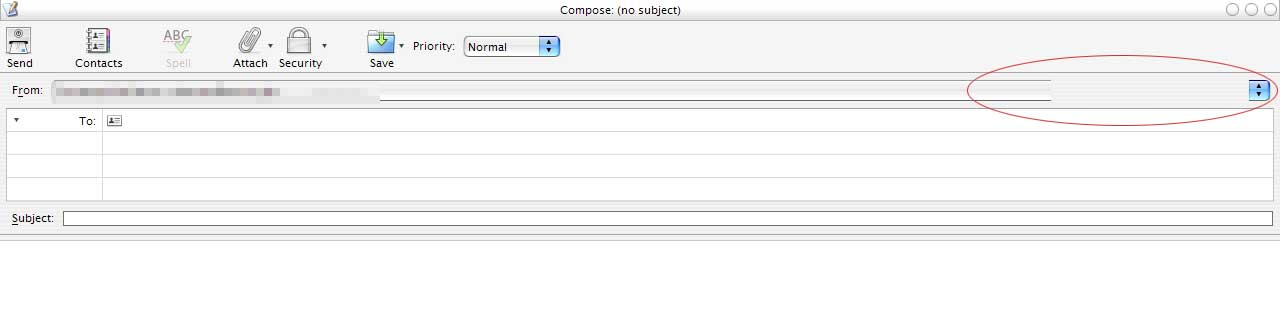
But there seems to be one bug: I did everything according to the tut, but in compose window, there is this bug.
I'm using an 19' monitor with a resolution of 1280x960 (so I had to add a lot of spaces in order to make the menus disappear)

Originally posted by alohahappa@May 3 2004, 05:51 PM
But there seems to be one bug: I did everything according to the tut, but in compose window, there is this bug.
that's the only one i've come across using it on 0.6 also.
is anyone else having the sort arrow error. The pruple transparent color isnt transparent...i get a purple box with an arrow in the center.

Originally posted by napes22+May 5 2004, 08:11 AM-->QUOTE(napes22 @ May 5 2004, 08:11 AM)is anyone else having the sort arrow error. The pruple transparent color isnt transparent...i get a purple box with an arrow in the center.thats your vs.
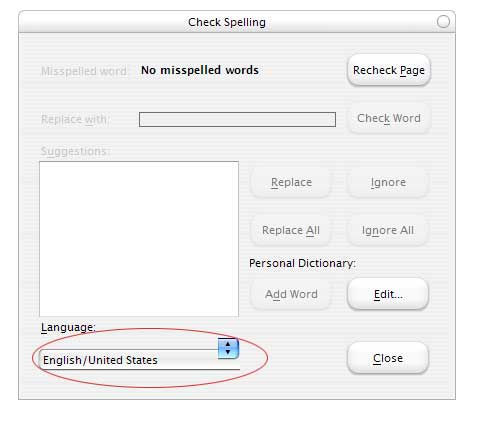
Originally posted by alohahappa@Unfortunately found another one.
"Write" -> in the body choose "Spell"
We know of that bug, and it's unfixeble, that meen, it's nothing we can do..
any help?? 
thank you...it was my visual style...it turns out most vs artists skip that file used. Thanks
however, it seems that either the theme, or most likely thunderbird only uses the up arrow for sorting. Its very odd. if you click on the arrow to sort decending or ascending, it only displays the up arrow. Any ideas?