Xplore 1.0

Originally posted by Flarex@Mar 14 2004, 03:53 PM

Felix may be part of the finderxp / smokescreen project but i think xplore is a much better app then felix.  ;)

Yeah that the project I was talking about! Felix 8 looks promising but Im having tooooooooo much fun with Xplore

and I have to agree with Duckie that would help or maybe just a single webpagq we could visit to check the latest update.

Scott

#129148

opinions opinions... how we all have them.

I think this app is awesome. Defintley not bad for only a week's work.

I have one suggestion though, I know the view buttons do not work but couldn't you just make a drop down menu like the options button?

#129149

this is my go at skinning xPlore :) :

xPlore-WinXp.jpg

if someone wants it, I'll releas it!!

#129153

shudders....windows...the horror...btw, magbi, how you get labels?

#129154

Originally posted by Flarex@Mar 14 2004, 04:25 PM

shudders....windows...the horror...btw, magbi, how you get labels?

it's not labels, it's just a window bk, sorry to get your hopes up!!

#129156

Ya I will post up a page on my site to keep it up to date for ya guys. :)

#129192

Something no one has brought up so far, is there a way to change files and .lnks and all that to be opened in xplore by default? That would be really nice....

#129201

? Like when you double click a folder it opens with Xplore?

#129204

Originally posted by TiG4@Mar 14 2004, 02:06 PM

? Like when you double click a folder it opens with Xplore?

I think he means that when you click on a .LNK file, it opens a new Explorer window rather than directing Xplore to the shortcut/folder

at least I know that's what it does for me

#129228

THANX!!!!!!!!!!!!!!!!!!!!!!!!!!!!!!!!!!!!!!!!!!!!!!!!

#129250

TiG4, do you have an update webpage?

#129251

Originally posted by stateo@Mar 14 2004, 01:31 PM

I Don't know about you guys, but I use brushed 3.5 Msstyle and I get Xplorer prefectly brushed on my screen!

It's not brushed, it's just gray. It doesn't have the little brush lines like the start menu and title bars have.

#129252

Originally posted by TiG4@Mar 14 2004, 12:06 PM

? Like when you double click a folder it opens with Xplore?

Yeah...i posted it in teh suggest thread

#129256

Originally posted by magbi9@Mar 14 2004, 04:27 PM

it's not labels, it's just a window bk, sorry to get your hopes up!!

What's Windows BK? It looks like labels to me.

By the way, how does everyone get their icons Pantherized? I tried downloading a Panther ico pack and manually changing each system icon using Iphile, but it would give me some major hassles. Is there an alternate/easier way?

#129259

Originally posted by Cruzn15@Mar 14 2004, 07:15 PM

What's Windows BK? It looks like labels to me.

By the way, how does everyone get their icons Pantherized? I tried downloading a Panther ico pack and manually changing each system icon using Iphile, but it would give me some major hassles. Is there an alternate/easier way?

1. a window bk is a background on the folder I'm inside, in win98 you could change it in the folderoption or something like that, in xp you cant, but there is still a way, you can just add some lines in the *.ini file in the folder to get a bk.

2. you must innstall some shell32.dll replacemnt's!!

#129265

:( That's a kickass app!!!!

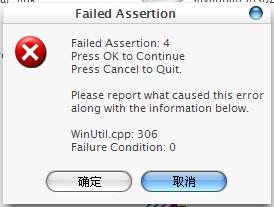
however I got a warning window whenever I wanna click on any folder. I had seen such kinda warnings ever since I installed the Stefanka's sys files (which I translated into Chinese). It looks like some kinda dll-crash...

god help me...

[eidt] dont try to tell me to uninstall Stef's sys files...that's horrible to go back to WINDOWS-LOOKING!

post-1593-1079293925_thumb.jpg

01.JPG
01.JPG

#129279

It seems that there is a problem with all chinese versions of XP and incompatibility with my application. I am workiong on fixing the issue.

#129287

you have to change regional options to english. mkii addressed and fixed this issue.

#129299

Here is a trick I discovered a while ago:

Want a shortcut to my computer? How about network places? Easily done! Just open the start menu and drag the icon into the dock. Right click it to get to properties and copy the numbers (2198980329):(0894u02391840) or whatever. There is the link location!

#129329

Wow :woot: , (im a little late because i just got back form snowboardin) This is amazing, thanx (Y) . i love it, i was waitin for this :P thnx (Y)

#129368

:woot: Wow that's uplifting...feel free to pm me if u need any chinese XP files, TiG4.

Flarex, thanks, I'd try it out. :rolleyes:

#129371

yeah changing the region settings did help. Now the warning is gone. But see if u can fix it, TiG4, 'cos I'd recommend ur kickass app to my Chinese friends ;) some of them might be bothered to change the region, though.

hope this wont bother u...

I repeat~ u rule!!!!! that's a real nice App~~~

#129379

here are some tip's:

http://home.online.no/~finbi/xplore.gif

sorry all 56 k'ers and 128k'ers :S!!

#129390

Originally posted by magbi9@Mar 14 2004, 07:17 PM

here are some tip's:

sorry all 56 k'ers and 128k'ers :S!!

yo man, that's killing my CPU

#129398

Originally posted by Duckie@Mar 14 2004, 11:25 PM

yo man, that's killing my CPU

sorry, I have removed it and added a link!! 56krs dont click on it!!

#129402