Xplore 1.0

After about a week of work I have completed the first public beta. There are still alot of features that need to be implemented but this is just the beta.

Before you run the application MAKE SURE you have classic folder view turned on (If you are using XP) goto Control Panel>Folder Options> Use Windows Classic Folders then hit OK.

ALSO, You MUST configure everything in the built in preference pane or else you will get kinda ugly results.

:D I hope you all enjoy it and please report all bugs in the bug thread in the Aqua Related Apps forum...

TiG4

Xplore 1.0 Download

#128436

VERY NICE!!!!!!!!!!!!!!!!!!!!!!!!!!! :bow:

THe onlly thing i cant do is link the network icon to the whole network neighborhood, any chance to tell me how to?

#128450

wonderful for a first release! keep up the phenomenal work, and get some sleep ;)

#128468

Hmmm... I think it is b/c Network Neighborhood is a Virtual Directory. Try creating a shortcut somewhere obscuere like my Documents to your network folder and link to that in Xplore

Tell me how it goes. :D

#128470

Then it prompts you to save the .lnk file

#128479

Can someone post a preview please, or links to some shots of this in action?

#128482

Download... ;) thanks ! looks like a great app ! (Y)

-Aviel.

#128488

first of all congrats on this amazing app best finder clone ive dealt with

some stuff still dont work but it is in beta stage so i doesnt matter

2 questions

is there away t ochange the icons on the left panel to reflect the icons you have for your current theme for example i have a milk theme going and milk icons on the left hand side will be awesome if no then it doesnt matter i still love the app

2nd question is when i try to link my movies folder it just goes back to objectbar folder for some reason and i cant link my computer to home it wont take it

and a suggestion for this app whenever we open it it starts with a blank page you should make the app start off at my computer cant wait for that finder search to function

#128489

WOOOHA amazing! :blink::blink: don't give up, no mather what!

#128491

Originally posted by jae lopez@Mar 13 2004, 03:24 AM

is there away t ochange the icons on the left panel to reflect the icons you have for your current theme for example i have a milk theme going and milk icons on the left hand side

Check out the \images\toolbar folder, there you'll find the images that are used on the left side of Xplore as well as a psd generously donated by TiG4 for your customization pleasure. I'm guessing as long as we don't muck up the size or naming of the files we can go crazy modding it up.

#128494

not bad for the first beta , infact id say it has some great possibilities to be explored , now lets see what our talented programmers come out with

AWESOME START DUDE !!! keep it up

:rock:

#128546

one word: asskickin :woot:

hey, one tip for all: if u want system preferences, copy & paste this:

::{20D04FE0-3AEA-1069-A2D8-08002B30309D}\::{21EC2020-3AEA-1069-A2DD-08002B30309D}

;)

EDIT:

hm, strange. system preferences seems not to work 100%. u can see it, but u can not use it. :(

#128553

Originally posted by Brainbug@Mar 13 2004, 02:09 PM

one word: asskickin  :woot:

hey, one tip for all: if u want system preferences, copy & paste this:

::{20D04FE0-3AEA-1069-A2D8-08002B30309D}\::{21EC2020-3AEA-1069-A2DD-08002B30309D}

;)

EDIT:

hm, strange. system preferences seems not to work 100%. u can see it, but u can not use it.  :(

System preferences works 100% for me thanks for the shortcut!

#128591

Will the background be skinnable?

#128602

Excellent! - What compiler was this written in? I got some strange results when dependency checking...

#128630

I love it. Very good work, don't stop ^_^

#128632

Originally posted by Enhanced@Mar 13 2004, 04:05 PM

Will the background be skinnable?

Later probably

#128633

my GOD !!!!

i LOVE this app !!! WOW !!!!!!!

amazing ! good job man !!! what a wonderful Work !!!! yeah. just imagine this baby with brushed metal style skin !! WoW :rolleyes:

this is one of the coolest app ever !!! :cry:

#128646

one of the greatest things happening in Aqua-soft's history is THIS VERY application.

I can name a long list of great moddings, utils, apps and skins, this one is leveling out among the greatest. :rock:

looking forward for the next update!

This is freaking wicked!

#128649

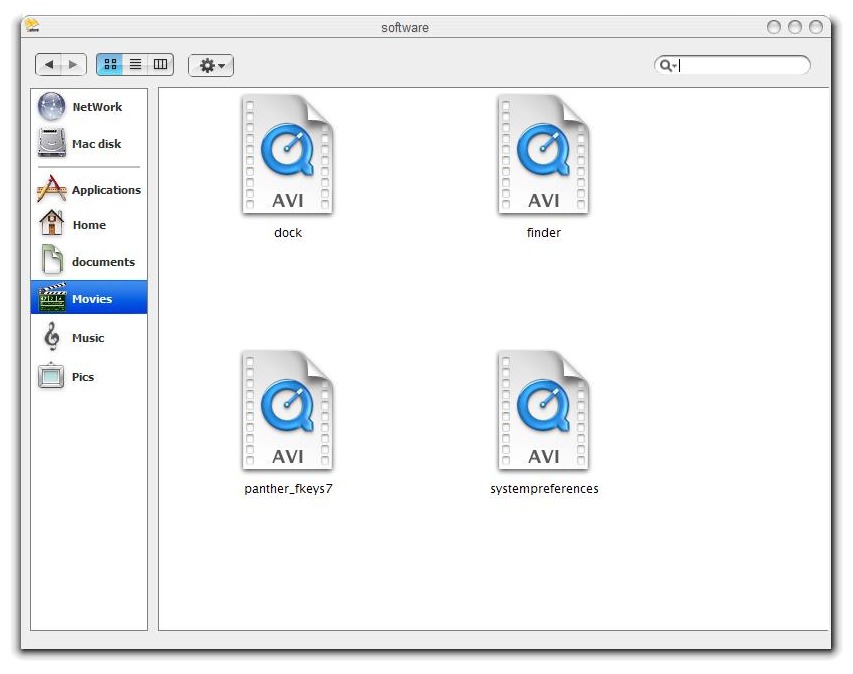
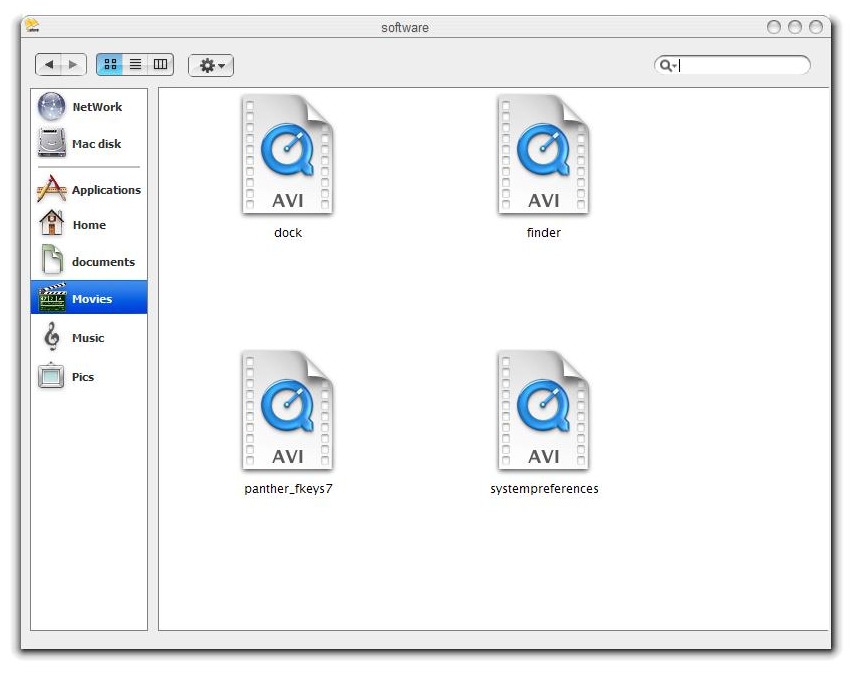
For the one who asked for the Screen Shot, here you are.

:rolleyes:

post-3126-1079200403_thumb.jpg

Capture__13_13_03_55_.jpg

#128663

Drag and Drop Shortcut is coming along good, it is taking a while b/c I am having to use alot of workarounds in order to get it just right, but I promise it will be REALLLLY kewl. :own: (Y)

#128733

nice

#128734

Originally posted by TiG4@Mar 13 2004, 04:38 PM

Drag and Drop Shortcut is coming along good, it is taking a while b/c I am having to use alot of workarounds in order to get it just right, but I promise it will be REALLLLY kewl. :own:  (Y)

keep it up man, but dont wear yourself out

we'll be here

OH!

and can you add i pixel to the buttons up top?

there is a single pixel line, going all the way across, missing on them.

see the difference? It gives the buttons a deeper/sunken look...and more realistic

#128735

Originally posted by Seph@Mar 13 2004, 08:19 AM

THe onlly thing i cant do is link the network icon to the whole network neighborhood, any chance to tell me how to?

See my Tutorial on this forum.

#128739

I really love this app - I have been tinkering with it for about an hour and its working really well.

Just one thing... is their a 128 png or ico for this as the supplied one is tiny?

#128744