[release] Milk Firefox Theme Beta 1.0

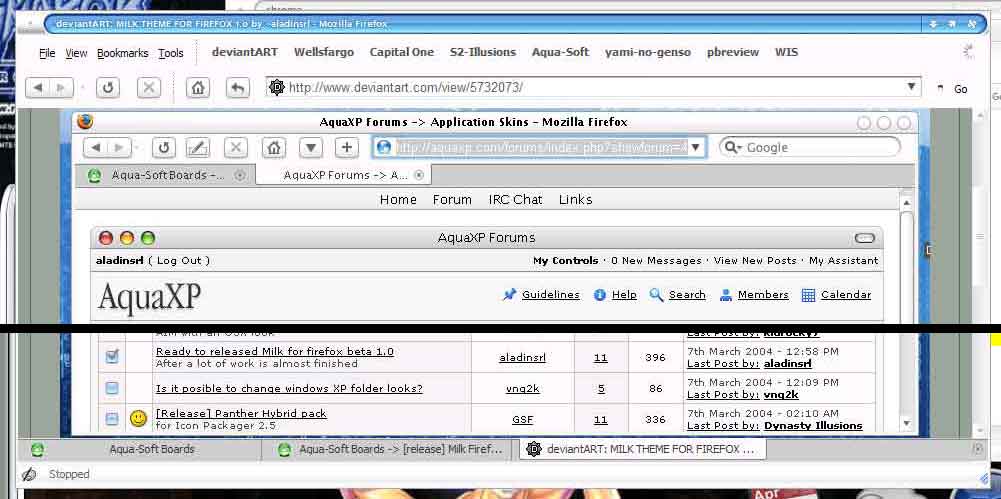
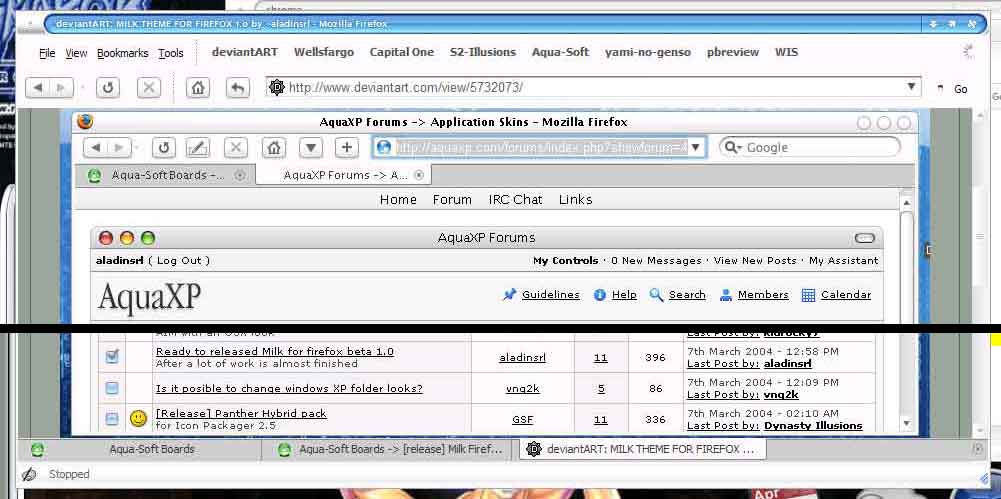
lol...that's the attitude Lynch, now my above 'ss' is posted...yes I have adjusted the 'width' settings and still my tabs look like the above 'ss'...

There is a dramatic difference in my tabs (on the top) and aladin's tabs on the bottom--->the width...

Kyods has done his best to get this neat theme into a proper .jar but by his own admission, his work was all done by trial & error, as his knowledge of .css files is some what limited, and it looks like aladin has supported this all he can (for now).

So I hope once you have finished your great looking Saf8 skin, that maybe/hopefully you will start on a Milk skin!

:woot:

As we have discussed many times, the problems with these 'Classic.jars' although nice work, is that they mess up all proper skin.jars ie: Milk.jar & Saf8.jar ect...

I will always start a new build/nightly of FF with a new profile and new directory, as although I really like this browser, it has a long way to go before I will ever use it as my 'default browser', it is not ready for 'Prime Time'...far from it...

#138687

I really don't understand the reason for modding the classic jar. Anyway, I tried Milk and dragged the modded milk TBE (after changing the name of my original TBE) and it does not even work - the tabs are all screwed up

#138695

Lynch,

Man I know that you are jumping back & forth between this thread and your Saf8 one, but yes you have such a valid point! When your themes are completed after all the hard work (trial & error at times too), it is such a pleasure to have it in a proper .jar file, and all you have to do is go 'Tools--->Options--->Themes' and then install...

That is it, a beautiful theme is installed without having to go through all the other work & effort of deleting and adding a whole bunch of files, folders, ect...

btw: after removing TBE from my present build, and then reinstalling it (again-lol) using the 'Width Option' in TBE features works! I found putting the settings in Tabs Option to:

Width--->to fit in Window--->in 15 to 175 pixels now has my tab size looking exactly like aladin's 'ss' @DeviantArt...!

:lol:

#138711

mine is set at 30-189

#138727

Here's a quick hack job but it all works (without special TBE). - just need to adjust some color

lynchknot-milky.JPG

#138740

Now with his buttons - not sure what's wrong with back button:

lynchknot-milkyy.JPG

#138742

Yes I like aladin's buttons, and this is getting there...Now with the 'favicon' on the right of the tab, and the tab close button on the left ala Mac Safari (yes I know that you are not concerned about 1:1), nor am I, as long as it looks great, and is convient to install!

See my reply in your Mercnvert thread...

:rock:

#138777

aladin's buttons are spaced too far apart

#138780

Originally posted by lynchknot@Apr 3 2004, 03:33 AM

aladin's buttons are spaced too far apart

Yes, completely understood, as we have discussed this issue in the past...What I meant was I like his actual buttons better: ie: the home button is much bolder ( the actual house within the button) then what you have...

I'm sure that he would have no objections with you using his bold styled buttons, but with your close together spacing of them...

If you look at the 'ss' posted by ji en in the Customizing Other Arena, in the iStyle thread, you will see how nice it looks:

iStyle Safari Toolbar Set

The toolbar set (buttons) are spaced like what you have shown...aladin has requested assistance and per his email to me over 10 days ago, he was going to send 'ss' of what he would ultimately like, but is probably bogged down with life's 'real work'...

#138787

yes, I know that Astray's buttons are a litle on the light side. I like the mercury type buttons (thick image)- like these - http://screenshots.haque.net/screenshots/v...nshot-11993.jpg

#138789

Exactely...the Safari Toolbar buttons in that 'ss' are nice (the spacing) for that is for the iStyle GUI kit, and fully aware that your skills do not include being an icon artist, unless you get the actual buttons (or permission to use them) it is tough to duplicate...

So the ideal solution would be for you to use aladin's toolbar buttons, with your spacing, if that can be accomplished...

The spacing of your toolbar buttons on Saf8 is great, and don't forget 'theme genie' that you brought up the 'toolbar button spacing' on aladin's skin, and now man I really notice it...lol!

#138791

well i did a minor mod with displaying the tabs on the bottom.. since i just prefer it.. and i at least want it to look nice.. i attached an image.. its a pretty sloppy mod but it works..

files i edited are tabbox.css and browser.css

in the browser.css change

.tabs-bottom {
       border: none;
       height: 4px !important;
       background: url("chrome://global/skin/tabs-bottom-bg.png") repeat !important;
       margin: 0px !important;

}

to

.tabs-bottom {
 color: #383838;
 margin: 0px 0px 1px 0px;
 background: url("chrome://global/skin/10pct_transparent_pixel.png") repeat;
 border: none !important;
 height: 24px !important;
}

in the tabbox.css delete the following

.tab-bottom > .tab-image-left {
 background  : url(chrome://global/skin/tabbox/tab-sm-bot-unsel-left.gif) no-repeat;
 width    : 10px;
 height  : 22px;
}

.tab-bottom > .tab-image-middle {
 -moz-border-top-colors: #FFFFFF #CECECE #000000;
 -moz-border-bottom-colors: #000000 #CECECE #DEDEDE;
}

.tab-bottom > .tab-image-right {
 background  : url(chrome://global/skin/tabbox/tab-sm-bot-unsel-right.gif) no-repeat;
 width    : 10px;
 height  : 22px;
}

.tab-bottom:hover:active > .tab-image-left {
 background  : url(chrome://global/skin/tabbox/tab-sm-bot-unsel-acti-left.gif) no-repeat;
}

.tab-bottom:hover:active > .tab-image-right {
 background  : url(chrome://global/skin/tabbox/tab-sm-bot-unsel-acti-right.gif) no-repeat;
}

.tab-bottom[selected="true"] > .tab-image-left,
.tab-bottom:hover:active[selected="true"] > .tab-image-left {
 background  : url(chrome://global/skin/tabbox/tab-sm-bot-sel-left.gif) no-repeat;
}

.tab-bottom[selected="true"] > .tab-image-right,
.tab-bottom:hover:active[selected="true"] > .tab-image-right {
 background  : url(chrome://global/skin/tabbox/tab-sm-bot-sel-right.gif) no-repeat;
}

and that should display the tabs at the bottom looking pretty good.. well at least better then it was..

check out the attachment to see what it looks like..

post-11459-1080986064_thumb.jpg

tabs_on_bottom.jpg
tabs_on_bottom.jpg

#138801

Hello

I have a prob with the tabbar icons (screenshot)... anyone can help, plz :(

post-13816-1081006291_thumb.jpg

tab_icons.JPG
tab_icons.JPG

#138864

Originally posted by kenzo@Apr 3 2004, 05:31 PM

Hello

I have a prob with the tabbar icons (screenshot)... anyone can help, plz :(

kenzo,

It's a well-known TBE issue. You have three choices:

1. Get used to it. ;)

2. Don't display favicons in the tabs.

3. Give up TBE, there are several extensions that can give you similiar advantages to TBE.

#138955

Might help - I have no problems with TBE and favicons/tabs.

lynchknot-sam.JPG

IN browser/browser.css

/* ::::: page proxy icon ::::: */


#page-proxy-favicon   {
 min-width: 16px;
 min-height: 16px;
 max-width: 16px;
 margin-top: 5px;
 margin-right: -4px;
 margin-bottom: 0px;
 margin-left: 4px;
 padding-left: 0px;

}

#page-proxy-deck,  
#page-proxy-button,
#search-proxy-button {
 min-width: 16px;
 min-height: 16px;
 margin-top: 5px;
 margin-right: -4px;
 margin-bottom: 0px;
 margin-left: 4px;
 padding-left: 0px;

}

#138966

kyods,lynchknot thanx for reply ;)

lynchknot i've tryed changing "browser.jar/content/browser/browser.css" and "classic.jar/skin/classic/browser/browser.css" like u but it dont work. browser.css is really the file to change?

ps: there many browser.css file... which one i must chnge :(

#139251

Amazing, Thnx (Y)

#139253

guys I need your help please. When I enable compact menu Extension there is a space left that I cant get rid of.does anybody how can I do this?

look at the screenshot please

#140813

What space are you talking about?

#141025

Sorry for not clarifying

#141035

Move the toolbar buttons, address bar and search bar up to the top space.

Move your book marks to the space previously occupied by the address bar etc

Uncheck bookmarks toolbar

#141195

I've updated my aladinsrl's Milk theme mod for the latest nightlies.

Acknowledgements: Max Rudberg, aladinsrl, Lynchknot, Aaron Spuler, CatThief.

preview.gif

What's new:

1. Max version has been upped to 1.0+.

2. Support for the Find Bar, Livemark and the new secure site indicators;

3. Support for Livemarks in the Bookmark Manager;

4. Fixed some favicon issues in both urlbar and the tabs (mainly a TBE issue);

5. The theme DOES NOT require patched Compact Menu's compact.jar. Appropriate icon resource is already included and linked in the theme, BUT you need the extension itself;

6. The mod has been renamed to "Milk, Remilked".

Known issues:

1. Find bar text looks a bit misaligned, but it's still perfectly readable (FAYT suits me better anyway).

2. TBE needs to have "Use another appearance for Firefox on Mac OSX" (Expert Options/Misc) checked for the tabs to appear correctly.

3. In order to have the milkdrop throbber on the tabs with TBE you still need to put following code in your %profile%/chrome/userChrome.css:

.tabbrowser-tabs *|tab[busy="true"] .tab-icon {

list-style-image: url("chrome://communicator/skin/icons/loading.gif") !important;

}

Get it here, here or here (both mirrors are courtesy of mikekey).

Any feedback highly appreciated.

#195207

Wow, thank you. I'll be sure to report any bugs I encounter. Thanks :)

#195313

Wohoo amazing!

I am so happy to have a milk them for my firefox...it never worked to install the other themes :) (...)

I was happy with the non-updated theme weeks ago and I am much happier with the "new" one.

Thanks.

Works fine here.

#195467

I hate to have to ask, but how do you install that .jar file?

[edit]nevermind[/edit]

#198596