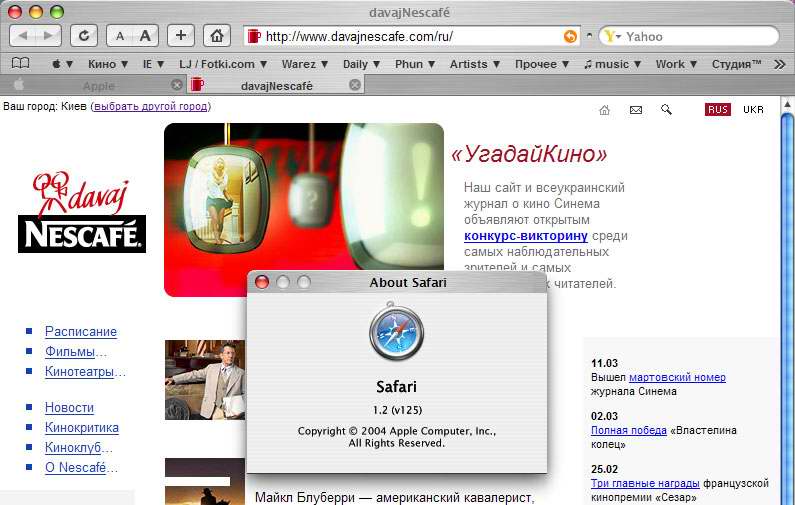
[release] Safari Is Here For U!

Thanks for the heads up on 0.2 :)

If anyone gets some weird problems with the buttons aligned funny, tabs close button off center or bookmarks toolbar looking a little glitchy check your Windowblinds 'Basic Settings' in particular the 'Skin Standard Parts' section... I accidently unchecked the 'Toolbar buttons' option and it things looked dodgy until I re-checked it... see if that helps anyone with these problems...

#127525

Can anyone get this to work w/ the Calendar extension installed? Everything works great if I reinstall FireFox w/out the Calendar extension, but then I can't install the Calendar after I've installed the Safari theme.

I know that cjaypaddock had the same problem origionally. Did you ever get you Calendar extension working again?

This is the problem here

Small icons look like the stock Firefox icons and Normal icons look like Calendar icons. Can we port the normal icons to the small icons? So they can live together in peace and harmony?

Thanks all for you help.

#127672

waiting for 0.2 :)

damn i`m acting like a neVVbie :D

#127712

waiting for 0.2 :)

damn i`m acting like Unbeliever :D

#127751

Originally posted by k21975@Mar 11 2004, 05:27 PM

Can anyone get this to work w/ the Calendar extension installed?  Everything works great if I reinstall FireFox w/out the Calendar extension, but then I can't install the Calendar after I've installed the Safari theme.

I know that  cjaypaddock had the same problem origionally.  Did you ever get you Calendar extension working again?

This is the problem here

Small icons look like the stock Firefox icons and Normal icons look like Calendar icons.  Can we port the normal icons to the small icons? So they can live together in peace and harmony?

Thanks all for you help.

I've been getting the same problem.

It's weird because I installed Calendar before doing this mod ages ago. Then one day it changed - so I rewrote all the files with the ones from this theme and it fixed it.

Then about a week ago for no reason at all it happened again. I've overwritten the files about 4 or 5 times and it's made no difference. It just seemed to happen without even using Calendar. Even when I've tried disabling then removing the calendar files it still happens.

I've decided to give up and wait till the next version is released - then I'm gonna re-install from scratch lol.

Anyone else had a problem with this but found a working fix?!?

#127759

I'm curious, is there a way to get Firefox to display the progress/status of the page loading in the address bar like in real Safari? I keep thinking its a simple thing of moving and resizing the current bottom-right bar hehe

#127799

Originally posted by starforge@Mar 11 2004, 10:00 PM

I'm curious, is there a way to get Firefox to display the progress/status of the page loading in the address bar like in real Safari? I keep thinking its a simple thing of moving and resizing the current bottom-right bar hehe

That would be schweet.

#127831

I use the Brushed 3.5 Msstyle instead of the WB skin... It works deliciously, but I don't get the specific toolbar with the bookmarks. (second screenshot at the first forumpost in this thread)

Does it only work in the WB skin? Or am I missing something?

This question was ignored earlier in this thread. Please answer now :cry:

#128041

I don't see why you guys must have a close tab in the tabs. I just middle click my mouse to close. If I have a close tab button on my tabs, I will run out of room for text. If you are like me and have many tabs open (13), you will only have room for a favicon and the close tab button. I'd rather have text.

#128052

Originally posted by lynchknot@Mar 12 2004, 11:47 AM

I don't see why you guys must have a close tab in the tabs. I just middle click my mouse to close. If I have a close tab button on my tabs, I will run out of room for text. If you are like me and have many tabs open (13), you will only have room for a favicon and the close tab button. I'd rather have text.

becuase some people are never happy

#128094

Hi Aquarius2003 - first I'd like to thank you for your hard work.

This is very nice and your hard work is very much appreciated :D

My question, however, is this:

I like my screen resolution to be 1600 X 1200.

When I have that resolution set though, the orange arrow and outline no longer fit inside the address bar.

Here's a screenshot:

firefox.jpg

If I drop down to 1280 X 1024, it fits perfectly, but like I said, I like 1600 X 1200.

Is there any way to fix this?

Any help is much appreciated.

Thanks again!

#128408

somehow, there's a space in mine :/

#128429

Originally posted by Hidea@Mar 13 2004, 08:54 AM

somehow, there's a space in mine :/

don`t be lazy and read the thread!

#128675

Originally posted by Hidea@Mar 13 2004, 08:54 AM

somehow, there's a space in mine :/

try to change the visual style

#128712

I also use a large res, 1920x1200 and I have the same glitch w/ the orange arrow. It's the native resolution of my laptop, so anything lower looks fuzzy. It's not a big deal 'cuz I rarely view my browser at full screen.

Still my biggest issue is the Calendar compatibility. I love the calendar program 'cuz I can use it to view other peoples iCal schedules and it is going to be a great program when it's done.

#129207

Well, mines work perfectly at all.

Thank you a lot aquarious

#130118

ok i have a problem when i try to click on the tabs i get a button that has noticeable white edges

its fine while the buttons aren't being pressed

did i do something wrong

#130681

All toolbar buttons were replaced with real Safari pix.

All of them have gray "inactive" status.

No more "close tab" button bug.

99%-like-real "About Safari" window.

No browser name and separator in title bar - like in real one.

Dozens of another updates and fixes.

45 more positions in my "To Do" list.

post-1896-1079575458_thumb.jpg

firefox_safari_update_v01.jpg

#131129

looks great

any time frame for release?

#131132

Originally posted by Unbeliever@Mar 18 2004, 03:09 AM

looks great

any time frame for release?

Hush, hush man ;) Didn't you see this:

45 more positions in my "To Do" list.

Let him work.

#131396

There's gotta be some way we can get this to work without using WindowBlinds.

#131401

OK... first... nice one... :lol: i like it sooo much...

second: i'm using itunes 1.5 VS... :naughty: its ok...

not 100% (there is a hoover effect on back, prev, reload. etc... someone can kill that?)

and third: HELP! :cry: my bookmark-menu is empty...

(only the "book" icon is there... )

#131404

The thing that appears behind the buttons when using a VS is the toolbar button images (i.e. the ones for back/forward/refresh/etc. in Internet Explorer)

You'll have to use a theme with blank ones to not have this effect (e.g. Good Grey).

This mod does work with VS' it's just that the VS system doesn't seperate itself from other applications so it's one skin for all. If you make a VS purely for this mod it may not look good on any other program.

#131424

Thanks Acaeris... so i have to live with it... i've tried brushed 3.5, but its the same...

but 3.5 looks better overall...

is there a solution for the bookmark-bug?? at the beginning of usin this theme it

was okay...

#131431

waowww really incredible, thx a lot for sharing with the community :woot:

#131450