 Aqua-Soft Forums
has there been any progress getting bookmark folders to display properly in the bookmarks toolbar? single bookmarks look great but folders are missing their rounded edges and have lost their down arrows. If someone can point me to the offending code I'd be happy to try and fix it, i kow some css but don't know hopw firefos themes are structured.
[release] Safari Is Here For U!
Well since I am not a very big fan of the Safari brushed look, I would like to get the animated progress bar working in the download manager of the pinstripe theme, would it be possible to post what code needs to be added or changed and where in order for this to work?
Have a look here: Firefox Pinstripe Theme thread - classic.jar w/ animated d/l progress bar

Originally posted by aquarius2003@Mar 2 2004, 01:24 PMI dont have a mac , so I was doing from ss. It is difficult to work without the original working thing /mac/. So this was the closest I could reach. But any of u suggest something and show it to me Iwill imediately apdate the whole stuff.
Can someone post screenshots /png/ on:
-pressed bookmarkbar button / the dark rounded /
-hover close tab button
-pressed close tab button
-default bookmark icon
-default bookmark folder icon
????
THX.
The actual resources would be even better than screens, no? 
Here you go: Safari 1.2 GFX Resources
(I sincerely hope apple won't sue me for this :cry:)
How do I get this and the Milk 2.0 visual style to work together? All my msstyles are dead when I use WB.
This theme is now my theme of Choice, its great. Just 1 thing, the back and forward buttons do not grey out when there is nothing to go back or forward to.
Also there has to be a way to make the sking ready for the next milestone for when Firefox 0.9 come out. This skin is too nice to live without and it does not work with Firefox builds that came after the 0.8 Milestone. I gave up nightly builds just to enjoy this nice theme.
What is next in line for updates to this theme?
remove this post
hey, there is this little gap on the left of the tabs, how do i fix it??? and also, there is some discoloration between the titlebar and the rest of the window, why is that? im using your safari theme..... help please

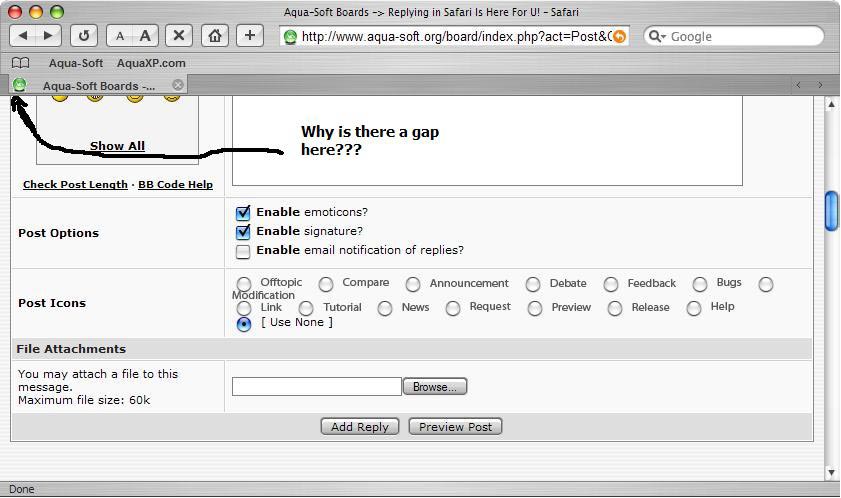
I don't know about the gap - but in terms of the discolouration that's a result of the way the WB theme was made - I think you can get ones that will resize accordingly but for this one, just maximize the window and it should look right then.
Im trying to do this thing with changin over firefox to look like safari but i dont have the folder c:\documents and settings\user(your user name)\application data\phoenix\profiles\default\xxxxx.sit\ chrome anywhere that I can find. so i dunno how to go on from here. Lil help please
Try going to Start menu > Run...
Enter %appdata% into the box and hit 'OK'
There should be a folder called 'Phoenix' there
Your profile is in that.
If there is no Phoenix folder, it means you haven't run Firefox before, hence there is not even a default profile.
If you install Firefox, the first time you run it it will create the Phoenix/profile folder.
If not....you have gremlins in your PC!
hey, there is this little gap on the left of the tabs, how do i fix it???
That gap is supposed to be there: check out this page: Apple Safari Homepage
Any chance of getting this skin packed into an actual theme file rather than having to replace so many files on our own?
Hey thanx a lot sultan, worked like a charm. never woulda thought of it
Originally posted by buzzlightbeer81@Mar 7 2004, 11:43 PMIm trying to do this thing with changin over firefox to look like safari but i dont have the folder c:\documents and settings\user(your user name)\application data\phoenix\profiles\default\xxxxx.sit\ chrome anywhere that I can find. so i dunno how to go on from here. Lil help please
Go to Control panel > folder options > view - check show hidden files and folders
im sorry if someone else has post this. but i just found this great visual style that has been relaseed. its a brush skin that goes great with the safari skin aquarius did. since alot of you guys dont use windows blnds and are like me.. that like visual styles. this will go perfect.. it blends in quite nicely. enjoy
http://www.deviantart.com/view/5628727/
you can thank me later 
please let me know if.. the skin worked great :woot:
That skin works satisfactory for me. The buttons work properly, the skins match allmost perfect, only the minimize-resize-close buttons are on the right...
There's just one question. There's a specific bar in the screenshots for the bookmarks. Is this only functional in the WB theme? And not using the Brushed 3.5 theme? Or is there some other way to get this done?
I just don't understand why aquarius2003 doesn't support this thread?
Because I messed around this theme for two days without result. I fixed some bugs, remake "about firefox" window to make it look 90% like real one, but I still cannot reach "bookmarks folder arrow" and normal functionality of "close tab button".
There're some mistakes in css files - look at the "bookmark folders" - they don't have not only arrows but edges too.
I'll try to install Stevie BM theme (http://www.aqua-soft.org/board/index.php?showtopic=10409) and maybe combine it with aquarius2003 theme, cause it seems that Stevie's theme have correct "bookmark folder arrows" at least.
this may seem unbelievable but i got rid of the close tab bug!!!
and now it works fine!..
i simply uninstall firefox, delete my phoneix folder from C:\document settings
and then simply installed it all over again...
and to my amazement ... it worked!! no more close tab bugs!!!
Hey I did the whole safair skin on firefox thing, its awesome, the only complaint i have is the close buttons on the tabs get highlighted really easily and it looks ugly cause they get this nasty black bok around them, anyway to fix this?
buzzlightbeer81
Stop flaming us with that question! Arrrghhh! Re-read this topic, OK? Or JUST PREVIOUS message. :rant: :rant:
matjurong
Damn. I don't want to lose all my settings. But I think I should follow your advice.
BTW we still have these ugly "no arrow and edges!!!" favorites folders.
(sight)
Maybe I'll just go and kill myself? >.<
aquarius2003! Why you don't love us anymore?! :cry:
I have that problemo too...
Sounds stupid but this works.
A temporaly solution for all ya folks who wants "folder arrow" in the bookmarks - open "Character Map" (Windows standart app in "Start", or tupe "charmap" in "Run" dialog), find "Lucida Sans Unicode" and then scroll until you see black down arrow. Copy&Paste it via "bookmark rename" for all folders. Also you can try another fonts for better results and copy@pasting not only arrows but almost every another symbol.
Now it looks better, isn't it? :naughty:
Yeah looks much better with the arrows - good idea!!
...and everyone should be nice to Aquarius.....he has given us the nearest thing to Safari that I've seen, and with a little more tweaking (such as your suggestion, Minsky) makes a really good browser look the part!
....looking forward to your future work, Aquarius!
Guys...
Iam supporting the topic, but I do not understand your problens.
I have tried the theme on several machines without problems.
Close button....I dont understand, this is the part where are no possibilities for errors.
No.
Rethink the whole procedure. Or try to use the prefs.js file which is included in the main zip.
This file carries all the information of my settings.
0,2 Update on its way........