 Aqua-Soft Forums
AoW777: Maybe the "ignore leftclick" checkbox is checked on the advanced tab? If so, uncheck it.
[release] Avedesk 1.0 Final
Suggestions to further improve avedesk:
a. add a doubleclick option for shortcuts
b. add selected state for shortcuts (highlighted or whatever)
Thanks for your suggestions Nate (Y) .
a. add a doubleclick option for shortcuts
This can be done already, check the global settings 
b. add selected state for shortcuts (highlighted or whatever)
Yeah, the upcoming v1.1 does support OnSelect() and OnDeselect() events.
Just a little update on v1.1 coding progress, because I am excited that I finally got the hue code working  :
:
I have added and implemented:
- Click thru option
- Ignore right click
- Snap-to-grid
- Hue / Saturation support (you want to recolor your icons to match your current theme? Just open the properties and play with the hue and saturation. ).
Still to work on:
- More desklets like media-controller
- #(@*!@-windows-showing-in-task-manager-bug (if someone has an idea, please PM / mail me, cause currently, I have no more ideas yet).
- mouse-over effects using plug ins (maybe not in v1.1)
- OnSelect() and OnDeselect() events.
This is great news...cor blimey!!
Andreasv, is it me or does the labels don't centralize normally?
Say I have a "Primary" label, the text is in the middle of the label. But if my label text is say "Beta" (which doesn't has anything protruding at the bottom), the position is a little lower. Or maybe it's just my label settings?
Originally posted by Nate@Jan 28 2004, 05:18 AM...the position is a little lower. Or maybe it's just my label settings?
I have encountered some of the same problems. Having some labels be
one-two pixels smaller-larger depending on what kinds of letters are in
the label (Uppercase/Descenders) Just wanted to add my 2cents.
~Ob¹
It's true. I have(had) the same problem, especially with PowderRanger's CNRI ports. But it's fixed in the next release.
@ Andreas re: your comment below: Nate will probably do the screenshot thing, mine is displaying correctly. I think I resolved this problem with ThePowderRanger, hopefully he'll post about it. Everything is centered in his CNRI label ports with Lucida Sans Unicode at 12 pitch on my machine.
Can someone post a screenshot of that effect please?
Yes, I can confirm that issue (not a bug) and yes, Ji eun is right when say that can fixed with my port of CRNI labels and those font settings.
@ Andreas: at the moment I can't take a screenshot, but I think the problem is that you take the whole string height as a reference to fill the back rectangle, instead using the string baseline. 
P.S.: sorry for the last night, I've started a new project on work in these days and I'm very busy at the moment!
Cheers,
Marco
Here's a shot of what I've observed on my labels...
I'm using Lucida Grande 12 Bold for all of the icons btw.
~Ob¹
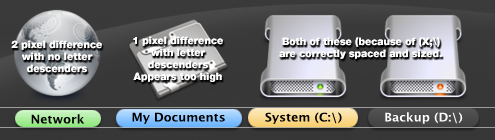
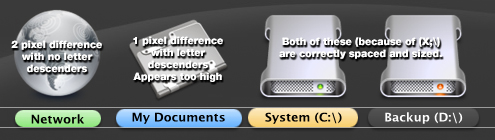
Thanks olinboy, that showed perfectly the error. It is caused by taking the rectangle around the text for the label to be able to use wordwrapping, anyone got a nice idea of how to fix that, 'cause my head is like exploding now...
BTW: thanks for being helpfull with this bug people! I really appreciate it (Y)
Originally posted by AndreasV@Jan 28 2004, 08:14 PM... 'cause my head is like exploding now...
Haha
Quick! Someone grab the duct tape!!
Is there a way to have the files and space displayed like in crni's (samurize) config?
Not to give you more than you already have but I was curious if there was already a
way that I was not aware of.
~Ob¹
Is there a way to have the files and space displayed like in crni's (samurize) config?Not to give you more than you already have but I was curious if there was already a
way that I was not aware of.
Will add that in the next version of the shortcut desklet Thanks for your suggestion (Y)
For those of you who are curious about version 1.1:
It's coming . I planned to release v1.1 this weekend, but I am not gonna make that date. I have been moving around 100 kb of source code around various files and I have resolved some memory bugs (that occur seldom btw).
Also, albeik had some very cool suggestions for the SDK, so I will implement these first before releasing 1.1.
Anyhoo, I hope to have a fully working and bugfree 1.1 somewhere next week.
I'd like to add a suggestion to this wonderful program. First of all, I'd like to just thank you for giving us such a wonderful program to use, very very awesome.
But, there's just one small detail that kind of interferes with my use of the computer. I tend to use key-shortcuts a lot, and I very often use (Windowkey)+D, which brings the user back to the desktop. Unfortunately, whenever i do this with avedesk, the icons on the desktop disappear, and i have to click another program to get it to reappear. Could you somehow make it lock to the desktop, and stay there?
Just a suggestion, other than that, I truly appreciate what you've done. Thanks. :bow:
If you set the style of all desklets to "Desktop icon", does that work?
wow, i didn't realize that was an option. My fault . Thanks a lot.
guys, where can i download the desklet?
you can have it on www.dockex.com or on the AS forum (use search)
for the moment there is not many desklet but it's comming up
ok thanks kerin!