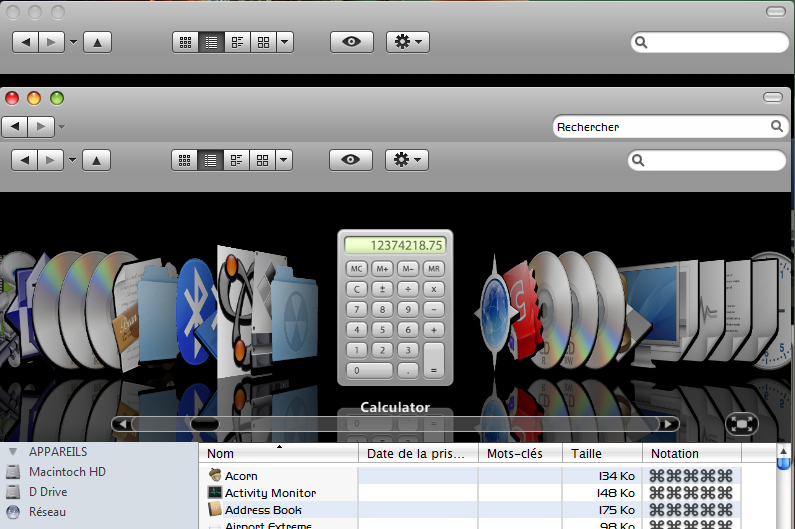
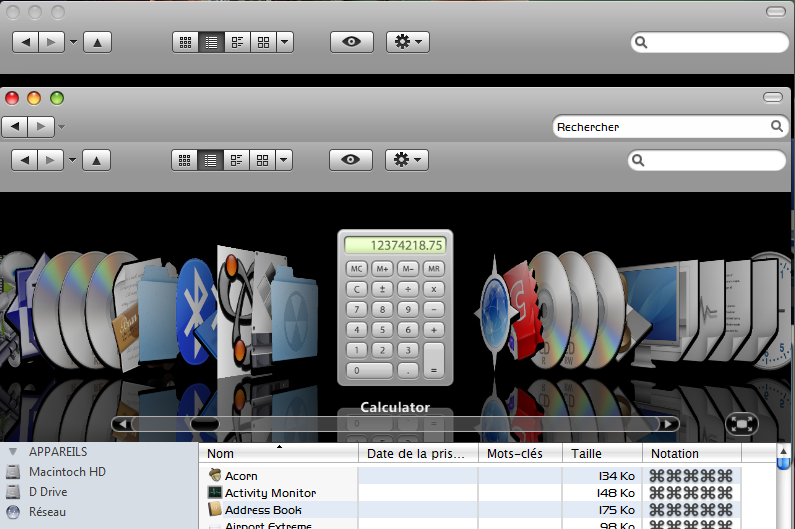
Mac Finder Navigation Toolbar for Windows

This is way better than Styler and less buggy. :D. but no "list" view. Yeah. The list view in windows icons view. Can you put another icon for list view instead the details view. Its good that we can have the "OSX looks" but Windows have so much features that are useful. :D

Pretty Please With Sugar On Top.

#525863

love this man, hope it gets to a very stable version.

#525884

I've got this sometimes, I have no idea what causes it, it just happens.

bad.png

The black goes away when I maximise.

#526236

Lucky you. I´ve got THIS sometimes:

neu-11z8y.jpg

#526251

Thanks much to All for comments and sorry on huge delay on answers! :)

I did not update it application yet. There are some other work/fun.

ceiiular, Windows skin would be good but this is not skin in one line I think... (I mean that bar under buttons and address/search edit)

Kane3013, Yes, list view is a really good idea. As option.

yorkey, Not sure why, I have this bug in some Windowblinds themes only. Or try to use "bg.png" for background(32bit(!), maybe this even in themes folder but renamed to "_bg.png")?

#526264

I don't have WB, just a lil' visual style. Not to jinx it, but I don't seem to be getting it no more.... I put bg.png and _bg.png into Themes, and I think it's worked. I'll test it out today.

#526281

Thank u so much for this Ksoft. :D

#526415

yorkey,

I think it should work. It would be good to fix this nevertheless...

devrexster,

Thanks for feedback! :D

#526420

yorkey,

I think it should work. It would be good to fix this nevertheless...

devrexster,

Thanks for feedback! :D

Yep, it's all snazzy now. :) Thanks man

#526434

wow, great app! Has anyone succeeded in getting this to work efficiently on Vista 32 bit?

#527406

omg i've gotta have this on vista! i'm dying for a styler for vista! please?????

#528644

Hi KSoft, I am dying to try it on my laptop but each time I want to install it its indicates that it cannot find DelphiBand and later another file. Tried everything, running install from within the zipped file, unzipping the file and running from there, but always getting the same error. I am running XP sp3.Suggestions?

#528717

Hi KSoft, I was able to install it and works great!!

KSoft and others, Two issues:

I would appreciate if I can get help updating the delphiband, where it goes the new one posted by KSoft?

How I go about changing the icons in the bar from the default blue to other options shown above?

THANKS!!!

#528732

nice! xD

#529323

Hullo im a newb here so dont get all pissy with all that "bring this topic back to life" crap.

Anyway I have windows vista and when I open up install.cmd, I get a error message saying The module "delphiband.dll" failed to load.

Make sure the binary is stored at the specified path or debug it to check for problems with the binary dependent .dll files.

The specified module could not be found.

Then I click okay and It says something else but I forgot.

What am I doing wrong? I ran the install.cmd as you said!!

#529325

You obviously haven't really read the entire first post in this thread:

"Working in Windows XP, there are no Vista support currently."

#529340

Hello, this is really a great looking app. Congratulations. Never have seen a toolbarstyler like this. I think the best one, but I have a problem. After install, which works very well, I couldn't start Windows Desktop search, wich I love very much. Further more Objectbar 2.01 didn't show the Menu of the Explorer, what was no problem with Styler. I Would apprecheat if someone have a workaroud.

#529940

Hi KSoft,

I didn't find a solution for the problem with de address bar (navigation buttos and search bar). I'm able to disable it once for a window, but it keeps coming all the time i open a new window(see image). I found that even if you click in the address bar option to enable it keeps checked, so maybe the problem comes from there. On the other hand closing explorer with task manager work fine for zizing and bar positions.

I running Vista 32 SP1 and for changing explorer I use: WB, explorer cover flow, QTabBar.

Thanks for ur help!

post-95527-1251557484_thumb.png

MacFinderScreenShot.png

#530705

Hi KSoft,

I didn't find a solution for the problem with de address bar (navigation buttos and search bar). I'm able to disable it once for a window, but it keeps coming all the time i open a new window(see image). I found that even if you click in the address bar option to enable it keeps checked, so maybe the problem comes from there. On the other hand closing explorer with task manager work fine for zizing and bar positions.

I running Vista 32 SP1 and for changing explorer I use: WB, explorer cover flow, QTabBar.

Thanks for ur help!

Freestyler has a nasty thing with locking the Toolbar layout so it won't be saved. You might need the KillLayout.reg file that comes with Cover Flow if it starts to make trouble, this way you can start over with a fresh layout. You shouldn't run the reg files from FreeStyler or the KillLayout file from Explorer but rather from the Desktop while Explorer is closed.

So the sequense is something like this (I have done this several times but it seems I can never remember the order):

Close explorer

Run KillLayout.reg (from desktop)

Run HideFlag.reg (from desktop)

open explorer and enable FreeStyler and hide the addressbar and the standard buttons

enable CoverFlow

Edit: open explorer and enable Cover Flow

Edit: enable FreeStyler and hide the addressbar and the standard buttons

close explorer

open explorer (it should now remember the settings)

It might take a little experimenting to get it working...

@KSoft:

I am the developer of Explorer Cover Flow and I have a request for you. I do like FreeStyler very much and it would be such a great thing to have a button next to the "View" buttons on FreeStyler to Show/hide Cover Flow! Is there any chance that we could work toghether on that?

#530709

Hi Vemod,

Firt of all thanks for replying and thanks for your great coverflow application.

I tried ur sequence but my explorer craches in the 5th step. I gotta say that I don't have killLayut.reg but disable_search_asst.reg. I "experimented" differents ways but it always crached. Can you plis post a copy of killLayout.reg to try it?

Thanks again.

BTW @KSoft:

I haven't say that your app rules, it was the last thing i needed for simulating Mac OS X. Thanks a lot, i'm just looking forward to solve this little problem.

#530776

Can you plis post a copy of killLayout.reg to try it?

Save this as KillLayout.reg

REGEDIT4

[HKEY_CURRENT_USER\Software\Microsoft\Internet Explorer\Toolbar\WebBrowser]
"ITBarLayout"=-

[HKEY_CURRENT_USER\Software\Microsoft\Internet Explorer\Toolbar\ShellBrowser]
"ITBarLayout"=-

[HKEY_CURRENT_USER\Software\Microsoft\Internet Explorer\Toolbar\Explorer]
"ITBarLayout"=-

#530777

I want to try it but the download link is broken :(

Someone could say me where I get the Mac Finder toolbar?

Thanks!

Nevermind! I found it on Deposit Files! :P

do not double post - mps69

#531412

When I press install.cmd, it says

The module delphiband.dll failed to load.

what should i do? :(

#531659

any update for coverflow button to turn on and of ecf of vemod

??

'

#534518

hi! When i use search - erorr. (sorry - if this question repeated)

a29f36c0f632t.jpg

#534761