Bug Report Center

Small bug report:

when hovering over the icons and moving swiftly away from the dock, the icon label remains visible.

same thing hapening with magnification (i have it off for this reason), icon remains magnified in stack when mouse runs away from it.

#521187

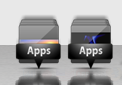
@bobah: Here's an example of the M*c stack icon I'd like to use (as seen at http://delta909.deviantart.com/art/Even-Flow-102149040), along with the generated icon looking as if placed inside the box:

Can you give a screen of the icon in (not correct) action, too? I think that would make things clearer.

#521200

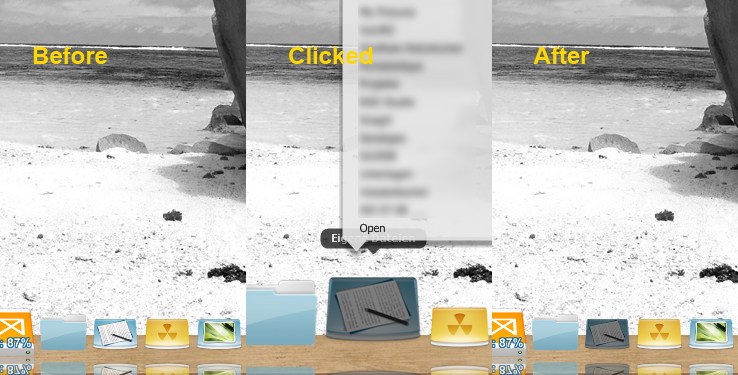
My stack icon continues grayed even after clicking the menu with the programs ... this only happens in list mode ... it would be a bug? I remember that this does not happen in version 5.2.3

#521208

My stack icon continues grayed even after clicking the menu with the programs ... this only happens in list mode ... it would be a bug? I remember that this does not happen in version 5.2.3

I copy that. The Icon remains at the "Clicked"-Stage. Only happens on "List"-Stacks. I created a screenshot for better understanding.

post-90085-1232452251_thumb.png

bug.png
bug.png

#521210

That's it... thank you Atreiu ! Using 5.2.3 again.

Also noticed that after minimize or close a window, the reflection continues in the dock, it would be normal? Or this reflection should disappear at the same time that I minimize or close the window?

#521214

Can you give a screen of the icon in (not correct) action, too? I think that would make things clearer.
Unfortunately I don't have a skin that uses that icon - yet!. But by looking at the icon I've supplied it's clear that the generated stack icon would appear below the bottom of the suspended box.

Edit:

Btw, the annoying bug of not showing the newly selected skin's StackOff.png is still present in this version. I've noticed that when you select a new skin, all but this image are copied from the skin file to .SkinsCurrent; then, if you exit XWD and restart it, the icon gets copied from the skin file and is then shown.

Another bug - much probably related to the first - is that when you do a clean install of XWD, StackOff.png from the (default) skin is not shown either; you have to set it manually via 'Stack Icon > Change'.

Edit2:

I managed to get an image:

.

post-58609-1232463986.png

Stack1.png
Stack1.png

#521230

Bobah, i found a Docklet API Bug: the X_OnDrop() is completely broken :(

It is simply not executed, when I drop something on my Icon.

I just tried to update my XDesktoplet, where the user was able to Drag&Drop files on the Docklet to copy them to the Desktop, like in the last version. Impossible, right now.

EDIT: X_OnDrop() is working fine. It was my bad, sorry! :o

#521315

BUG: in minimizing windows, when i press the button (on the application bar) of an open windows, it minimize in dock, but the window still remain on desktop!!!

#521319

This bug has existed for a while now, but when I plug an external drive of any sort (usb key, etc), the dock chokes when I click on my computer.

This doesn't happen when I click on desktop icon, so it's the dock :)

anyone else experiencing this?

#521399

Hola soy nuevo y este es mi problema espero tenga solucion ya que me gusta mucho xD

por cierto mas o menos lei los post anteriores pero no habia nada parecido

Tengo XWindows Dock v5.2.3

win xp sp2

1gb ram

el problema es que tuve un error de win y use "Restaurar el Sistema" resuelto mi problema entro a win y mi XWindows Dock no sirve :S borre carpeta de XWindows dock y volvi a instalar y me sale el mismo error :s luego instale en c: y me sigue saliendo el mismo error :S ya no se que hacer todo estaba todo perfecto

hace unos dias lo instale ya que usaba rocket dock y otros y XWindows es el k mas me gusto pero salio ese error y no se que hacer :(

les pongo unas capturas de mi escritorio para que vean el antes y el ahora con errores :(

--------------------------------------

( sorry for my english )

Hi this is my problem i hope have a solution :(

i have XWindows Dock v5.2.3

win xp sp2

1gb ram

i also read the past posts and i don't find someting equal :(

the problem : i restore my computer because a Windows error then when i fixed and start windows again :D my XWindows doesn't work :( then erase the folder XWindow Dock and reinstall and again the same error :S then uninstall again and now change the destination folder in c: and . . . again the same error :s i don't know how to do :(:(

i put this screenshot :( :(

help me please . . . . :( :(

before :(

miescritoriold5.th.jpg

and after:(

When is open :

errorscreen1jk6.th.jpg

when clic in preferences

errorscreen2bl6.th.jpg

and . . . :(

errorscreen3lc5.th.jpg

saludos a todos

XWindows esta genial me enamore de esta barra

lastima por mi error :(

y perdonen por mi ingles :P

atte: Tedydan

#521503

Hola soy nuevo y este es mi problema espero tenga solucion ya que me gusta mucho xD [...]

Please try to reinstall XWindowsDock into a different folder. This helps, most of the times.

#521504

Please try to reinstall XWindowsDock into a different folder. This helps, most of the times.
...then uninstall again and now change the destination folder in c: and . . . again the same error :s...

Yeah...

#521509

I think it's problem of the dock.... because I had got like this one before... try to install and don't use in preferences options like (icon's shadow offset and icon's offset), if it doesn't help you then wait for the next realese.

#521510

that was fast

xD yes i changed into c: and again the problem :S

and i try put in my documents HAHA and . . . . Again :(

HAHAha ... haaa . . . :(

then . . . just wait for the next realese??

:(

. . . aun asi gracias :P

no se podra modificar algo en system32 ???

bueno de todas maneras gracias :P

I think it's problem of the dock.... because I had got like this one before... try to install and don't use in preferences options like (icon's shadow offset and icon's offset), if it doesn't help you then wait for the next realese.

the same error :(

i try this too :(

By Panta: merged. No need for double posting; use 'Edit' instead.

#521513

Have you tried running Windows Update? If it was running before but not after you restore the system to a previous state, this may help you...

#521522

This has nothing to do with your conversation right now, but the dock should re-calculate icon size for stack animation every step, due to zoom and stuff. You can really see the bug if you set magnification to something huge and click on a stack: the icons start of tiny :P

#521535

Hi BOBAH13,

I reported earlier that with Explorer, Folder Options->Show Hidden files (Enabled) & Hide Protected Operating System Files (UNCHECKED) Produced (=) Gallery Mode Stack & Dock Freeze.

However, now I'm not so sure this was the problem as I just experienced another (reproducible) freeze (Dock "Not Responding") event. (See Screenshot for description and how to reproduce.)

20090122xwdfrozen2jq9.jpg

Hope this helps.

#521570

Please can you tell me what is item's reflection ratio (in gallery prefernces) ? and width and height of second picture in gallery ? :) Thanks... or I think I fixed it already, or not, who knows :)

#521585

Is this everything you need?

settingseg8.jpg

And crestock-75773-2560x1600.jpg (width and height of second picture in gallery ) = 2560x1600

If you need more info, just let me know.

Oh, and another item:

Problem (What currently happens) Screenshot:

20090122minimizeerror2dcz2.jpg

*please note, the above "2" windows are the same window.

Correct way (What should happen) Screenshot:

20090122minimizeerrorcovn9.jpg

#521590

First problem about gallery is fixed, I hope :)

#521606

Great news BOBAH13, when you release the fix, I'll be sure to test it out thoroughly and report back.

P.S. I know I have repeated this problem before, so please forgive me for sounding like a broken record :) but I know you were busy back then and now have indicated that you will be focusing on Bug fixes, so here goes:

If possible, please fix the minimize-windows-to-Dock (with genie effect) Double click issue. Solution: when Minimize window event begins, disable any additional minimize event for that exact window (then, clear the disable when minimize animation finishes.)

If user accidentally minimizes twice, the same window during the single animation, the dock disappears! and all windows minimized to the dock cannot be accessed and you have to kill the dock and all lost windows using the task manager.

Again, sorry for repeating myself but it's such a depressing bug and choosing between mouse gestures (which I cannot live without,) and your wonderful dock would make my head explode ^^

#521643

Also, there were already fixed, in my opinion:

1. Detecter of full screen mode of windows;

2. Icon's shadow (now it's not changed to another value by itself);

3. Gallery's items. Now they aren't showed till you are moving the mouse, when you will stopped they begin rendering. Also you will not have any problems with "freez" of gallery

4. Problems when dock try to start (Access violation....)

I hope it will be wokred, because I haven't these problems now in my PC

#521646

are these bugs fixed now?

when will the next release be out?

#521651

I hope it will be wokred, because I haven't these problems now in my PC

I suppose the only way to find out is to release the update (when you feel it's ready) and see what gets reported ;)

#521653

links inside stacks beginning with "::{" are recognized by xwd, but not retained in the xml files... haven't tried with plain old dock. Does anybody have a workaround?

Edit: in fact, I can't even link to the c drive.

#521666