FlyakiteOSX v3.5 Bug Report Thread

Hi,

The pack is owrking fine, but I see a little vug in the OSboot.

The boot screen show properly, but when it is finishing, the screen gets blank (the apple figure disappears, but the rest of the boot screen keeps the same, but without the apple figure), and it takes 20 seconds to continue with the logonui.exe screen (when the users has to log).

Would be a boot screen bug?

A few recomendations for next releases:

-possiblility to change the boot screens

-posibility to change the logonui.exe screens

-Posibility to change the icons sets

Regards!
#433664

hello

i just want to report this bug

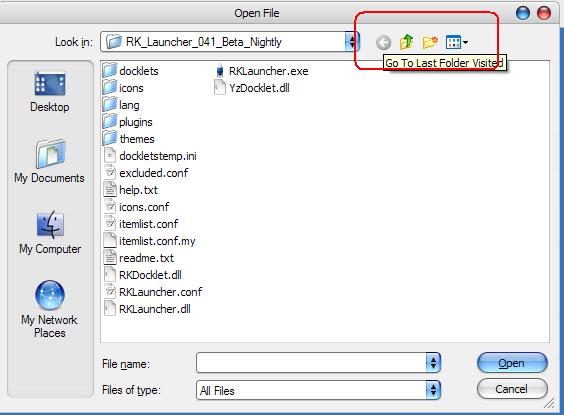
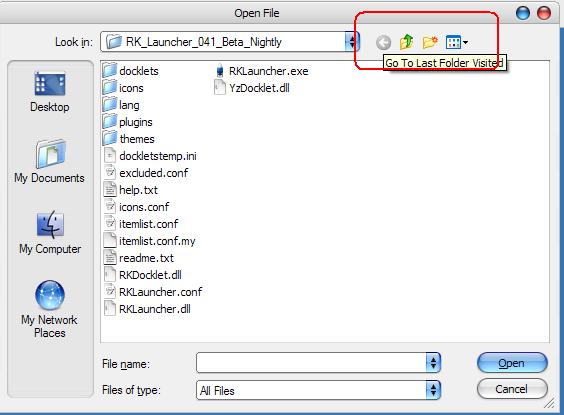
i formatted my computer and install flyakiteOSX v3.5 and bug found in open file dialog

please see picture below

how can i change this icons?

thanks a lot

post-56925-1167024005_thumb.jpg

open_file.JPG
open_file.JPG

#435262

that is in a DLL called comct.dll...or something like that. theyre rly difficult to change.

#435263

i already run the rebuild icon cache and the Force System File Update but the icons does not change

:(

#435276

Those icons are in a file called comctl32.dll. They're a pain to ResHack, as flyakite has said before. There's not much that can be done, unless you want to do it manually yourself.

-NC

#435323

Hi,

I've read of this problem somewhere before (bt I can't find it, so I'm asking here).

When I put an empty disc in my drive I cannot access it (e.g. write music on it).

I get an error message saying "D: is not accessible. Incorrect function"

PLEASE help me

#439706

Yes, i have this too. It has to do with your CD Creator... For some reason it works with some blanks CD's, but refuses to work with other ones. Go to Microsoft Support and they'll tell you more. I still haven't fixed mine.

#439710

No I read that it's bcoz of Flyakite.

Plus ALL blank CD's worked before I installed FlyakiteOSX.

Can somebody please help us 2!^^

--------

I NEED THIS TO WORK ASAP.

Please, I asked nicely

-------------

Ok the solution has been figured out, thanx shmengie for supplying me with something to work with ;)

For those of u also experiencing this problem try this:

Go to ur CD/DVD drive> Right-click> Properties> Recording> and make sure "Enable CD recording on this drive" is ticked.

FlyakiteOSX must disable this accidentaly when u install it.

//Posts Merged. -NC

#439731

Hi there!

I saw a post about black screen when proceeding Scan-disk and my situation's similar.

I ran Adobe Partition Magic to make a ext3 partition and a reboot was required.

After loading the Windows bootscreen, I thought I'll see the blue screen, showing the progress of making the new partition, but... just a black screen appeared.

Anyway, after one hour that I've spend watching the black screen, the system rebooted and after launching Partition Magic, I saw PM had done it's work. I'm almost sure the problem was caused by a bug in Flyakite, so please let me know if I'm right.

Anyway, Flyakite is an awesome program, it's just great!

Greetings!

I'm not sure whether it's a bug or it's normal to appear like that:

http://img116.imageshack.us/img116/2630/flyakitebugeg7.jpg

I'm talking about the text inside the buttons in the program window: "Select Folder", "Change Background", "Change Text Color", "Default", "Exit"

Greetings!

#440869

Hi, I'm running Windows XP (SP 2) and after using FlyakiteOSX for a few month I decided to uninstall it.

I had two problems :

- the first one was that after uninstall, icons didn't come back to the XP set of icons, in fact I had to manually change all the .FlyakiteOSX in my WINDOWS/system32/ to do so

- second thing that I still haven't fixed right now is that iTunes is not working anymore. I tried to uninstall iTunes+QuickTime properly so that I could reinstall them after but Quicktime couldn't uninstall [Error message : something like "fatal error during installation"] and if I only uninstall iTunes, the problem is stil here.

Thanks in advance for your help...

cf http://www.aqua-soft.org/board/showthread....4323#post444323

#444292

Having the following problem - my Start menu has become invisible. Apparently it's happening after some program is being loaded at the startup because just when Windows boots up the start menu and the whole taskbar is there. But in 10 seconds it's invisible but obviously in place - the start menu opens with the keyboard but the tray and quick launch along with the whole thing are still innaccessible due to transparency. Help plz.

#444565

Well, i don't know if that's a bug or not....

I just installed the Flyakite, all good for now.... but when i want to change a theme with windows blind.... don't work

I want to change the default aqua theme, to brushed theme....... window blinds don't change it...

How can i do to fix it ?

Sorry for my english .....

#445183

hi,

i'm sure it's been covered before somewhere, but i can't find it with search so...

does anybody know how to change the font that is used on the logon screen at startup - the one that the user name is shown in and the 'now loading' text after you click on the user, etc?

thanks

#445897

Can some1 tell me what to do about that "cube" in the middle of the screen?

it apperad when I pressed the Button dialoge at the dashbord and wont dissepear :(

bakgrundkm3.th.jpg

#447704

that problem relys with Y'z Shadow, not FAK

#447707

Ok, problem with Football Manager 2007, it runs and occasionally i can load my save game, but since the program uses some sort of different resolution to my native one, ie, it doesnt fill my screen, it flickers between resolurions and then minimizes, and it repeatedly flickers several times if i try to restore it. Anybody able to help? Please...cos if i cant get this to work, i simply will have to uninstall flyakite!!

Flyakite 3.5, XP, i ticked all the boxes on install

#447973

MSN Messenger don't work. ?help

#450626

Possible bug with latest MSFT patches dealing with Animated Cursors. It seems it touches shell32.dll and user32.dll.

Not 100% sure since the only sign of issue is that Monitor.exe and wsecomm.exe cause memory addressing issues.

#450643

I can't open my calculator or my AVG anti-virus because there is some sort of .dll relocation problem?

#450684

Nothing seriously report by me, but i will really apreciate updated FLyakiteOSX with bugfixes, updates of included skins, apps and optimizations for WIE7+WMP11

#450698

Possible bug with latest MSFT patches dealing with Animated Cursors. It seems it touches shell32.dll and user32.dll.

Not 100% sure since the only sign of issue is that Monitor.exe and wsecomm.exe cause memory addressing issues.

I can concur on this - avg anti-virus won't load

this has affected two machines and uninstalling flyakiteosx 3.5 solved the problem

#450718

Possible bug with latest MSFT patches dealing with Animated Cursors. It seems it touches shell32.dll and user32.dll.

Not 100% sure since the only sign of issue is that Monitor.exe and wsecomm.exe cause memory addressing issues.

Same Problem here, xp home / german.

If you google it, many people have that problem with other shell mods.

The problem has been introduced with security update kb925902.

Microsoft released a fix, but it only addresses a different part of the problem.

Removing kb925902 works, however, this is not the way it should be.

#451153

I installed flyakiteosx 3.5.

Now, running certain .exe applications will give a "The system DLL user32.dll was relocated in memory..........." window pop up error message.

Can't say which ones exactly for sure and why, but the two I encountered so far is this one iEX http://www.oxygen-inc.com/premium/InsaniSoft/iEx.htm, and neXplorer by by vneumann.

Might have something to do with shell32.dll, not quite sure.

#457244

i just performed a clean installation of windows after a hardware upgrade. everything in flyakite seems to work APART from the osx tiger theme for some strange reason. the windows are still in classic mode as is the taskbar. i've tried performing the installation in my user mode, i turned off the firewall and antivirus and then installed flyakite, i even booted into safe mode on the root account and tried there. still flyakite will not patch the window theme. really very strange. im using latest free zonealarm, free avg and my windows is xp2. i'll post a screenshot after a short time.

any ideas much appreciated...

here's a screenshot: http://www.blinque.co.uk/flyakite.jpg

p.s. yes i tried the force update without success...

#458207

luminouslemon, use the UXTheme Patcher found here.

http://www.osx-e.com/downloads/utilities/patcher.html

Then everything should work just fine.

-NC

#458335