 Aqua-Soft Forums
@theEVILcube, your mod certainly makes me want to look at the start.xhtml more than click on a message, hehe, but I guess the whole Apple favorite uses minimal colors in small spaces. I'm thinking just the logo and taglines are okay. Simple and cool at the same time.
How Thunderbird can look like

Updated the start page per the requests. I think it looks very 'Apple' now.
Click image to download.
This is my personal mod of tiger mail 2.0 so far... Need milk:)

So far so good but the only thing thats driving me nuts is the about thunderbird screen, is there any way to change the "about" text to something else?
I figure its in the messenger folder in thunderbird but im not sure where to go and what to edit...
If any one could point me in the right direction that would be great.....
@j2227:
thanks for the Images! They look great!  A Tutorial is a nice Idea! Good Luck concerning this!
@theEVILcube:
thx for your start.xhtml! I must totally agree to that Statement:
...your mod certainly makes me want to look at the start.xhtml more than click on a message, hehe...
@ijaxx:
woo! Really nice Milk Theme Mod! And i know the Wallpaper... (you set it "skillfully" in scene) hehe 
The problem with making a skin BEFORE the mods are done is that every little kid in here will start asking for themes instead of mods and then all the incredible work done in this thread will be lost in a mix of 'gimme (insert crappy longhorn skin here) now...I must have it!' replies.
Can we please move back to the thrread itself and not release skins in here?
It's great and all that you spent the time, but why not release it elsewhere, in its own thread?
Now, on to my question:
Somehow, in the mix of the hundreds of posts I read here and in another thread today, I forgot/didn't see where I edit the font sizes for the text directly under each button (i.e get mail, new...etc)
@Duckie, that's under
label { font-size: 12px !Important; }
I believe. I may be wrong, but if that doesn't work
* { font-size: 12px !important; }
changes the whole theme's fonts.
---
@theEVILcube, good update, but--I hope I don't like a nag or anything...you kinda made it too big so that the scrollbar shows. Thanks for the update though 
I'm working on combining all the userChrome idea into the theme so you guys don't have to do it. Hopefully I get done with the whole tutorial by next week.
j2227,
your first suggestion worked perfectly when added to the userchrome.css
now, I also haven't noticed anyone mention the text sizing in the left hand column where the inbox and everything else is.
Is that an easy fix or does that have to do with the icon sizes? I did read about the possibility of making the icons larger, but nothing about text.
Again, I could have missed it.
Thanks.
**EDIT**
Is anyone else having issues finding where to turn off the new Calendar option in the left panel?
That's an easy fix. I'll get on it right now.
Not sure what calendar you're talking about...I didn't even know there was a calendar in Thunderbird.
The calendar was just released today. It's embedded into Thunderbird as an Extension, but it's an actual Mozilla Release.
Teh OMG, its Duckie *waves at Duckie* 
I gotta request for @DJ Fall:
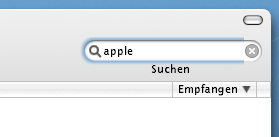
I know you did an awesome job with your search box mod....well...do you mind doing one with the blue glow behind it? All you have to do it edit the PNGs. I noticed that you made your search box on the top line, so you might have to edit the original so that its inline with the glow one. If you don't have any time, well, I suppose I'll do it myself.
Hmm, that's a good Question! I'm not sure if this will be possible... is there a "klicked-status" and a "non-klicked-status" Image? I only see one Image to edit and not two like in Firefox. Correct me if i'm wrong but i don't think this will be possible to get the blue glow effect working with only one Image in the TigerMail Theme.jar... perhaps with a UserChrome-Setting but with that i don't know the right Command for that.
Yes, I think it should be possible. It's possible in firefox (a klicked-status and non-klicked-status) just see any of the firefox to safari themes, so it should be posssible in thunderbird via some tweaking of the searchbox.css (or whatever its called) I'm about done with all the editing userChrome stuff, so just checking about that.
plz, i need help!
i done all from first post and my thunderbird work perfektly, but i go to View->Toolbars->Mail and all buttons and menu hidden. And now, i don't know how it return


@j2227:
i think you are right... i looked in my Firefox Safari-Theme (Searchbar.css) an found a Parameter called: [focused=true]
I think with this we can get the "hover State"-Possibility in the Searchbar... i will try to edit it. But i don't know if it works and how long it take to get a good result. I'll post my status in the next days, ok?
What's about the Titelbar? We need that Feature that it shows the Number of Messages too... but i don't know a solution. I looked at the coding stuff but i understand nothing, concerning this...
@DJ Fall, good question. I know with the extension INpac mention way at the beginning of this thread it displays the number of unread. The problem is that its before the folder name:
(1 unread) Inbox
and it also doesn't say the total number of messages. I'll briefly look through the extension and see what's what.
-----
@texa, what extension are you using to hide your menu if any? did you add the userchrome.css to your theme? In it contains a line /* Hide menu bar (File, Edit, Menu, etc) */ and that does hide the title bar.
@j2227, i don't remember, i done all as wrote in first post
this content my userChrome.css file:
@namespace url(";http://www.mozilla.org/keymaster/gatekeeper/there.is.only.xul");treerows {
background-color: #F7F9EA ! important;
}
treechildren {
font-size: 8pt ! important;
font-family : Tahoma, Arial, Verdana, sans-serif ! important;
font-weight: normal ! important;
}
treechildren::-moz-tree-cell-text(read) {
font-size: 8pt ! important;
font-family : Tahoma, Arial, Verdana, sans-serif ! important;
font-weight: normal;
}
treechildren::-moz-tree-cell-text(unread) {
font-size: 8pt ! important;
font-family : Tahoma, Arial, Verdana, sans-serif ! important;
font-weight: bold;
}
I am having some problems getting what I want in the messages pane.
I have an image that is used for the folder and messages pane but what I want is for the image to only be displayed in the messages pane. IE the alternating message background.
I would like the folderpane to have a solid background, not an alternating color.
Everything I have tried so far either displays the image in both the message and folder pane or neither. I cant figure out what controls the image in each specific area.
Here is a link to what I have now. Hopefully someone help.
did you only change it in the message pane?
if you do it in the folder tree also it will affect the folders, too.
@j2227:
My Status of the search box mod (with the blue glow) is:
I got it to work!! But i need some help to finish it. My problem is that i don't get the "focus-Status" to the right side of the search box!
Do you know a solution? If not we have to delete the gray "Clear-Button"-Feature. Without that, the blue glow is working all over the Bar... (i tested it)
[Text removed...]
But the addition [focused=true] didn't work in my mod for the last parameter (quick-search-clearbutton)...  I hope you understand what i mean and you have a suggestion how to fix that.

@sean.fletcher - Thats my problem. I havent been able to figure out what the css is for defining a specific image to just the message pane is.
I think when I changed mine to have larger row heights, the folder pane was defined by ""/*::::: tree rows :::::*/""
I think the message pane is ""/*::::: message pane :::::*/""
Well Ive tried some more trial and error and looking in the DOM inspector but all with no success.
Also 'tree-rows' is the class I think
This will disable all the features in the folderpane but it does leave the message pane image in place. Almost what I want.
#folderTree {display: none; !important;}Help any one?
@DJ Fall, did you try the !important tag next to the background-image property? It looks like you did it on all of them except it.
Also try:
.quick-search-clearbutton:focus
@texa, if you have the folder {EDA7B1D7-F793-4e03-B074-E6F303317FB0} in your extension folder, i suggest deleting it. If you don't have it, I recommend moving all your extensions to a different folder, and once you get a the menu back, one by one see which one causes it.
@theEVILcube, I'm not sure there is a way to have both different. When testing, this kinda broke my DOM inspector so i gotta reinstall that...
Edit:
Wait a second...of course there is the folder tree's blue and the message pane is greyish white so there has to be. Please hold.
That's all I've got for everyone.
Do you mean it like this?
.quick-search-clearbutton[focused="true"] {

  background: url("chrome://messenger/skin/icons/SearchBarRight-hov.png") right center no-repeat !important;
-> this i didn't works.
Hmm, the alternative Parameter: .quick-search-clearbutton:focus didn't work too. Also not with the important tag. Maybe i'm too stupid for that part...
I hate when things not working... I'm a the End now with my skills... :cry: Is it possible that you could try to get an other Image on the right side for the "klicked state"? I only need the Parameters who work. Or if you want, i send you my work till that point and you try your luck.
But i'm sure the Problem is about this Image, because this is responsible for the right side of the searchbar. :confused: