Aqua-Soft Forums
@Qweedle Guy, a million thanx! I TOTALLY forgot about that. I saw it just a few weeks ago in the release thread, but wasn't paying attention.
@DJ Fall, thanks too as well!
@Qweedle Guy, a million thanx! I TOTALLY forgot about that. I saw it just a few weeks ago in the release thread, but wasn't paying attention.
@DJ Fall, thanks too as well!
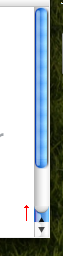
Look at the attached image:
I edited the scrollbar-up button images so that they look more mac like. But now the problem is, that because of the new height of them, they do not fit correctly into the position. does anyone know how to edit the y pos of the scrollbar up button?

Ok check this out!
I did some extensive searching and fishing through theme files and I figured out how to use an image for selected items in the Folder pane!
Click to enlarge:

Just add this to your userChrome.css:
/* Use an image for selected items in the Folder pane */
#folderTree treechildren::-moz-tree-row(selected) {
background: url("foldertree-selected-unfocused.png") #676767 repeat-x !important;
}
#folderTree treechildren::-moz-tree-row(selected, focus) {
background: url("foldertree-selected-background.png") #225ED0 repeat-x !important;
}
Then put these two files in the same directory as your userchrome.css file.
foldertree-selected-unfocused.png
foldertree-selected-background.png
EDIT: Of course, if you use TigerMail 1.5 then you'll have to edit the PNGs so they're the right size for the selection.
very cool, thanx
it looks so unbelievable beautiful, I can't wait any longer for Mac OS Leopard screenshot 
but now we gotta create the correct scrollbar buttons! Does anyone know how to move the scrollbar buttons?
@Qweedle Guy:
Cool. I'm glad we got yet another modder on board. 
@INpac:
to move the scrollbar up, I'm sure you have to edit userChrome.css or toolbar.css in your theme's .jar. Its funny because I was just thinking about doing this a few days ago, but have absolutely no resources. However, you can't use the DOM Inspector, cause its doesn't work on the scrollbar I don't think.
I remember long time ago there was a windowblinds theme that was brushed that had the correct OS X scrollbar positions, but I don't remember where I got it nor what its called.
that would be so great o_O
let me see what I can do
PS: right now there's the apple event, how funny ^^
Minor graphic update. Straight from the Tiger Mail Resource! Got all the resources from a friend. PM me if you need any.
Replace it in your tigermail.jar//messenger/icons/
This will only show when the Thread column is not selected. If selected it shows the default 2-arrow icon.
If you want it to be a callout as well, copy and rename the copy threadcol.png
---
[Extras removed. Please wait for tutorial ]
can someone do a milk version for this? so all would be happy and satisfied.
@j2227: Thx for the "minor graphic update" and the UserChrome Addition!!! Very nice! :cool:
Good to know that you have all Tiger Mail Resources!
Now we are really close to the real Apple Mail! Respect! I never thought that it could be close like this... hehe
@kaloyster: a milk version? Hmm, changing the per application wb-Skin to milk will be a good step in this direction. For example you could mod the Toolbarbuttons to get a "milky look"... but a total conversion will be very hard!
I also have the pinstripe compose window, which i will post up in a few hours when i get home. i spend long nights doing this  , but it's cool and worth it i think.
[Extras removed. Please wait for tutorial]
Now we are really close to the real Apple Mail! Respect! I never thought that it could be close like this... hehe
But there's one more thing ....
look at this screenshot:
http://jotbe-fx.de/daily/images/156.png
there are those small capsules next to the entries of the list in the sidebar. It's pretty difficult to realize it, perhaps (the mozilla coders always copies the good elements of the concurrence, that's great!) that will follow within an update, otherwise, any coder could try to code that - would be superb!
great work guys. never imagined i would go this crazy trying to customize a mail client skin...
i have been trying to make a Milk version of this, ans latley photoshop has become a good friend of mine. lol
ill try to post up a sceen to see what you guys think of it... so far its for personal use but well see if i get permissions and if thier is intrest.
but none the less great works guys with all this tips....
its been a while since ive been back here at aqua, i got the customizing bug agian......
@INpac: i know, i know. There are some more things... I want to praise the people here!
@j2227: Good to know that the capsules are possible! But if we could not realize them, i can live without that feature...
But I have another missing thing: It's possible to edit the Titlebar-extension that it shows additional the number of mails in the selected folder and not only the new ones???
I'm sure it is.
try opening the xpi-file and search for the right file, I think it's probably a js-file, that handles the title. But I could be difficult to get the name of the variable that returns that number.
Well i tried my best to get it to match the milk 3.1 VS im using and get it to also match Safire Milk
for firefox.
Still have to tweak the text, not to pleased with it so far....
Its not exact to the original tiger mail but suits me fine ... love the milk themes..
Im using compact menu with a blank png for the main window
and used the hide menu in the userchrome for the compose and address book windows...
and a few other tweaks i got from you guys on this post....
here a little screeny.....

keep up the good work guys
and thanks INpac for starting this thread:)
wow... this looks f**** awesome!!! i love the milk themes.
if you made a complete theme, would you share that? please. i would kill for that
i agree that looks great. i'm not a milky person myself, but you release that and it'll be my default
hi @ all...maybe someone is interested in the modified "compact" extension for tb
if you want it get it here
I'm very interesting, but why instead of icon inside of package is just a search box? Also I can't get on bar "apple" button as it appears in Firefox with Compact Menu. Just word "Menu". Also after installation I can't see this extension in extensions list.
i see the problem. the file for downloading wasn't a .xpi file... i have updated it here
but it's similar to me, that there is no "compact" extension listed in the extension mist. but if it's installed, you can find it in the chrome folder, in the tb profiles.
and first there is just the word "menu" in the toolbar. right click on it and you can configure the toolbar. probably at the bottom of this menu will be the "apple". now drag and drop it wherever you want - in the toolbar. hope you get it
i see the problem. the file for downloading wasn't a .xpi file... i have updated it herebut it's similar to me, that there is no "compact" extension listed in the extension mist. but if it's installed, you can find it in the chrome folder, in the tb profiles.
and first there is just the word "menu" in the toolbar. right click on it and you can configure the toolbar. probably at the bottom of this menu will be the "apple". now drag and drop it wherever you want - in the toolbar. hope you get it
Of kozz you are right, this procedure I'm know well, but before, instead of "apple" buttion in bar preferences was just a search box :-)
Anyway, now all is right! Thanks for wonderful job. Your extension is only Compact Menu for Thunderbird extension in all web (checked :-)).
One more question. I would like bold text in folders (incoming, deleted and so on) with unread mesages, as it was in my previous theme. It's very useful when you have few acounts and mail is coming. Also it's useful in case when thunderbird incorrectly marks message as a spam, any time you can check it out, becouse it's visible in trash with bold.
What to write in userChrome?
Of kozz you are right, this procedure I'm know well, but before, instead of "apple" buttion in bar preferences was just a search box :-)
i see... nobody told me before
Anyway, now all is right! Thanks for wonderful job. Your extension is only Compact Menu for Thunderbird extension in all web (checked :-)).
well, thanks for the flowers, but i only replaced the icons, so actually i didn't made this extension.
One more question. I would like bold text in folders (incoming, deleted and so on) with unread mesages, as it was in my previous theme. It's very useful when you have few acounts and mail is coming. Also it's useful in case when thunderbird incorrectly marks message as a spam, any time you can check it out, becouse it's visible in trash with bold.What to write in userChrome?
hopefully anybody who's smarter with userChrome can help you.
I also have the pinstripe compose window, which i will post up in a few hours when i get home. i spend long nights doing this/* Compose Window */
#msgheaderstoolbar-box, #FormatToolbar { background-image: url("OSX_Background.bmp") !important; }
I would like to change the toolbar background for my compose windows.
What does this code change the background too?
I thought it might change the background in my toolbar in the compose windows as it says but I cant get it to change. Does anyone know how I might do this ?
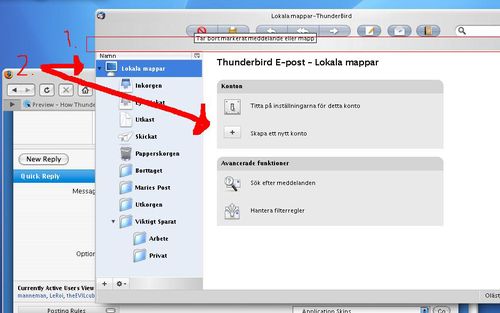
Hey!
Almost 100% happy with mine... but I could need some help...
1: Can I make this space disappear? How?
2: How do I make TB start like this as default?
Thankx!
Manneman, Sweden