Aqua-Soft Forums
omg go to the properties of the move search items extension and enable Hide:

omg omg haha...so lame I didnt figure this out myself 
omg go to the properties of the move search items extension and enable Hide:
omg omg haha...so lame I didnt figure this out myself
Patstome, I postet that code in order to give you the ability to skin the splitter (the horizontal line you can move between the mail and the mail list). The other code was to edit the search bar width 
you can find userChrome.css as I mentioned already in C:Documents and Settings[username]Application Data[Mozilla ]ThunderbirdProfilesdefault[---]chrome
= C:Dokumente und EinstellungenXXXAnwendungsdatenThunderbirdProfilesXXXXXchrome
Anyway, if you didn't get how to move the searchbar by now, reread the post. Here's the modded messenger.jar. I change mine so that it's blank.
http://www.myfilehut.com/userfiles/62389/messenger.zip
[Extra stuff removed...]
“start xhtml” where to download ?
@macwin - start xhtml is in the messenger.zip file provided by j2227, just replace the one in the
this location C:Program FilesMozilla Thunderbirdchrome
now i'd really like to replace the simple blue rect when you select an item in the sidebar on the left with a gradient image so that it looks like in itunes.
does anyone knows how this would work?
Looks like i havn't got a user Chrome.css.How can i create one?
@INpac:
I heared in toyo-snow's Thread that you have the same Problem with the german words, i solve the Problem... Look at my Screenshot: 
EDIT: Image removed, updated my Screenshot in Post no. 58!
I modded my "Compact Menu"-Extension, to get that Result. If you want to know the Details, write me a PM and i explain it you in German. 
Great work regarding your Thunderbird-Tiger-Mod! I love it... :cool:
Looks like i havn't got a user Chrome.css.How can i create one?
Go to your Documents and SettingsYour NameApplication DataThunderbirdProfilesxxxxx.defaultchrome
create a new text file and rename it userChrome.css . you should see the icon change as well as the sublabel. if not, you have to show extensions which you can do in your Folder Options
@INpac
i tried to revert the sidebar icons to the old ones, but i kinda messed up and had to reinstall the skin. How'd you get the larger icons exactly? userChrome or did you edit the original skin?
??
I didn't get the larger icons back in tiger 2.0.
I extracted the theme some time ago and I saw always only the small pngs of the icons so I think toyo-snow didn't inlcude the large icons anyway in 2.0 but he said he will release an update soon
@DJ Fall
Thanx for the srceenshot, it's the first time I see my extension running on a different system and I'm glad to see that it seems to work
Concerning the toolbar labels problem: I think it isn't the best idea to shorten the labels with a ".", so that's why I'm simply hiding them - well, we could try to edit the font size of the labels a bit in order to make them fit between the toolbar buttons. I gotta get an original screenshot of the german apple mail
thx
does anyone know how to edit the labels under the buttons in the toolbar? Using the german version, I looked for the right dtd file in chromede but I can't find any file that contains the text 'Antworten' (=Reply) or something.
Can anyone help me?
??I didn't get the larger icons back in tiger 2.0.
I extracted the theme some time ago and I saw always only the small pngs of the icons so I think toyo-snow didn't inlcude the large icons anyway in 2.0 but he said he will release an update soon
Oh, oops, hehe, I was referring to DJ Fall. How'd you get the large icons on the sidebar like in your screenshot?
thxdoes anyone know how to edit the labels under the buttons in the toolbar? Using the german version, I looked for the right dtd file in chromede but I can't find any file that contains the text 'Antworten' (=Reply) or something.
Can anyone help me?
I brought that up on MozillaZine yesterday but i didn't fully understand what to do.
Edit:
To change your labels for the toolbar and thread sorting columns:
(1) Go to your Thunderbird program directory's chrome folder C:Program FilesMozilla Thunderbirdchrome
(2) Open up your locale version.jar . For me, it's en-US.jar, but i do suppose its different for different countries.
(3) Go to your locale(local version)messenger directory (e.g. en-US.jarlocaleen-USmessenger
(4) Locate messenger.dtd and extract that to a temp place, like your desktop, and open it up in wordpad.
(5) Search for and and change the appropriate fields. (e.g. "Write" to "New", "Date" to "Date Received", "Sender" to "From"
(6) Finally replace it in the original .jar file.
There you go
@INpac:
hehe i had the same Problem here... and i don't know a solution!
Do you have a original Screenshot of a "german Mail Version"? If yes, i would love to have a Screenshot! I don't know how it look in the german Language.
Why not shorten it??? It's only two words... and (if we find no other Way) the easiest! But you're right, we want the original Look!
@j2227:
Simply: I don't upgraded the Theme... i still use Version 1.5.6 and not the 2.0
But wait patiently toyo-snow want to update his Skin. Here is his Post:
Regarding big folder icons, I plan to include a sub-skin in the future that will enable large icons through userChrome.css.
But i have an additional Question regarding the Toolbar:
Is it possible to change the Font of the Toolbar with the "userChrome.css"? I serached for the Code which i have to use, but i didn't found anything in google? Anyone perhaps?
@DJ Fall
Toolbar as in the labels of the toolbar? I think that was listed in the release thread. Then again, that was for the global font:
-> Use the following to change the font everywhere in the user interface—folder pane, message-list pane, menus, dialogs, toolbar buttons, etc./* Global UI font */
* { font-size: 11pt !important;
font-family: Verdana !important;
}
-> Instead of changing the font globally, throughout the user interface, you can change it for only specific elements.
/* Folder pane font */
#folderTree > treechildren::-moz-tree-cell-text {
font-size: 10pt !important;
font-family: Arial !important;
}
-> Use the following to change the font for all menus.
/* Menu font */
menu, menulist, menuitem {
font-family: Times New Roman !important;
font-size: 12pt !important;
}
Don't know if that's what your looking for.
Anyway, here's what I've got so far with Thunderbird
@j2227:
thx for your Reply, i knew the codes in the release thread, but thx for that.
I changed my Font with "Global UI Font" to lucida, but i asked to change the Font of the "icon toolbar" individually.
As you see in my Screenshot the Text is (in my opinion) a little to high... i want to try another Font (to get a better spacing between the Font and the icons)
but if i look at your screenshot i think, i must deal with the error-spacing, because your font is quite high too...
What skin-theme do you use? My plantinum theme (if you compare my screenshot with yours) looks more plastic (i mean the bottom of the toolbar), i use a (lil modded) wb-skin: mac os x tiger - plantinum aqua theme (by steve grenier). Beacause your theme looks "so flat"?
i also use steve grenier's platinum aqua, however, i agree. telling by your screenshot, your toolbar has more of a gradient to it than my dull one.
ok, i found a solution for my "icon toolbar"-Font, because i found another better matching lucida font!
But now i want to change the Font in the Message List. I want to set it to "always bold - like the real mail app in mac os" (and not only the new messages)
This works fine for the "global UI Font-change" but then it changes all my fonts to bold! 
I want only the messages list in bold, the other fonts are now close to the original. I hope this is possible...
EDIT: another Question: It's possible to get the "Search" Text unter the (moved) Searchbar???
@DJ Fall, i was previously trying to find out how to change the bold text in the message list. The DOM Inspector acts kinda weird with this theme, so i can't find exactly where they're located in the .jar. Give me some time and I'll probably have an answer by the end of the day.
Also, to get Search on the searchbar......hmm....i'm thinking edit the png for the searchbar? i'm not sure you can add an actually label EASILY. Just make sure its transparent and matches the same font and size.
@j2227:
this sounds good, take your time, to find the "adjustment" for the bold messages...
hmm, this with the edit of the .png of the searchbar is a good idea! I will try this...
(I wanted to do this anyway, in order to change the magnifying glass to "mac-style")
This looks wonderful!
Would it be possible to replace the selection colors with .png's too? Like with the separator, that way we could have the gradient used in selections too.
Also, in Steve Greneir's Platinum theme, there's a 1px border...are there any other platinum themes that are borderless? If not, how do you edit the theme file to be borderless?
@Qweedle Guy:
first, i don't know a platinum borderless skin. To edit your wb-Theme you must use Stardock SkinStudio...
Now i'am done with my work on the Searchbar... now it's matching 1:1 apple mail!
But i tried to find the right adjustment for the height of the searchbar. But i don't found it.
The Searchbar must 7px higher, here is the code of my modded searchBox.css: (but which parameter must i edit???)
EDIT:
deleted, beacuse i found the right parameter... Stay tuned for updates...
btw, ...
guys, ur going here into deepest surgery of skinning. i´m following this thread silently till the beginning. great stuff. rock on.
allow me one question either: is it possible to adjust the font size in mail-list-window (meaning that window, f. e. inbox, that shows all mails in list-form.)
all i can do is change the font size in preview window.
@Brainbug:
/* Change Thread Tree Font */
	#threadTree { font-family: LucidaMac !important; }
stick that in your userChrome.css
@DJ Fall, mind posting a screenshot of your toolbar and how acurate you say it is?
Another Edit: I completely reinstalled Thunderbird and all the extensions in this thread (and compact menu) and am avidly continuing to work on this So what is it this time? A mod to INpac Account bar extension. Just replace the one next to your userChrome with this threebuttonsbg.bmp It has the resizy image that was missing (i suppose on purpose.) Feel free to edit it to fit your needs.
Also, change this:
#AppleMailBar { background-image: url("threebuttonsbg.bmp") !important;
				background-color: none !important;
				height: 23px; }
toolbar { border-bottom-width: 0px !important; }
Guys you will not believe me!!! I made it!!!! :cool:
The modded 1:1 Searchbar! It is now fully functionally and looks exactly the same as the original!
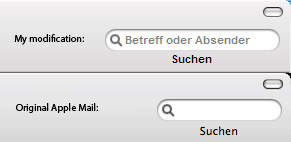
This was a really hard job for me! I post the details later but I am very much inspired of the result! You see my REAL Searchbar on the Screen!! Nothing faked, only the left Text...
Take a look at the teaser screenshot: SearchBar.gif - At the Top is my Mod and at the Bottom the original one. You can compare it...
@j2227: thx for your Apple Mail Bar Mod! It looks fine!
@INpac: I got some original "german" Apple Mail Screenshots! This will be my next mod..
More Informations soon...