Aqua-Soft v2 for vBulletin 3.5 Skin Released

I also want to show the IP icon as in default skin

Template postit_ip in default skin:

"$vbphrase[ip]"

Template postit_ip in Aqua skin:

$vbphrase[ip]: $post[ip]

$post[ip]

I tried to modify this template, always got messy result.

Can you show me how to update this template, so that the IP icon will appear after the online-status icon? (Just as in the default skin).

Thanks a lot.

#393660

Dejun, can you post a link to your forums, so I can see where you have the online status icon at?

Also, I have started working on the IPB port again. No set date for release, so we'll see how skinning goes this week, and if its a smooth ride, you can expect it out soon.

You can view the status here - http://www.vastyles.com/ipb/

#393867

Just a heads up, I will not be updating this skin for VB 3.6 (BETAS!) once it hits RC or Final I will update the skin. Last time they changed way too much stuff between each beta, and it was just a hassle to play catch up.

#394016

thx Tim, for the news... i was wondering about it. so i'll only update my forum when you release the skin for vb's new version :D

#394631

Is there any way that we can make the width any smaller. I don't like it being soo wide

#394727

Yes you can, in the CSS change the width of #container to the width you want.

Example

#container { margin-left: auto; margin-right: auto; min-width: 770px; width: 99%; }

To

#container { margin-left: auto; margin-right: auto; min-width: 770px; width: 900px; }

#394732

Thank you very much!!

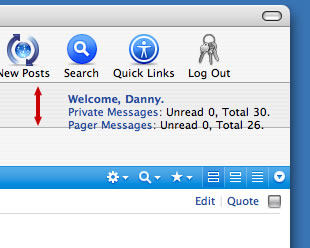
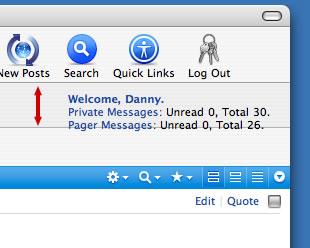
Another question if I may....

At the top, where it says:

"Welcome, Danny

Pricate Messages: Unread 0, Total 30."

Is there any way I can stretch that area a bit more to fit in another line of text?

Below I have an picture that shows you what I mean, and why I need to do this.

Thanks

post-48942-1149787640_thumb.jpg

stretch.jpg
stretch.jpg

#394856

In the CSS you need to specify a height for breadcrumb, reason it has a specified height, is because in IE there was a flickering issue which was fixed by adding it.

#394865

Thanks a Lot

#394873

Excuse me if this is the wrong forum. But cant find the bug forum for as2.

Anyway, attached is an image that shows what my problem is. Its basically wrapping and I cant find were to turn it off.

http://www.dslrexchange.com/forums/attachm...87&d=1150857770

jtorral, I moved your post into the vB Skin release thread. -NC

#398217

I am really low on money due to car insurance being due in a few days for me. Would $5 dollars be enough to get this style? I LOVE it and it would go well with my MovetoNYC.com vBulletin for a "Big Apple" theme idea I was going for :)

What would the lowest amount be to be able to get the style? In a few weeks I'd be able to give more, I just don't have it at the moment.

- MovetoNYC.com

#398300

Excuse me if this is the wrong forum. But cant find the bug forum for as2.

Anyway, attached is an image that shows what my problem is. Its basically wrapping and I cant find were to turn it off.

http://www.dslrexchange.com/forums/attachm...87&d=1150857770

jtorral, I moved your post into the vB Skin release thread. -NC

Seems to me you have added another item in the toolbar, the default skin should work perfectly in 800x600, but thats about it, any windows smaller and it will do that.

#398315

I can't change my header, it's wierd i uploaded over the vbulletin3_logo_white.gif file but it still shows the default aqua-soft image. Any ideas? Great style btw :)

edit: it was site_logo.gif that kinda confused me... I don't have a mac so I can't use the same font as you guys used. Could someone put either MovetoNYC or MovetoNYC.com on one sorta like the one on Aqua-Soft.org default, if not I have a friend that has a mac and I can do it on her computer, But hers is in the shop.

I LOVE THIS STYLE!!! I am updating the postbit a lil bit, but I really am enjoying it.

#398550

At the top (NAVBAR) you have:

User CP

FAQ

Members List

New Posts

Search

Quick Links

Guidelines

Log Out

2 questions:

1. How did you get Guidelines there? (and can I use your rules structure)

2. I added an extra button on my page, but I am having trouble getting an image to show. How do I get an image to show?

Thanks

#398664

Backup before you do anything, but this is how you can add items to your navigation bar. Note as Timan has stated before the style is only really suppored with default options at 800X600, but if you want to add items just go to your admincp, style manager, edit templates on the aqua-soft style.

edit the navbar template.

I don't know where you want your new items, but I added next to the Calander.

						<li id="tbcalendar"><a href="../../../../unavailable.html">$vbphrase[calendar]</a></li>

Find that in the template and that should be the basic consept of adding the same thin somewhere else.

The only hard part is you need to make a new tb______ in the css. So go to All Style Options and find the Additional CSS Definitions by the bottom. Find the other tb____'s and copy it and change it to your liking.

I hope this helps.

Timan if you don't want me posting this you may dealte my post. But I thought i'd help.

At the top (NAVBAR) you have:

User CP

FAQ

Members List

New Posts

Search

Quick Links

Guidelines

Log Out

2 questions:

1. How did you get Guidelines there? (and can I use your rules structure)

2. I added an extra button on my page, but I am having trouble getting an image to show. How do I get an image to show?

Thanks

#398829

Thanks so much!!! this really helps a lot!!

#398883

Timan if you don't want me posting this you may dealte my post. But I thought i'd help.

Nope, its awesome others are helping with some support!

#398885

Looks amazing!

Excellent job on this, it's really worth the work.

Good luck in the near future!

Alex

#399313

Where can I download this?

#401000

Read the first post of this thread.

#401003

Oh, gosh! I didn't see the "is now only available via donations" part haha >.

#401005

Another IPB update, done quite a bit of work recently on it, only bits left are the crappy bits. Usercp, Posting Screens, smaller areas, and the crappy Calendar.

#403069

This is one of the best skins I've ever seen for a forum software, Timan. Great work!!

The only bug I've noticed is a small border on the right of the postbits. I guess you added a "border" tag in the CSS and forgot to set "border-right" to 0px (I haven't checked the CSS file, so excuse me if it's not that).

I'm looking forward to the IPB version. Will you make a registration assistant like the one you made for vBulletin? I loved it!

I'll keep an eye here for updates. Thanks for making an awesome forum skin!!!

#403260

I am going to do the registration bit tonight for IPB, I highly doubt I can make it like vBulletins though. IPB is just so damn limiting on what you can do with its templates without modifying files.

The bug you just mentioned, is this in Firefox? and if so, does it vanish when you resize the window?

#403293

I need to put this skin on a white background. The art around the main body of tables has the blue and drop shadows photoshopped in. I've tried to change it in photoshop but the sides and bottoms are super hard to get accurate and to get the drop shadow to be a consistant size is tough too.

Anyone have a white background version of the skin elements? It's only 6 graphic files that I need.

Thanks

Paul Green

#403419