 Aqua-Soft Forums
Yea, I got an error message when I sent it to you, just send me an email with the alternate address.
Can you check PM's?
Thanks
AkeB0N0
Yea, I got an error message when I sent it to you, just send me an email with the alternate address.
Can you check PM's?
Thanks
AkeB0N0
Hey guys, here are some updates with the skin and all.
Right now the invisionboard version is still a ways off, I started working it and got most of the forum index done, but skinning ipb is a paid so I took a break.
The wordpress skin for version 2 will be out shortly, I havn't had time to get that done and out the door.
With the vbulletin skin, I have a few more templates left to update and fix 1 or two more bugs. Also still plan on getting the posting screens finished, right now they do look a tad ugly if you're using the wysiwyg editors. So stay tuned for updates on that.
If you find ANY bugs please report em so I can get those fixed and send it out the door.
With the vbulletin skin, I have a few more templates left to update and fix 1 or two more bugs. Also still plan on getting the posting screens finished, right now they do look a tad ugly if you're using the wysiwyg editors. So stay tuned for updates on that.If you find ANY bugs please report em so I can get those fixed and send it out the door.
Woot! Looking forward to the update. Thanks for the great work, Timan.
Should we be posting bug reports here or the other discussion thread?
.....The first line you should see
just change that class to whatever you want (specified in your stylesheet), press save and that should do it.not quite understand here, sorry about I am a **** here, would you please explain here more, for instance, where is the stylesheet? also where I can find the class that I want specified in the stylesheet?
Also, in this skin, it seems no way to show the customize title.
Thank you very much
OPB
Hey guys, here are some updates with the skin and all.With the vbulletin skin, I have a few more templates left to update and fix 1 or two more bugs. Also still plan on getting the posting screens finished, right now they do look a tad ugly if you're using the wysiwyg editors. So stay tuned for updates on that.
If you find ANY bugs please report em so I can get those fixed and send it out the door.
aahhh Tim, waiting for the bug fix skin 
I added something new here to the forum home (http://www.aqua-soft.org/board/index.php), if you notice to the right of the forum name it shows a blue rss icon. When you click it it will show the last posts via rss, so people can have feeds for certain forums... blah blah blah
Anyway, if you guys want this, I'll add this to the skin and have it in the next version I send you guys.
woo! thats a nice addition to the aquaskin features, I did notice the little rss icons in the forums. Can't wait for the next version, hopefully it will be available soon 
I would like to donate to get this skin. The only problem I have is that I am 15 and if I donate I will have to do so through my mum's account. Is there a way I could donate but have the stuff delivered my my own personal email address instead of my mum's pay-pal email address? Sorry if I am a bit confusing, it's a bit late here for me. I should be in bed... ZZZzzz... Jeff
Yea, just send me a pm with the email details.
OK. Do you want me to donate first or send you the details first?
PS. I hope only a few dollars is enuf because i don't have much money atm...
*EDIT* PM and Payment Sent...
Unless its at some WEIRD hours of the day, I'm pretty fast with sending em out, can be 5 min to an hour, but its usually fast.
Timan;
I tried to add the graphite as a child to the parent AS2 and i still get the ugly look the graphics not loading.
What do you think it is?
Post a screenshot of what it looks like please.
Post a screenshot of what it looks like please.
I fixed it. What i did was take off the style. Then I re-uploaded the first style and then uploaded the other as a child of the 1st.
I guess i misunderstood what you told me in IM
Now I got 2 other problems
1. Which image do I change, so that i can have my site logo show, instead of the Aqua-soft.org one? (ie: graphic on top left corner).
Update: The site_logo.gif in the main folder of as2 does the trick. the blue skin shows the correct logo, yet the graphite one doesnt. I uploaded the site_logo.gif to the as2graphite folder as well. What did the trick was to upload the vbulletin3_white.gif to the /misc folder in as2graphite. Now both logo's are changed.
2. I use VBAdvanced, and for some reason your skin doesnt show some parts with it. (see screenshot) This is the one i have left that I need to figure out why its not showing the graphics.
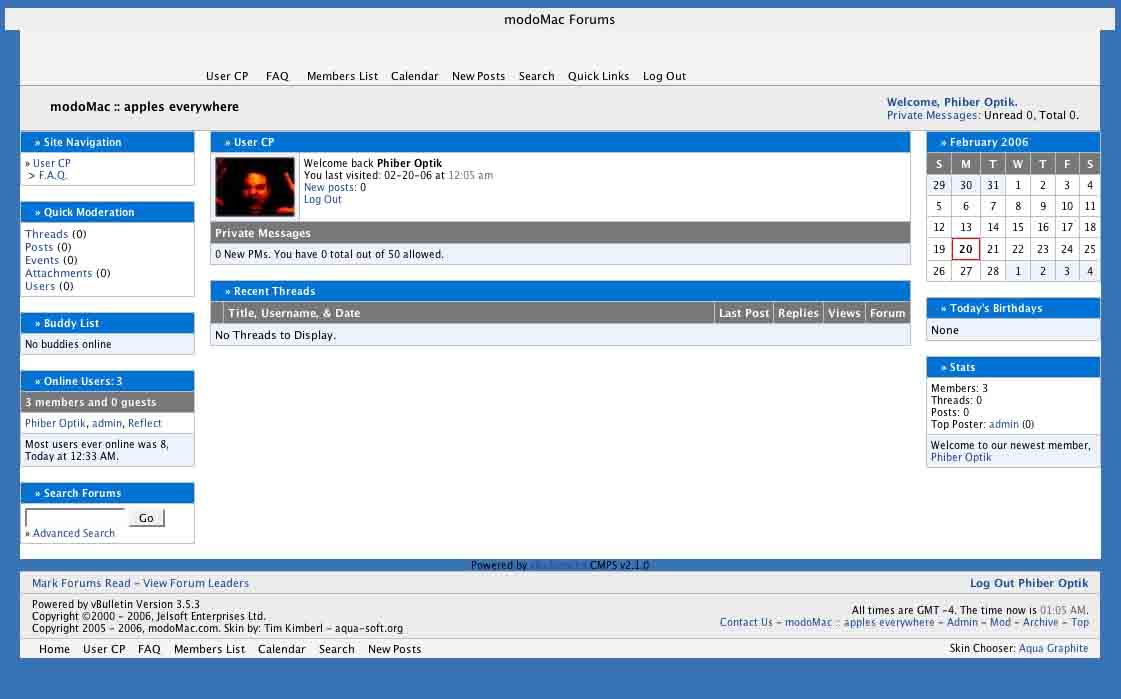
I have no idea what causes that in VBAdvanced, the skin doesn't officially support that add-on to vBulletin, but from the looks of it, its looking in the wrong folder for the images.
But yes the site_logo.gif is the site logo used on both skins, one in the "as2" folder is for the Aqua skin, and the one for Graphite is in the "as2graphite" folder. You can check the stylesheet and look for the #toolbar #tbhome a { background: url(images/as2graphite/site_logo.gif) no-repeat; height: 55px; padding: 0; width: 170px; } and it should point what image it is.
Hey Timan. On my forum @ http://forum.ijeff.headplug.com/ I dont have the Aqua and Graphite skin chooser at the bottom of the page...
Hey Timan. On my forum @ http://forum.ijeff.headplug.com/ I dont have the Aqua and Graphite skin chooser at the bottom of the page...
Here is what you do:
<td nowrap="nowrap" class="smallfont">Skin Chooser: <a href="../../../../unavailable.html">
<img style="vertical-align:text-bottom" src="../../../../unavailable.html" alt="Aqua" /></a>
<a href="../../../../unavailable.html"><img style="vertical-align:text-bottom" src="../../../../unavailable.html" alt="Graphite" /></a>
</td>
Add this piece of code to the footer (or header). Substitute the ?? in the Styleid with the styleid in your site for the skins. First style is for blue, and 2nd one is for grey
Kil
Here is what you do:<td nowrap="nowrap" class="smallfont">Skin Chooser: <a href="../../../../unavailable.html">
<img style="vertical-align:text-bottom" src="../../../../unavailable.html" alt="Aqua" /></a>
<a href="../../../../unavailable.html"><img style="vertical-align:text-bottom" src="../../../../unavailable.html" alt="Graphite" /></a>
</td>Add this piece of code to the footer (or header). Substitute the ?? in the Styleid with the styleid in your site for the skins. First style is for blue, and 2nd one is for grey
Kil
I am meant to put that in the footer of which file? (sorry, I am a new to vbulletin)
Just a question tim, which font u used for that site logo ? can i get that font or a .psd version of site_logo.gif .. thx
Lucida Grande is the font. I'll add a template for the logo on the next release I send you guys. I'll have an editable text layer, and some "other" generic logo.
While I like the UI and look of the PM Notification pop-up, my users are reporting it doesn't display properly on IE 6.0 on Windows XP. And yes, pop ups are enabled in User CP, the browser isn't blocking them, etc.
Sometimes the PM notices don't pop up at all for the, or they appear at the bottom of the page and they miss it. (You can only tell if you scroll all the way to the bottom when you happen to get a pop-up.)
Also with Firefox, sometimes the notice appears in another tab instead of the active window.
I haven't noticed these issues, but I'm on a Mac. Most of my users are not.
Tim, I sent you a payment (even though I already had a previous version) under the name Joe Pluck.
PM me with a link when you get a chance.
Thanks
I am having trouble with my graphite style: http://ijeff.podcasthost.com.au/forum/index.php?styleid=3
It wont display correctly... I have no idea why. 

btw: your skin is great... i just absolutely love it!
I am having trouble with my graphite style: http://ijeff.podcasthost.com.au/forum/index.php?styleid=3It wont display correctly... I have no idea why.
btw: your skin is great... i just absolutely love it!
ya I got exactly problem like you show there,
any the really bad problem is that both version(blue and grey) can't display the customed title