 Aqua-Soft Forums
No, I am sorry, there are no commands and no functions to use starndard windows style...
DeeTOX.
No, I am sorry, there are no commands and no functions to use starndard windows style...
DeeTOX.
has anyone any clue as to how i can recover my lost Firefox bookmarks and favorites
ok foget firefox....made the text file and ran the program you gave me, what should i do now. the text file is still empty
Just a thought but im using GDS v2 could that be a problem
@colraffs--Go to C:Documents and SettingscolraffsApplication DataMozillaFirefoxProfilesxxxxxxxx.default
Is there a Bookmarks.htm file there?
-NC
I am using GDS 2 too... It is not the problem... I need you use the exe i give to you and try to search something... It will give you another error message... Give me this one !
Thank You.
DeeTOX.
Hi deetox10 here is the image i have http://img275.imageshack.us/img275/7628/19qp1.jpg
Your question might not be stupid..for some reason after a recent format and install of windows my main drive i.e. the drive with windows and program files is G could that be the problem ? and is there any way round it
YEAH !!! IT IS THE PROBLEM !!! My application find a file in c:...
So... I will ( now ), make a correction in my code to give your HD... It is ok man : this week ( and this night if i have enough time ), you will use i-Find ! 
DeeTOX.
Ok : You can download the i-Find 0.11 that will fix your bug ( an some others ) :
Go to My webPage and in "Téléchargement" : You can download i-Find intaller or just a RAR to uncompact in a folder ( at your choice ! )...
A direct link to the installer : here
Tell me if this version in working please.
It is not about i-Find but if you want test the onWork version of i-Xplore ( faster and with drag support ) : this is the link !
So, I need to sleep after this good job ! ( in france it is : 10.07 ) PM.
Good night or good day ! 
DeeTOX.
Thankyou, Thankyou Thankyou it is working like a dream...maybe a bit slower than i had hoped but i know its early days. your help has been fantastic and i hope an inspiration to other developers. if we had a developer of the month page here you would get my vote, cant wait to try your other projects.
Respect
deetox10 - is it possible to make it find as you type.. because i notice that i have to press enter each time inorder for i-find to return search results. I want it so that when I type a word it will automatically start finding like google desktop and the real spotlight..
thanks good work.. on the program very greatful !!1
Hey deetox,
Been using your i-Find app for a couple of days now. It's fantastic! In terms of functionality, I think it's by far the closest to the real Mac Spotlight.
Is it possible not to use your default i-find or spotlight skin, but use my default brushed windowblinds skin?
Your reply is greatly appreciated.
to ilovesn25p : Yes it is possible to find as you type BUT : it is very hard for your CPU !! So I think it will not put this function I think... ( are in option... Do not know for the moment ).
to kestorr : you have a personal message !
Thank You.
DeeTOX.
New at these boards, new at this thread and already loving it!!! Just a request, if possible: could you add a feature so that the user can customize where the search window is positioned? I have a sidebar (right side of my screen) and I have it set to be "always on top", so it hides the spotlight window when it comes up... If I could set spotlight to show the window some pixels to the left, this problem would be fixed... Thanks for this great app!!! :cool:
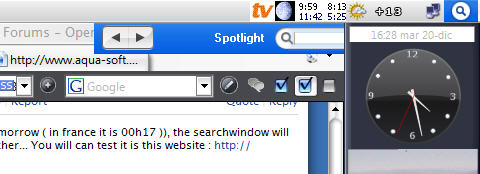
In the next onWork version ( will be uploaded this night or tomorrow ( in france it is 00h17 )), the searchwindow will be intelligent and will positionate always near the i-Find launcher... You will can test it is this website : http://pascal.hervo.club.fr/osxplorer/index.htm
Not quite sure what you mean... I've downloaded version 0.11f and my problem still remains. The search window is always shown at the top right position of the screen, and I have my sidebar there ("always on top"), so the search window is hidden behind the sidebar (see attachment). Would it be very difficult to let the user choose where the search window should be shown (instead, or besides, that intelligent behaviour)? In my case, I would just need to move the box some pixels to the left and down. Thanks again for this excellent app.
PS: What is that "ScreenZPos" new feature? If I select it, the search button just dissappears and nothing else happens (or it seems so...)

Looks nice... but i thinks the google's desktop search is better
screenZpos declare i-Find launcher as a simple window ( not toptoptop very top most ). It mean that if you put another window, or a TASKBAR ( taskbar is on toptoptop ultra top most ), the launcher is hiding !
For your bug... I understant now ! I am stupid !!! IT IS VERY EASY To put it on top ( like the launcher )... So, I can not to do that now ! I will try to fix it this week end.
DeeTOX.
@XDeskCal: This uses GDS, nimrod.
Not at all!!! I should have put a picture from the beginning... An image is worth a thousand words!For your bug... I understant now ! I am stupid !!!
Great! Thanks a lot for fixing my problem. Anyway, for future versions, maybe you could consider making the window position configurable by the user. Perhaps other users would like to have it at the right side of the screen, or centered... A configurable position would be a more "universal" solution (just a thought...)IT IS VERY EASY To put it on top ( like the launcher )... So, I can not to do that now ! I will try to fix it this week end.
Thank you so much...
It is a great idea to let user choose main window position... so I think i will put a function to let the choice in pixel ( left and top ) when I will be at home... It will be in the next onWork... ( it mean a happy christmas to me ! lol... So please, do not blame me if I put a new onWork only the next week ! lol !
Bye and good night to all of you ( or good day !!! ) <-- it is 18h50 in France... !
DeeTOX.
