
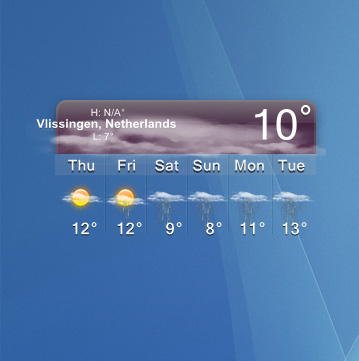
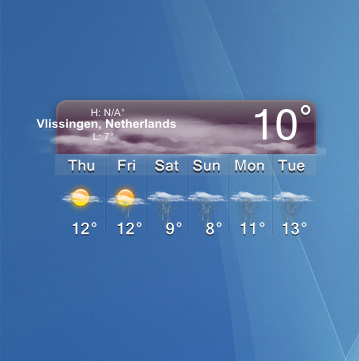
[link/release] Dashboard Weather Widget

right click --> configure --> overlays --> city --> configure --> format --> erase "%s" and type in "city, state" --> click okay --> repeat for city shadow. *NOTE you might have to fool around with alignment on the x-axis

That "hardcodes" the values in...is there any way to have it a variable, but not display the zipcode?
#279596

in the config replace the two instances of //dnam to //obst

#279601

in the config replace the two instances of //dnam to //obst

awesome...that worked for me. although there were 3 instances (City, City, and City Shadow). thanks reil!

#279607

i just downloaded it...

and this is how it looks by me:

post-27958-1115234861_thumb.jpg

strange avedesk.jpg
strange avedesk.jpg

#279608

Does anyone know of any possible fixes/work arounds to address the cpu issues/memory, etc.

#279614

edgarf87 - I'm jealous....my "slide out" isn't transparent like yours...it shows a purple background

rugbyspartan - yeah...I notice that Avedesk now takes 24% of my cpu when idling whereas it used to be just a few percent with the aeroweather widget.

#279619

I put the widget on Showcase, and Avedesk takes up 1,000 MB

#279625

I put the widget on Showcase, and Avedesk takes up 1,000 MB

That's pretty intensive... But a small sacrifice for knowing what kind of weather it is going to be in style ;)

#279641

I meant 1000 KB....1 MB hehehe

#279645

This think used too much cpu/memory?

post-510-1115250933_thumb.jpg

docklet.jpg
docklet.jpg

#279714

Well, firefox uses around 40,000 and itunes uses more.

Without the weather widget my Avedesk uses 460 kb, as opposed to your 5000.

#279723

I know Avedesk use very low memory, it must be a memory leak in the weather widget.

#279729

Does anyone know how to make it stay expanded always even when you start up Avedesk without having to make a whole new config. Thanks.

#279747

Really well done, I like this thing a lot, except the CPU/mem usage but i can live with that till someone finds out whats cousing the prob

#279811

this is the error of AveDesk

#279842

The time meter controls the change of the background between AM and PM. If you change theinterval for it to, say, 60 the CPU usage should drop a lot. *edit* it looks like there's a little bug in SysStats - you will need to restart AveDesk to see the CPU improvement.

If you delete the time meter altogether you will definitely see an improvement but you will have to go into .../docklets/SysStats/icons/MWSF and copy topPM.png or topAM.png to top.png.

This will also be why some people aren't seeing backgrounds - because in their locale the AM/PM indicator isn't AM or PM.

You can set the location to just the city name by changing the City overlays to have a selector of substring-before(//dnam, ',').

Thanks judge... I just tried changing the "time" meter to 180, ram usage dropped to 800kb and cpu-usage at 0 :)

You made me a happy man ;)

#279857

Does the time meter reflect the interval at which it goes out for updates? In seconds?

#279860

The time meter controls the change of the background between AM and PM. If you change theinterval for it to, say, 60 the CPU usage should drop a lot. *edit* it looks like there's a little bug in SysStats - you will need to restart AveDesk to see the CPU improvement.

If you delete the time meter altogether you will definitely see an improvement but you will have to go into .../docklets/SysStats/icons/MWSF and copy topPM.png or topAM.png to top.png.

This will also be why some people aren't seeing backgrounds - because in their locale the AM/PM indicator isn't AM or PM.

You can set the location to just the city name by changing the City overlays to have a selector of substring-before(//dnam, ',').

judge - found that last night by looking at the config of aeroweather....is there a selector substring that would give you "city, state abbreviation" (e.g. Boston, MA - as opposed to just Boston)?

also....excellent tip on the time meter setting....I changed it from 1 to 60 and it knocked CPU use way down.

#279875

Ok, Im still confused on how exactly to change the location from city, state zipcode to just city or city, state. if i type in //obst for //dnam and type in city, state, it just stays as the words city, state, and not for instance Chicago, IL. What exactly do i need to be typing in? or how can i use that substring selector feature to knock off the zipcode. Thanks

#279879

Ok, Im still confused on how exactly to change the location from city, state zipcode to just city or city, state. if i type in //obst for //dnam and type in city, state, it just stays as the words city, state, and not for instance Chicago, IL. What exactly do i need to be typing in? or how can i use that substring selector feature to knock off the zipcode. Thanks

The selector that judge shows above -- substring-before(//dnam, ',') -- will give you just the City name.

Typing in //obst puts in any "hardcoded" text you type in - as you found out

#279890

The selector that judge shows above -- substring-before(//dnam, ',') -- will give you just the City name.

Typing in //obst puts in any "hardcoded" text you type in - as you found out

Actually //obst will output the observation station used to obtain data.

This could be the same as //dnam depending on where you reside.

For me, //obst returns Buckley ANG, which is 18 miles east of where I live (see below).

<loc id="80022">
<dnam>Commerce City, CO (80022)</dnam>
<obst>Buckley Arpt., CO</obst>

So, if you want City, State abbr., try substring-before( //dnam, ' (' )

#279929

Judge thanks for your comment on that drawer issue I just made a whole new config because I couldn't figure out how to do that.

#279938

Hey Hallf, can you explain in detail how to go about changing these values.... Thanks

rt-click/configure/overlays tab

select "city" in list

configure button

content section

selector box insert: substring-before( //dnam, ' (' )

might have to readjust position/draw at x value at top of configure box

click OK

repeat for "city shadow"

#279950

Has anyone figured out the problem with it moving about 100px or so away from the top of your screen if you try to move it up there?

#279962

Has anyone figured out the problem with it moving about 100px or so away from the top of your screen if you try to move it up there?

You're seeing that too? At least I'm not alone...

#279998

