 Aqua-Soft Forums
Just click "per application" In windowsblinds.
Then click add, find the program, and then click "selecet skin"
It's also a good way of making a Safari clone, while still having Tiger as your theme all around.
Just click "per application" In windowsblinds.
Then click add, find the program, and then click "selecet skin"
It's also a good way of making a Safari clone, while still having Tiger as your theme all around.
Hi guys,
i have a little problem with the skin.
when i use the skin, the "minimize to tray" extension from thunderbird don`t work.
if i click the minimize button, thunderbird doesn`t go in the tray.
maybe somebody else have this problem??
i love this extension and i dont want to lose it.....
thanx from germany
cysco
I found the solution for my start-button problem: i was using an old version of true launch bar, now i upgraded it to version 3.2, and the problem is gone!
it's a perfect theme now, the best I've ever seen... thank you very much
*clap clap clap* i like
OMG!! This make me switch from StyleXP to WindowBlinds! Xero, you'r the best!
P.S. It's somewhere an Log-On skin for this theme and an Firefox v.1.0 style? Or it's to early to asq?
All my best Xero!!!!
When SkinStudio adds FireFox skin support I might make a nice Safari clone for it.
Laurence don't sweat it man. People are people, some are nice, some are ****s, **** happens. Although thankfully the majority has been nice, but those ****s do stick out like a black thumb on a white hand. 
Sorry for the problems you are experiencing in certian programs. I will see if I can find a solution to them.
Xero....this is the business and no mistake! I've had to drop windowBlinds for the mo...my gear aint up to it...I've had two very laggy days working with it and have gone back to stylexp... I really need that gig of ram methinks!
1.8ghz cpu 256 Ram GForce2 MMX...a meagre effort I agree.
Good luck with this...I may come back to WB (because I paid for it!).
Keep up the great work me old!
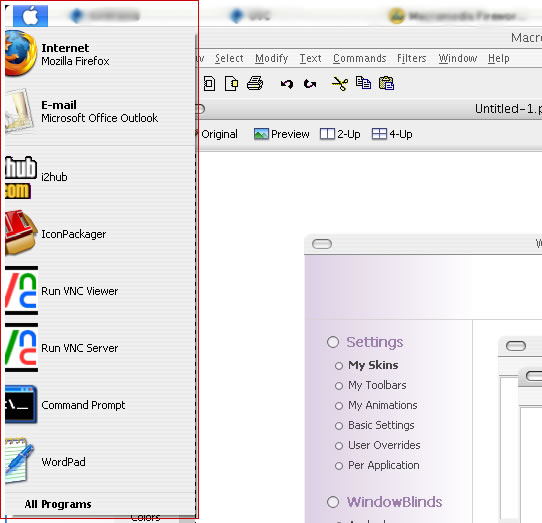
I've tried to use the Apple Menu (AM) style of the skin but I've had this problem. It doesn't format the start menu correctly. The non-AM styles work fine. I'm using the latest version of WindowBlinds 4.5.
Thanks for all the hard work, the skin looks fabulous otherwise.
WB Version 4.5
Windows XP SP2
1280x1024

Everything is great about the skin - except for one little problem that for some reason is bugging me like crazy!!
Sorry to be so picky again, but here is the problem - The buttons for this theme just don't look right. they are too pointy at the sides. I'm pretty sure it's not just my programs or wb or the fonts i'm using (since I installed your versions of the Lucida fonts). If there is a way to make the buttons like they are in your Panther theme, please change them! Hopefully it isn't too difficult to do. I also noticed that the text in this Tiger theme doesn't fit as nicely as it did with Panther. Look at attatched image.
Has anyone else noticed this stuff too?
Sorry to be so picky here - i still must say overall this is a killer theme!
I've tried to use the Apple Menu (AM) style of the skin but I've had this problem. It doesn't format the start menu correctly. The non-AM styles work fine. I'm using the latest version of WindowBlinds 4.5.Thanks for all the hard work, the skin looks fabulous otherwise.
WB Version 4.5
Windows XP SP2
1280x1024
you have to change the icons in the start menu to "small icons"
quick question: how to remove icons from windows title bars in the brushed substyle?
Everything is great about the skin - except for one little problem that for some reason is bugging me like crazy!!Sorry to be so picky again, but here is the problem - The buttons for this theme just don't look right. they are too pointy at the sides. I'm pretty sure it's not just my programs or wb or the fonts i'm using (since I installed your versions of the Lucida fonts). If there is a way to make the buttons like they are in your Panther theme, please change them! Hopefully it isn't too difficult to do. I also noticed that the text in this Tiger theme doesn't fit as nicely as it did with Panther. Look at attatched image.
Has anyone else noticed this stuff too?
Sorry to be so picky here - i still must say overall this is a killer theme!
You know what, I totally agree. One thing about the old Panther theme was that it was one of the VERY few OS X themes that didn't have pointy edged buttons... unfortunately tiger seems to. Xero, is this an easy fix in any way?
Xero,
This is great ~ thanks for sharing your love.
Q: Are there supposed to be different shellstyles for each skin type; ie. with aqua you get a white bar and aqua buttons (looks nice) .. I'm using platinum skin should I have platinum type bars (and menus without the lines?) Hope this make sense. I've had some problems with WB not loading shellstyles correctly.
Thanks again.
I didn't even notice the system buttons. Very easy to fix. I'll do it in the update.
To remove the icons from the titlebar in the brushed style you need to open skinstudio and delete the system icon value from the titlebar buttons section.
The shellstyles are the same, except Graphite has a Graphite bar, while Aqua has an Aqua bar.
Ughhh... :confused: Try to launch something from Office 2003 when using this skin... Oh my God! I thought I found the pretty good stuff... But I was wrong... Damn!
Whatdoyoumean? I'm using this skin at this moment while working with M$ Word 2003,
what's the problem? I find Xero's skin to look great; it's the first non-Bzeitler skin on my XP system that has lasted longer that a day! Personally I love the smaller fonts so that my menu's don't get cluttered so easy. So again, what's your supposed problem with this WB skin?
Returning to StyleXP and KoL's wonderful skin modified by me for myself...
Why use StyleXP while there are free alternatives? More important: WindowBlinds can make the windows look OS X in visual and (most of) the behaviour; top-left close, min, max glyphs rollup functionallity, themed toolbars, e.d. while the VS is mere skin (with the illogical M$ top-right min,max,close). And since this site is about OS X/Aqua, why bother with a lesser mimmic?
Xero....this is the business and no mistake! I've had to drop windowBlinds for the mo...my gear aint up to it...I've had two very laggy days working with it and have gone back to stylexp...1.8ghz cpu 256 Ram GForce2 MMX...a meagre effort I agree.
What? Are you serious? I've been using WB on my former K6-2 450 mhz pc (with an ancient 3dfx 16mb GPU) under Windows XP for about a year and a half with no lagging problems whatsoever, so how could it be the case on your obviously superior rig? WB should never be a problem on your specs.
At least try the sollution that worked great on my k6-2 system: the trick was to disable skinning the menu backgrounds under WindowBlinds basic settings.
I've read quite a few times that Stardocks' WB skinning engine is faster that the native XP skinning engine as long as you don't use over-the-top-skins (OS X themes are in essence quite minimalistic).
wiebeest....I'll give it a go...it really is a work of art for sure...I think I know my system inside out and WB is drawing my Ram. I'll reinstall and try again...I'm not knocking anyone here, so don't get huffy!
I work with Dreameaver MX, Photoshoshop7, notepad and the usual (ObjectBar. AveDesk, Rainlendar, RKDock, iTunes and Rainmeter) Theres a lot going on for my old XP machine to deal with!...all at the same time!
Regards...chill...drink some beer...life is fun!
wiebeest, I couldn't have said it better myself.
Xero Love the skin best yet IMHO
BUT GD some people on these boards are NEVER FREAKING HAPPY
Wow! I absolutely love this skin! I have used other like it before, but this one is magnificent.  Awesome work man! Just a quick question, Is that iTunes that you're using to play your music there? or its that some other program with a sweet skin, and how do i get mine to be sweet like that?
im loving this, im using it right now
Just tryed this theme today, freaking awesome !!!
Edit/ Just one problem: the shellstyles are not skinned here
Winxp sp2 spanish
WB 4.5
1024
why didnt this make the front page?
what does it mean when it has "AM"?
is it possible to apply a different skin in WB for shutdown dialog and/or taskbar only?
