Mac OS X Tiger

If you want an almost exact copy of the Mac OS X Icons, you should go here and get icon size 38 pixel and magnification of 84 pixels.

Doesn't that make the Dock very small?

If I emulate the real OS X through PearPC with 1024*768 res the dock seems much larger,

than if I set my dock icons the size you recommend in RKLauncher.

Maybe objectdock makes the icons appear larger???

#267739

If you want an almost exact copy of the Mac OS X Icons, you should go here and get icon size 38 pixel and magnification of 84 pixels.

Doesn't that make the Dock very small?

If I emulate the real OS X through PearPC with 1024*768 res the dock seems much larger,

than if I set my dock icons the size you recommend in RKLauncher.

Maybe objectdock makes the icons appear larger???

I'm very interessted which is "original" Size of the real "Mac OS X"-Dock?

Is it: 38 - magnification: 84

or: 54 - magnification: 128 (these are my ObjectDock settings...)

Questions over questions! :)

#267788

I'm very interessted which is "original" Size of the real "Mac OS X"-Dock?

Is it: 38 - magnification: 84

or: 54 - magnification: 128 (these are my ObjectDock settings...)

Yeah, that setting resembles it more...still looks different than the real OS X dock though...

#267804

my bad. i guess mine was modified to make it look small (professional-ish)

i'm currently using the 84/128 settings.

#268182

I have Logonstudio 1.0 (not RC6) and there are problems with logon screens. When I apply any logon from Steve I get such error:

"Value creation failed at line 40"

#268337

I have Logonstudio 1.0 (not RC6) and there are problems with logon screens. When I apply any logon from Steve I get such error:

"Value creation failed at line 40"

You installed Flyakite OSX????, uninstall longon and no more problem. :)

#268348

Yep, he is right. I have had a few people get that error and al of them had Flyakites OSX installed.

In other news. I updated the theme just fixing the progress bar animation direction. That is the final update so enjoy it. Check first post for a link as usual.

#268391

Steve, is it possible foryou to post the icons and rest of the theme items on WinCustomize? The links are down again.

#268913

Big thnx, M Mantovani!

it works fine after uninstalling of flyakite's logon...

#268945

hey Xero,

Awesome work. 2nd day using it and I'm loving it...

Quick question, although i'm not sure that your wb theme is what's causing it...

stats:

Windows XP Pro

1024x768

WB 4 (most recent version)

Somehow, desktop icons (and documents) display the background color. Not text with shadows but the background color like Win98...

Which is really weird because i'm running winxp and by default its set to be transparent so it works. I've checked the system properties and the display and it's definetely enabled, just not working.

grr. Frustrating. Might be the ObjectBar theme conflicting with the WB theme. Shouldn't be happening though.

Thanks.

#269035

if u have any desktop objects enabled that will happen. WinFX may also be the cause, it's not the WB theme though.

I'm looking for a host for the files. It's not easy. WC won't host them because they don't want to get sued by apple. ;)

#269083

Wasn't I hosting it, and then asked to take it down?

This doesn't make you look very good.

#269084

I asked that for a reason, I use up a lot of BW and I didn't want to drain anyone elses. Not to mention I think you were hosting the theme which is fine. It's the additional files that need it.

Nonetheless I'm talking to Wincustomize trying to get them to approve them.

#269181

Why not store them on http://www.artuproar.com/ or http://www.skinbase.org/ either way, you store them anywhere else thats not a skinning site, you are going to run up all the BW.

#269289

iCan host them for you , call me on msn

#269294

This style is definately a masterpiece. Best WB skin ever, so far (imho, of course).

The only thing which worries me a bit are the very thin window borders in all styles except the brushed ones. It makes resizing windows sometimes a bit hard.

#269300

The only thing which worries me a bit are the very thin window borders in all styles except the brushed ones. It makes resizing windows sometimes a bit hard.

Common, you can do it, it's not that hard ;) Just enable a status bar, that way at least IE, and Explorer will be easy to resize, the other windows aren't that hard. Worst case is you resize it from the titlebar.

#269310

Common, you can do it, it's not that hard ;) Just enable a status bar, that way at least IE, and Explorer will be easy to resize, the other windows aren't that hard. Worst case is you resize it from the titlebar.

Yes, you're right. Status bars make resizing easier, especially when they have a size grip (which a status bar of a resizeable window should have anyway).

Anyway, I'am normally using NiftyWindows, which is a pretty nice tool for adding mouse gestures for most common tasks (resizing included), so that I rarely have to align the mouse exactly at the border of a window..

I wonder, if these small borders are authentic? Are they really only 1 or 2 pixels in the real OS X?

#269314

Actually on OS X they have no boarders at all. But next to all windows have a resizer in the bottom corner of the window, much like the one you seen in the status bar in this theme.

Links are back up ladies and gentlemen. I think we can all thank Dream Team for providing me with the hosting. If any problems occur let me know.

#269315

I have a line on top of the apple button, does somebody know how i get rid of it.

I enclosed a picture of it

post-28050-1112085800_thumb.jpg

macke.jpg
macke.jpg

#269571

Thats not even tiger...

#269614

I have a line on top of the apple button, does somebody know how i get rid of it.

I enclosed a picture of it

Is that a objectbar theme with the task items floating? as it looks like it. Looks like text is shrunk down to 1 pix for that specific description section.

#269633

Is that a objectbar theme with the task items floating? as it looks like it. Looks like text is shrunk down to 1 pix for that specific description section.

Actually I think it's just a WB or Msstyle theme's taskbar with a quick launch icon. Anywho I think it may be any toolbars you have in the taskbar, quicklaunch, language..ect

#269686

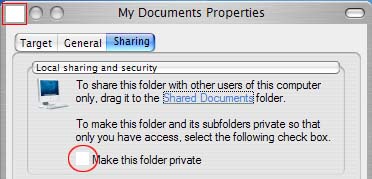
Hallo, I counter a problem of checkbox. I cant see whether it is ticked or not. The bitmap is replaced by a blank one. Same goes for red closed button in the windows. Thx. I have already delete the folder contain the theme, then reinstall but to no avail. Pls see the attachment pic.

post-28413-1112280620_thumb.jpg

missing.jpg
missing.jpg

#270224

Hallo, I counter a problem of checkbox. I cant see whether it is ticked or not. The bitmap is replaced by a blank one. Same goes for red closed button in the windows. Thx. I have already delete the folder contain the theme, then reinstall but to no avail. Pls see the attachment pic.

What version of Windowblinds are you running? Upgrade to the latest (4.5)

#270238