 Aqua-Soft Forums
Nice job, this will be very handy 
[release]searchbar Desklet

This app is great 
you did it! Great work! (Y)
I'm updating as we speak: chinese text mess ups are fixed (used std::wstring instead of std::string now ), trying to integrate the results bar too, might not succeed on that today.
You're doing a great job! I really dig the search bar :rock:
Here we go!
Brushed style.
Edit: Just added some shadows
Enjoy

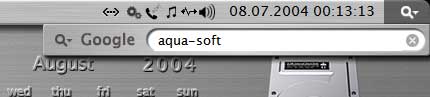
@Skinny Jim: very cool
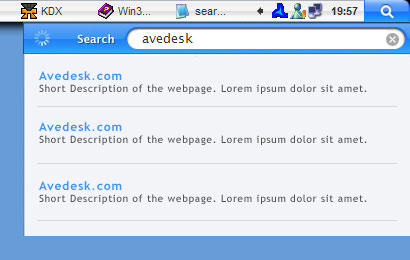
I need some help. I have no idea how to display the results nicely (the s etc will be removed in the final version). See this layout:

Any ideas?
Andreas, do you mean in terms of parsing the data? Or how you should physically place the results on the dropdown? One response would require someone know how that data is returned [be more into programming] the other answer is simply design [more into graphical design] ;-)
I need design
Originally posted by AndreasV@Aug 6 2004, 06:22 PMI need design
<{POST_SNAPBACK}>
Alrighty then ... First I would look at the header image HERE
Now, what might be a good idea is to place the link, or the main page url in the left column, and then have the resulted caption text for that page on the right. Justified so that the first line aligns with the page url on the left column.
This will truncate the page link on the left, being a smaller column, but at least they will be spaced out from the text that is on the right.
Depending on what the parsing does or whatever, perhaps have the page 'title' only show in the left column instead of the entire URL?
That's my two cents anyways.
Oh, and I also like karmaboy's suggestion. BTW: will there be scrolling in the result dropdown? Either like the stickies desklet or with a scrollbar?
looking good..., I just have trouble using it....because I use the taskbar always on bottom..., so when using a full screen app...like photoshop..it is over the close button..., anyway....this is fantastic...
very nice trick  good job
Originally posted by Skinny Jim@Aug 6 2004, 10:59 AMHere we go!
Brushed style.
<{POST_SNAPBACK}>
hey skinny jim where can i get that skin for object bar??
Originally posted by AndreasV@Aug 6 2004, 02:13 PMAny ideas?
<{POST_SNAPBACK}>
Yes, have it ignore html code for now
Originally posted by andres160@Aug 6 2004, 11:46 PMhey skinny jim where can i get that skin for object bar??
<{POST_SNAPBACK}>
Sorry bud
I don't use stardock 
That's 1 pix Brushed 3.5 MSStyle
This is freaking awesome. Using as I write 
Sweet work! (Y) Definitely enjoying this since I use google 24/7 due to my Gmail account and various essays I need to write.
UPDATE
Screenie

Just try it out now, the bar has been implemented and some other stuff
Thanks to all suggestions for the layout, and special thanks to bzeitler, for his help, time and awesome graphics :rock:
Download
http://mpj.tomaatnet.nl/Searchbar.zip
edit:
You can define your own text colours by renaming disabled_colors.ini to colors.ini and changing the values in the INI file. Make sure to readd the desklet to have the changes there be applied.
Amazing, man :rock:
K, see if you can replicate this Andreas ...
Loaded the searchbar.
Changed it to not have the label.
Searched for "AveDesk" and hit enter ... display came down.
Click on the X in the search field to close the dropdown.
then right click on the left side [blue "Search"]
AveDesk closes/crashes ?
sorry, did a little booboo, please redownload and see if the problem still exist: http://mpj.tomaatnet.nl/Searchbar.zip
I can't seem to get it to talk to google.com right now, but any chance of allowing a specific google site to be defined (.co.uk in my case rather than google.com)
Cheers!