 Aqua-Soft Forums
I got transparency! I'm currently redoing the graphics to make it look better. Expect upload soon...
[release] Shell32 Tweak - Panther Drag/copy
Originally posted by schaggo@May 17 2004, 04:00 PMI got transparency! I'm currently redoing the graphics to make it look better. Expect upload soon...
I think I figured out whats going on here. The transparency only works at 16 color depth or lower. I re-did the graphic and finally got transparency to work. Thanks you guys for helping me figure this out. The new graphic is not as color rich, but it looks all right. I'll have it up along with the revised arrow in a little bit.
cheers and thanks
???
Look here... the shortcut mask isn't as good as I want it to be, but it works. currently tuning it...
Edit > One thing I didn't figure out yet, why the cursor becomes transparent too. I'll see what I can do further to make this perfect!
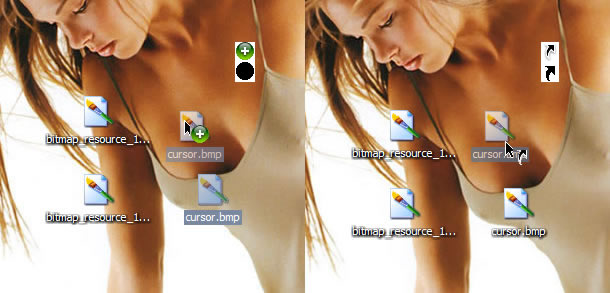
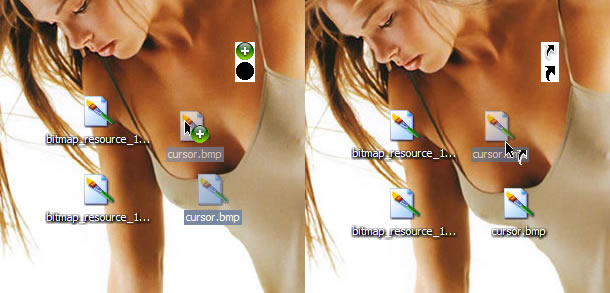
Originally posted by schaggo@May 17 2004, 04:21 PM???
Look here... the shortcut mask isn't as good as I want it to be, but it works. currently tuning it...
Edit > One thing I didn't figure out yet, why the cursor becomes transparent too. I'll see what I can do further to make this perfect!
I have the same for my masks, but what is interesting about what is going on with yours is the occlusion of the windows cursor. If we can figure out what is going on with that, we could manipulate the graphic so that we could occlude the windows cursor completely and then add the mac cursor to the graphic and get the true mac effect like in the ole32 tweak.... aha!
Here are the steps I did.
- Downloaded your PNG file.
- Resized in Gimp to make 20x20 dimensions, because your graphic was slightly stretched.
- Doubled the height (so its now 20x40px).
- Added square of black to bottom half.
- Took the shape of the image that I downloaded, and made a new layer.
- Filled with white and moved it into the mask half.
- Saved file as PNG.
- Opened file in MSPaint.
- Saved file as 24bit BMP.
Now here's the trick, it may have saved as a 24bit image, but it retained the transparency (Properties > Summary > Bit Depth: 32).
So now its a 32 bit BMP file, with the mask. It works nearly perfectly for me... No box, alphablended edges on the green circle, and only the shadow looks a bit funky.
*Edit: Now do you capture the cursor, I'll show you what mine looks like...
Originally posted by Relativity_17@May 17 2004, 04:43 PM
So now its a 32 bit BMP file, with the mask. It works nearly perfectly for me... No box, alphablended edges on the green circle, and only the shadow looks a bit funky.
your graphic didn't work at all on my system for the transparency. Don't know why.
Originally posted by Relativity_17@May 17 2004, 10:43 PM*Edit: Now do you capture the cursor, I'll show you what mine looks like...
I guess you meant "how"... Techsmith's Snagit [http://www.techsmith.com/products/snagit/default.asp]
yea, get some sort of screenie, then lets release this thing! (p.s. - i cant seem to find a time when the old style drag and drop icon is used - always green/non existent!  )
) 
Groovy. I got it to work. There is a way to completely get rid of the windows pointer.
Question for you Shaggo: what form of bitmap are you using for your transparent version? I've only been able to get 8-bit indexed bmp's to work so far. Are you using a higher format, cuz it sorta looks like it in your screenie...
here we go. I cheated by using the same size as the original...
I use 24bit bitmaps.
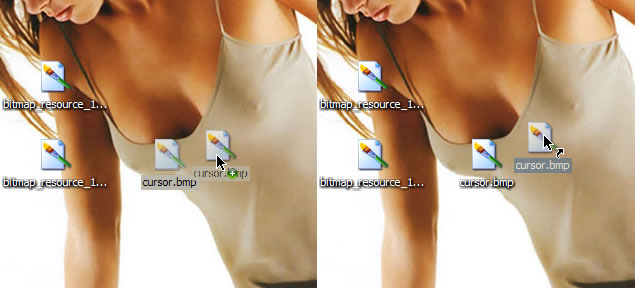
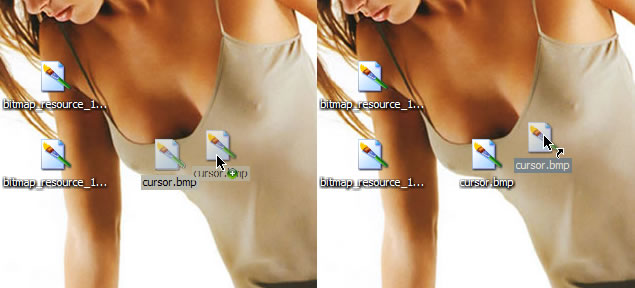
Here is the pointer over a variety of backgrounds so you can get an idea of what is transparent, and what isn't.



Originally posted by schaggo@May 17 2004, 07:02 PM
Are you sure you captured the shell tweak in that screenshot? Looks like the ole resource tweak. The result I got from your upload does not look like that on my end.
Anyway, I am close to getting a version that gets rid of the windows pointer altogether.
yes, I am sure because I just edited the shortcut cursor in the same file. And since I only drag an icon on my desktop around and not from one windows to another or whatever, only on the desktop. But I think I know what causes your problems, I use another resource hacker, I use Restorator 2004 instead of ResHack. Obviously Restorator is much more powerful...
Check the shortcut screenshot and the resources provided with this post.

Originally posted by schaggo@May 17 2004, 08:33 PMBut I think I know what causes your problems, I use another resource hacker, I use Restorator 2004 instead of ResHack. Obviously Restorator is much more powerful...
Check the shortcut screenshot and the resources provided with this post.
hrmmm... I see
what does restorator have control over that resource hacker cant do in this situation?
unfortunately, restorator is not freeware like resource hacker, therefore your fix will not be available to most. I just wish I understood what restorator is doing different here, because like you said, it obviously has more power to replace the resource with more control. The res hack only gets the transparency to work on 8-bit color depth and no higher. I guess I can update my release with my 8-bit transparency fix ... do you mind if I include your bmp's for those with restorator?
Well, it was your idea, your original work, I just played around with the different programs...! So include whatever images you wish!
I think restorator can handle 32bit BMPs while ResHack can't, I don't see another possibility. I did it like Relativity described it: original PNGs edited in Fireworks with transparency and alpha effects -> Export to 32bit PNG -> open PNG in paint and save it as BMP -> Replace resource in shell32.dll using Restorator
It is forbidden to talk about stolen software, so I don't talk about it, only about EXE files. You may want to try my restorator.exe? :naughty: PM or e-mail me...
Well... I'm using ResHacker, and I'm getting perfectly fine alpha blending from the tweaked images. Oh, and ResHacker handles 32 bit images just fine. I used it to replace my shell toolbar buttons with an alpha blended Crystal icon set a long time ago, and I've been screwing around with Logins and Visual Styles for a while too.
Another good alternative is Resource Builder, by the same people who bring you StyleXP. ResBuilder and ResHacker, along with various decompression utilities, are my basic toolkit for modding any file on my system.
Originally posted by Relativity_17@May 17 2004, 09:31 PMWell... I'm using ResHacker, and I'm getting perfectly fine alpha blending from the tweaked images.
Hmm... now that is truly a mystery to me. Yeah, it didn't make sense that resHacker would not deal with 32-bit images when its a 32-bit program. I cannot figure out why the very same bmp you use and replaced with res hacker, does not work for me. Very very strange. I'm stumped. Until I can figure this out I will fix the rar file to contain Shaggo's 32-bit alpha blended bmp's and include my 8bit files with non-alpha blended mattes as a backup for people who end up with the same problem I am having with the 32-bit files. I appreciate both of you guys for your help with this. It has been puzzling but enlightening.
Lets try and run through all the possibilities for this...
- I checked the ZIP file in case the compression screwed with the image. That possibility has been eliminated, the image was not changed.
- I'm using Resource Hacker v3.4.0.79
- WinXP SP1 (no SP1a, no SP2).
- Replacement procedure: Select Bitmap 143, right click, "Replace Resource", and then the rest of it...
That's about all I can think of...
-I have the same version of res hacker
-I am on XP Pro SP1
-Replacement procedure: Select Bitmap 143, drop menu select Action --->Replace Bitmap Resource ...etc...

the only difference is I used the drop down menu. Can't imagine that would make a real difference but I am trying it now just to check.
EDIT: no, it didn't make any difference.
Regardless, I have revised the rar file and updated the initial post so the community can have the revisions we hashed out here. Thanks guys. You perfected this cool tweak for all to enjoy.
cheers
No problem. Its great to finally be rid of that ugly Windows square...
for some reason im getting two cursors? my normal windows cursor, and then the bitmaps. is this an easy fix? i have both the shell32 and ole tweaks done successfully.
Originally posted by sciguy007@May 18 2004, 05:46 AMfor some reason im getting two cursors? my normal windows cursor, and then the bitmaps. is this an easy fix? i have both the shell32 and ole tweaks done successfully.
Damn. Are you using the 32-bit files? if so, try the 8-bit files real fast and tell me what you get.