 Aqua-Soft Forums
Oh - I forgot to say... in the end I've no plans of adding pictures to the .exe since it should all be running by use of the ( future ) theme manager.
Right now even the background is coded into the FinderX.
-Daxziz
Oh - I forgot to say... in the end I've no plans of adding pictures to the .exe since it should all be running by use of the ( future ) theme manager.
Right now even the background is coded into the FinderX.
-Daxziz
You are using some interesting components there. "TPanels" and "TFileListBoxs". They look like default components, but with an extra "s" added to the classname. Can you tell me where you got them and what the extra functionality is?
BTW, because it seems that you are doing most of the drawing yourself (TCanvas???), you might want to look into the TransparentBlt)and AlphaBlend() APIs.
I just realised that I didn't answer your question about programminglanguage - I don't use Delphi - sorry, but a language named RapidQ. http://www.basicguru.com/rapidq
I don't draw my stuff upon canvas - I use a component named qimage which after being compiled probably will be named timage or something.
I'll look deeper into all of that once I have the first rough code done. Optimizing can always be done 
-Daxziz
just realised that I didn't answer your question about programminglanguage - I don't use Delphi - sorry, but a language named RapidQ. http://www.basicguru.com/rapidq
Hahhaha, that's so funny. I assumed you used Delphi because of the TClasses. Also, in the Exe there is a reference to "Borland\Delphi". I think RapidQ is coded in Delphi 
Actually the "compiled" code is interpreted into a Delphi "shell" / exe I think that the actually done code is highly compareable to a standard Delphi exe.
-Daxziz
Daxzix, thanks for your reply. I was just commenting on what I would like to see. Whether you implement it or not is completely upto you. Also I understand that what you have done in just a few days is quite remarkable and I applaud you for that. I can't wait to see how this thing turns out. But I definitely commend you for what you have gotten so far. Even attempting a project like this is far beyond my programming skills.
btw 'MS Shell Dlg' is not a "real" font. It does not exist in \%systemroot%\Fonts. It's just a redirector so to speak to a real font such as "Tahoma" or "Microsoft Sans Serif".
Just wanted to be clear.
Of course. Thx. The less windows is involved the more Mac-ish this will turn out.
Anyway I think that I have an idea for making System Preferences real Mac-ish, but still it will look rather empty once it's completed. :/ I'm not sure that I'll redo EVERY controlpanel.
I'll make it as OS X as I can, and then add Desktop and Theme Manager and maybe a thing called Appearance. Theme Manager being a controlpanel which reads some files and sets the system after that. Like wallpaper, icons, GUI pictures in general. Appearance being the place where you can set it each to your own liking. MAYBE. Desktop being the place which ONLY will deal with the colour or desktop wallpaper to begin with. This will be the first I'll do. Maybe even tonight.
I still need those buttons though for the windows.
-Daxziz
Well if you need screenshots you can look here
http://www.therealduckie.net/gallery/thumb...?album=4&page=1
Originally posted by Daxziz@Mar 25 2004, 02:40 PMI still need those buttons though for the windows.
Not sure if this is what you meant, but oh well...

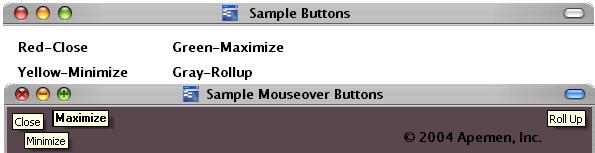
Wow, looking good, I'm excited to watch this develop..
Sasquatch, that was just want I wanted 
Well folks - plans of today - 1) Make the windows buttons with the mouse over effect. 2) Add mouse button effect to those. 3) Implement the System Preferences panel. 4) If there's time I'll add the Desktop part.
xfluffyx - Thx
-Daxziz
Asmat said that if I needed help, I should just ask. Well I don't need any coding help - not now atleast, but since I don't want to start working at a site myself, since that would drag my time away from FinderX I would like to hear if there's a person or many more who would be willing to work at a site for FinderX - a site which sorta mimics Apple.com ( if not the site makers has a better idea ). It's no huge project, I guess.
Those who would like to do this, simply just post here. I already have a server for hosting so that's no problem.
Anyway - there's no great news about FinderX yet though.
-Daxziz
Hey!
I can do a nearly exact Apple.com clone. AIM, PM, or email me with details and I'll get started :rock:
Originally posted by Daxziz@Mar 27 2004, 07:43 PM"or many more " should have been "or maybe more"
-Daxziz
I think duckie has a nearly perfect colen thats not doing anything, might wanta go and talk top him.
all links are deadcan someone mirror the latest ver?
Whoops - seems like I erased the wrong file - ah well I'll just upload the latest version - but you should know that the only extra in it is quite well - no good since some menus just are replicating themself, and the only useful info is that "About this computer" just displays your max amount of RAM ( hehe just found a little piece of code in my old library  )
)
Oh, and there's a semi-working routine for showing if the mouse is over the window buttons. But you still can't close the windows. And NO "Alt + F4" don't work
Anyway latest version:
http://129.142.201.212/FinderX-Preview.zip
-Daxziz
I'm happy to announce that I finally found a solution on the close window stuff - It's now possible to close windows
I still hope to bring you all System Preferences later
Do you want the latest version up ? The one with the close window code in ?
-Daxziz
I havent seen this thread, and I guess i overlooked it, but this is REALLY incredible work. I've read all pages in this very topic and after seeing this thing in action, I started remembering Mr Aqua (the REAL god who re-made all aqua apps in delphi, and they are the corner stone of our success as an aqua emulation).
My feedback on this thing would be to reduce the heavyness of this code and minimize / focus it into a 'finder' clone. Imo, in this current stage it may deserve a lot more time and efforts to advance the code for a minor change. If this could be a finder clone 'one-window-app', it'll require MUCH less efforts to bring it into the ULTIMATE level we thought we would never get to before..
Delphi, as much as few sick people hate it, is the TRUE and BEST way to bring up fast and a perfect clone app.
Kudos Daxxis, lovely work, you may get entitled to be called Mr. Aqua #2, hopefully you could go down the path I suggested.
Delphi, as much as few sick people hate it, is the TRUE and BEST way to bring up fast and a perfect clone app.
Daxziz doesn't use Delphi, that was a wrong assumption of me :canadian: He is using a arcane basic dialect which has been made in Delphi, that's why you find many traces of Delphi in his app (including a string 'Borland\Delphi\').
Heya Goku. Sorry, I'm not gonna make this into yet another Finder clone - there's already so many of'em - really - it's not my fault that MS has tricked so many ppl to use VB - really it's crap... oops my opinion, but that's at least true. No offence.
Anyway I actually started this project because I wanted another interface to windows - if there's something I'm tired of, it's Windows, and even more the Explorer. So I wanted to write my own, and suddenly remembered that nobody ever has done this completely, heck nobody has ever been so far as I am now, at least that's what I think.
I will however NOT simulate the OS X 100% since that would be stupid - first of all we would get problems with Apple, that's for sure. Without digging to much into it can I offhand say that IF it would be a 100% simulate I would be facing 2 copyright issues since the Mac OS X shell would be owned by them, but also the Rhapsody DR2 Workspace Manager COULD be an issue soooo... I hope you can see where I wanna go.
Currently I've stayed a little of each time, so that it looks MUCH, but still has either more or less content than you would see in either of those 2 systems.
Also I'll make the System Preferences a little more different. Still keeping a look-like OS X, but still in FinderX's own style.
Last problem is the gfx in FinderX, but since that will all be themes in the end, the problem will be out of my reach.
-Daxziz
Last release for tonight. It contains the idea of how FinderX will handle the System Preferences stuff. Not quite OS X but something which sorta goes there anyway
I can smell an Alpha Release around the corner, ppl A little more work and it's there.
"The same url as last time, Miss Sophie? - The same url as always, James"
-Daxziz
As the result of booting my PC during a party, sixteen people in January went into an Apple shop that previously they had been walking past for years. Nine now have various flavours of Apple. The others, being hyper poor students, have skinned their Windows Teletubies boxes. The feedback they got from friends resulted in more people going into Apple stores. Not all of them are swayed; some are anti Apple (and anti Microsoft) and would rather be using Linux, which has a greater market share than does Apple... through word of mouth.
If someone bought out a single click exe that turned a PC into a fully functioning Panther experience (and no one has come even remotely close, or technically can), our friends at Apple would have reason to be angry. As it stands, irrespective of absolute copyright issues, these aqua tribute sites and skins are generating revenue for Apple. That's now a given, but from a legal standpoint it would create goodwill if themers and mods would consistantly issue a simple one sentence with their tribute themes, stating the superiority of Panther over XP (that would not so much rub Microsoft up the wrong way as make Microsoft address the issues of both functionality and aesthetics...which is why most of us are here ! ).
Point being, you seem ambitious and it would be wonderful to see something that blows both explorer and finder out of the water. Point being, unless in fuctionality you are offering a 100% clone of Finder, there seems no harm in providing what others in this community are striving to do with their tribute Finder attempts, all of which, at present, as far as I'm aware, lack even full Explorer functionality.
Hats off and gawping google eyes for your industry :woot:
Not that I understood everything you said, but I think I got the point. And you're quite right. But FinderX will be a long term project, which to begin with, will offer a fair OS X look, but at some areas, will be different. This will however minimize as time goes by - at the moment you can all see how controlpanels are handled by FinderX - later when a working version is out, and I can get some real good feedback from its users to continue working with, more will be added and a more exact OS X Panther look will probably be what's gonna happen.
I do plan on reworking the windows again so people can get the Panther look - but now I'm on controlpanels - so this is what I'm gonna finish first.
Also FinderX does as said above do controlpanels different than you might want, but that's simply because I judged that it would take to long to recreate all the controlpanels, and atm beyound my reach - I need to dig deep into windows to figure'em all out. This is why FinderX will ship with only a handful of controlpanels, and that was to few to give a good OS X looking panel.
I think quality before I think quantity. Some will probably not like this, others may see it from my view and give me right. In the end, I'm pulling the work and if you will... calling the shot. I will strive to bring the community what they want, but I will also try to make it work as good as I can, and if that means that a minor rework / redesign is needed so be it.
-Daxziz
Ok ppl - I've uploaded a new version - this doesn't contain anything new to the controlpanel part, but I need your help with a test.
I've found some earlier code of mine ( yes, again ) which I didn't fully complete but tested and judged to work. It's the Shutdown / Reboot part I'm talking about - now since I'm in the middle of a heavy disk wipe, I can't test it myself.
I promise you that it can't harm your system, so can someone please tell me whatever the Reboot and Shut Down menuitems are working.
-Daxziz