[release] Milk Suite V0.2

Great config... everything working perfect here... (Samurize 1.5, Milk Suite 0.3 - Milk Skin) . Only the Album didn´t show... no matter what i do... even with PNG or JPG with the name of the folder in the folder... nothing. :(

(Sorry if this was already posted... but i read the entire tread and didn´t find it).

**Edit** AlbumArt loads a image with the same name of the folder if the image is on Samurize\covers... but just ignore any image on the mp3 folder... why?? I can´t use the samurize\folder as a option because i have some albuns, from diferent artists, with the same name.

#162057

@ronin

I think the person to talk to about the album art question is better suited for Tropics over at Samurize :lol:

because I don't have a clue... :blink:;)

#162129

Originally posted by Tadis@May 15 2004, 10:16 AM

@ronin

I think the person to talk to about the album art question is better suited for Tropics over at Samurize  :lol:

because I don't have a clue...  :blink:  ;)

Tou right Tadis... but, anyway, thanks for the reply, and... OMG, THANKS for the amazing config.

EDIT: I´ve browsed i little on Samurize forum and discovered that the problem is with Itunes won´t being able to report the entire file folder for the plugin. So, i guess until this being sorted, my option is, renaming the albuns with the same name, and then using the Covers folder.

#162145

Hi Tadis, thanks for the widgets, looks great, specially the weather widget.

I´m having an issue with with the memory and cpu meters, it´s showing 0, sorry if it was posted before but i can find any clue. When i try to edit the field manually, i save it and says that can´t save the script in the specified lenguage, i´m in xpsp1 spanish, then i select english like default but nothing happens. any help please? :mellow:

#165172

@jggame

Seems like you're having issues with the WMI meters, your best bet is to visit the Samurize forums as they'll have a better idea of whats going on.

@all

Just letting everyone know that all the issues with iTunes and AMPI (album art mainly) are about to fixed so stay tuned. ;)

#165222

Thanks Tadis.

I corrected my meter problems in this way:

- opening Milk Suite Mem 1.ini and Milk Suite Mem 2.ini

- replacing

Path=\Processor(_Total)\% Processor Time

by

Path=\\YOURCOMPUTERNAME\Procesador(_Total)\% de tiempo de procesador <--- Your computer name and processor variable in your lenguage

- and replacing

Path=\PhysicalDisk(_Total)\% Disk Time

by

Path=\\YOURCOMPUTERNAME\DiscoFísico(_Total)\% Tiempo de disco <--- Your computer name and disk time variable in your lenguage

#165281

jggame :

you have to go in the config program and edit the .ini. For each non working meter, respecify the meter with the included selection process of the config program. The errors are related to the fact you are not using a english xp.

Tadis : do you know where I can find the milk white icon for winamp you display for the media widget on your website ?. The current icon is too much colored for my white visual style :(

#165282

Yes, i made my first try with the config program but when i try to save it don´t let me becouse it can´t save the scripts in the current system lenguage, that´s why i´m editing the ini files manually.

Edit: But i got the variable names in the way that wazoo says, thanks. ^_^

#165288

Tardis, does these work on english systems only? I am using a non english system and tried to use it on it but it was not possible, the installation file gives me an error. Is there no way to install it manually,

#165435

Originally posted by Dante@May 21 2004, 06:37 AM

Tardis, does these work on english systems only? I am using a non english system and tried to use it on it but it was not possible, the installation file gives me an error. Is there no way to install it manually,

To install it manually, first make sure you know the basics of Samurize, if you don't visit the Samurize website and learn how the app works i.e. learn about configs, scripts, skins, how the config editor works and what instances are.

Then, copy all the files and folders into your Samurize folder, then edit each and every ini file (configs) to reflect your paths and settings.

Next, create instances to SuiteMem (System Widget), SuiteWeather (Weather Widget) & SuiteWinamp (Media Widget).

Lastly, load the corresponding config into each instance, if you don't use the correct name for the instances, the multi-mode (opening/closing drawers) won't work.

And the name is Tadis not Tardis! :lol:

#165460

Sorry Tadis, my fault

#165574

OK, 2 quick questions...

1. Can anyone tell me how to get the weather symbol on the top where it says PLEASE CLICK ME to change to a symbol (ie. cloud, sun)???

FYI...I've installed all PNGS to the IMAGE & TEMP FOLDER in SAMURIZE....

2. How can I change the BIG WINAMP PNG IN the MEDIA PLAYER widget???

:ninjastar: :plane: :pokey: :rain: :robot: :starwars: :ph34r:

#165868

NEVER MIND...I GOT IT.... :D

#165885

Tadis, firstly let me thank you for making some beautiful and functional widgets ... I love everything you've created.

I have what perhaps may turn out to be a dumb question, however: I have version 0.3 of your milk suite, and upon coming home from college this past week, i now want to be able to check the weather for both my school and home locations. i tried to run a new instance of the weather widget under a new intance name so that i had two weather widgets running simultaneously. i then tried to change the location code for one instance; however, the OTHER widget switched locations and the second just sat dumbly on my desktop.

i'm sure there's a way to run two instances for two different locations at once; i just can't seem to figure out how ... :unsure: ... if you could point me in the right direction, i'd be most grateful. thank you!
#168011

OK, you could technically run two instances, but it would require some work, you'd need to copy the entire milkWeather widget to a different instance name i.e. copy the configs and scripts to a different location and edit them so that they respond to a different instancename (instead of instance: SuiteWeather you could change it to suiteWeather1).

You'd also need to edit the Change Location.vbs file so that it amends the locations of the new widget rather than the old one, am I making sense? :blink:

Either that or do what I do (too lazy to follow the above steps) and just run the change location wizard when necessary. :lol:

I'll look to implementing something like that in the next release.

#168123

thanks i will try it :D

#168428

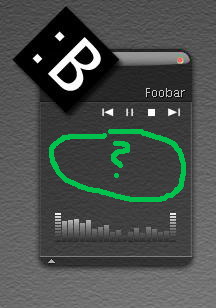
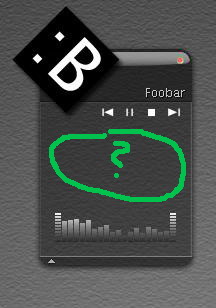
Hi Tadis. After reinstaling my Windows and Samurize i can't configure my Milk Suite v0.3 Media Widget

I have samurize 1.50, Foobar2000(0.8)

Can you Help me? Maybe prob. is in advanced media Plugin??

here it is:

everything is now OK. I have instaled Samurize 1.41 and everything works!

here is screen :

http://members.lycos.co.uk/meetcrusher/Screeny/ry.PNG

:smartass:

regards

post-12281-1085760493_thumb.jpg

1.JPG
1.JPG

#168672

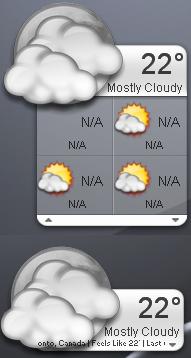
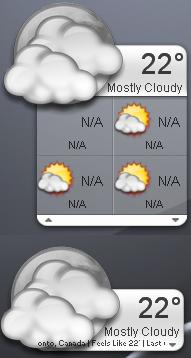
Hey guys I'm having some troubles here with the wather. I configured the weather (great scripts! :)) for Toronto and put in for the metric system. The main temp works fine (see attachment) but the forcast does not come up with the days.

Any help would be apreciated. I have already look through this bored and on the tadis website and couldnot find it (hopefully i didn't miss any thing). Any help would be apreciated.

P.S. for any one reading this Winamp works fine but itunes does not for the media control (as well as CRNI's media control). So if any one knows why - help would be nice :P

Regards

(Screenshot Included - A picture is worth a thousand words, eh) :lol::lol::lol:

post-29144-1115935296_thumb.jpg

post-16123-1090564281_thumb.jpg

weather.JPG
weather.JPG

#192938

Originally posted by Antonio_YYZ@Jul 23 2004, 06:31 AM

Hey guys I'm having some troubles here with the wather.  I configured the weather (great scripts! :)) for Toronto and put in for the metric system.  The main temp works fine (see attachment) but the forcast does not come up with the days.
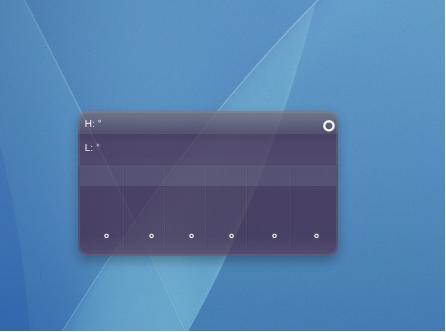
Hi!

I have the same problem....the forecast dont work! :(

Somebody have an idea what is wrong??

thanx from

cysco

#193117

Using the latest Samurize (1.51) and MilkSuite V0.3... every time i close (for any reason) the SuiteMem i get a crash message. Someone get this too? I know i can just don´t close the app, but, i wanna know if somebody else is getting the same problem. (The other modules just close OK).

#193307

I'm having the same problems with the forecast. It worked fine for months, the problems just started yesterday (or the day before).

Any help would be greatly appreciated!

Much obliged

Edit: it's working again!!! Just turned on my pc this morning and voila! Sorry for the trouble!

#193359

Sorry if this is offtopic - but can i get the wallpaper of the first screenshot ? thanks !

#193368

It still does not work. I think it may be a problem with Weather.com. It works alright in the morning/early afternoon, but by late afternoon/evening/night, it just shows N/A for everything.

#193855

is there any fix in the works for this?

#194897

yeah seriously ... i depend on the weather widget more than anything else on my computer ... and this has been soooo annoying! i keep reinstalling the milk suite, which temporarily solves the issue for a couple hours each time ... but it's such a hassle!

one thing of note is that it seems just to be the forecast scripts that are having issues ... i ported widescape weather for myself which uses only current conditions and those work fine ... and on the milk suite, the current conditions/now's larger, main icon and the accompanying text work whereas the forecasts receive the errors.

tadis, did weather.com change its format for forcasts perhaps?

i know you're busy but an update is CRUCIAL!

/me gets down and begs....

#194920