[release] Milk Suite V0.2

Hi All,

thumb-9423.jpg thumb-11662.jpg thumb-11659.jpg thumb-11436.jpg thumb-11365.jpg

This suite of widgets requires NO EDITING or ANY form of configuration other than what is presented inside the actual widget.

Simply extract the folder from the zip onto your desktop and execute the installation vbs. Everything is copied into the correct locations and the configs are automatically edited to reflect your local samurize directory.

Double-click the shortcuts that appear and each widget will guide you through its configuration ON-SCREEN

There are four widgets in all: System Stats, Media, Weather & Album Art.

As always, let me know if you have any problems, but please read the instructions on my website first.

Tadis

Download:

Samurize.

Full Instructions:

tadis:WEB

tadis:WEB Mirror

#131506

Great, i will try it out in a minute. :woot:

#131508

thanks MAn - looks nice, verrrry nice and milky....:)

#131530

Very nice bro, but I prefer the white winamp icon, the orange one doesn't match my milky theme :lol::lol: Nice work thank you very much Tadis :rock: :rock:

#131540

Originally posted by duyvan82@Mar 18 2004, 10:31 PM

Very nice bro, but I prefer the white winamp icon, the orange one doesn't match my milky theme  :lol:  :lol: Nice work thank you very much Tadis  :rock:  :rock:

So do I, but I can't distribute modified icons. ;)

I'll probably create my own 'milky' media icons and release them in a separate skin.

#131554

Excellent work, Tadis. ;)

Keep it up. I like the widgets you've been making. :)

#131555

I love it. The Winamp froze up on me but i haven't tryed it with Foobar or iTunes yet, but regardless i love your work! keep it up!

#131569

awesome :o

everytning is automatised(instalation,skin changing.....)

thank you :lol:

#131573

Yay, at last! It's great, a real breakthru in Samurize world :P

Tell me when you will have some spare time. But no need to hurry ;)

#131620

:woot: god of the samurize when you go down from the sky .... (Y)

#131626

Originally posted by Pe7er@Mar 19 2004, 12:15 AM

Yay, at last! It's great, a real breakthru in Samurize world :P

Tell me when you will have some spare time. But no need to hurry ;)

Does this mean that Samurize legend Pe7er is about to embark on another quest? ;)^_^

Tadis, you always give us a new goal to reach!

This is fantastic!

Thank you

#131635

Hi Tadis Gr8 work I love this winamp samurize script but I have some problem running it...

1. When I move the widget on my desktop, it always ask to me wich player I use ( 1,2,3)

2. Cannot expand the widget with the bottom right arrow ( it make the widget reload )

3. Nothing appear in the bottom area ( I mean ID3 Tag etc... ) all I can see is a transparent area.

I use winamp 5.02 any idea?

#131671

Read the Install guide on his homepage. Tadis has the link on his original post.

#131675

yeah, do not worry :rolleyes: you just have to click on the vbs installation files I installed it but it doens't work properly I mean... the widget is showing but some fuctions isn't working ( look above for my 3 bugs ) :cry:
#131684

Most excellent.... Thank you so much for making it this easy to configure.... :D

#131693

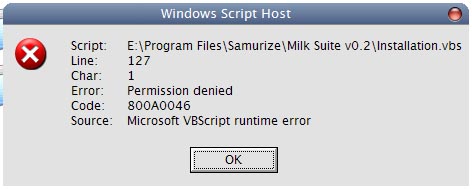
I read the instruction on your page and installed last Windows Scripting Host, but i got the problem shown in the pictures

post-1096-1079660944_thumb.jpg

permission.jpg
permission.jpg

#131695

Bugs:

1. Winamap froze and can't exit out

2. Weather gidget resets settings once skin is changed...

Hope to be able to use it once fixed

#131700

For me, everything works.

Very good work. Thank u for this! ;)

#131874

Thanks for the comments guys glad you're liking it.

To address a few issues:

@AoEKiller

To move the widget, you must make sure that the mouse cursor doesn't change to the hand (i.e. don't try to move the widget from the big icon because clicking the big icon in each respective widget brings up some form of configuration).

From what I can gather it appears that you're not using the provided shortcuts, basically these shortcuts create 'instances' with pre-defined names, and the switching script only works with the instance specified.

Apparently, you need the full version of winamp (with the media library) for the AMPI plugin to work, maybe this would fix your problem?

@Bicet

I'm unsure why you're getting that message, I've checked the the code (and the line-number in question) and the function that appears to be your problem is the one that copies the files aand folders. I know that some antivirus programs detect certain functions as malicious, maybe this is causing it?

@ntchemist938

The winamp freezing issue I've tested over and over and I've minimised it as much as possible but as yet I haven't come up with a complete solution. I can tell you that only the fully open drawer (with the visualisations) has this problem.

As for the weather configuration on downloading skins, I mentioned that on the download page and I quote:

Note: On changing to a new skin you will need to re-localise your weather settings.

@Pe7er and Unbeliever

I'm at your full disposal ;)

#131884

Hey Tadis Thnx, i don't know what it was but now i tried again and it works like a charm

#131888

OK, Thanks to Bicet and his question I've inadvertently figured out what was causing the crashes in the media widget, expect an update tonight (GMT) with a fully tried and tested crash-proof suite.

#131891

for me Tadis U R a GOD of Sam configs.... ;););)

Here is my desk.

http://members.lycos.co.uk/meetcrusher/Screeny/Blue.PNG

Thenk U Tadis!

:D :naughty: :D :naughty:

#131974

Hey Tadis -

GREAT widget! I love it... it's the only widget I've seen I feel is worth running Samurize for. I have a request, though.

I've had a bit of fun modding the media widget to fit my tastes. Since I only use iTunes, I changed the link on the big icon to the shortcut to the album cover widget, so I don't have to run the second widget at startup or go find a shortcut for it.

It works like a charm opening the album widget, but it would be awesome if you could create some sort of script where I could click on the album widget and have it close. That way, I could permanently hide the systray icon, and just use scripts to open and close it.

I know that's an extremely specific, personal request, but maybe other people in the community would appreciate it!

--mgehrett--

btw - I nearly had an aneurysm when I spent an hour modding the three media configs in one skin, then switching skins and having all my work overwritten. I quickly figured out I should back up the changes in the skin folder!

#131999

Especially for you mgehrett:

Currently clicking the album art links to the amazon website (for downloading album art), just replace that link with a link to the following vbs.

Edit:

I forgot to mention, i've just updated all the skins on my site to the non-freezing/crashing variety. This leaves the bundled skins (milk and black) still liable to crash. Hopefully I'll be able to update these before the day is over.

No more freeze ;)

CloseArt.vbs

Attachment: CloseArt.vbs

#132000

HOLY CRAP!!

I was in the middle of creating a multi-frame gif to show you what I mean, and you've already answered my request!

YOU ROCK!!

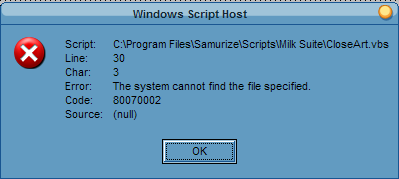
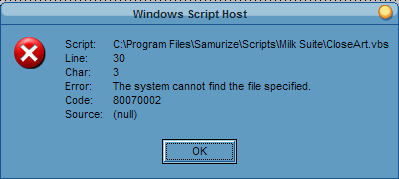
[edit] You still rock, but I get an error when I try the link. See the picture below. [/edit]

What exactly did you update to prevent crashing? I don't want to re-download and have to recreate my mods if I don't have to. Thanks!

--mgehrett--

post-1525-1079715248_thumb.png

error.PNG
error.PNG

#132001