 Aqua-Soft Forums
@kmccormi
You can move the shortcuts wherever you wish, but without them
@amadex
Regarding the moon issue, see back a few pages in this thread for the answer.
@Eyesonly
I'll have a look for you later tonight (am at work)
@kmccormi
You can move the shortcuts wherever you wish, but without them
@amadex
Regarding the moon issue, see back a few pages in this thread for the answer.
@Eyesonly
I'll have a look for you later tonight (am at work)
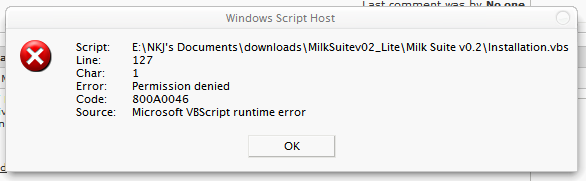
I tried using this but i get an error . i updated the scripting host as on ur side. i m running windows xp sp2 , samurize 1.30 .no other instances of samurize . The first version of this config Milk 0.1 u realesed worked fine and made the shortcuts on the desktop on this one i get the error
try and extract the installation file and run the setup from desktop... not on other partition. or maybe theres a problem with sp2.
uh? before I asked I looked over the posts... then after you said, I've looked again but I don't see an answer... deleting the images on temp doesn't work (if this is what you've said)...
i know that this is not the right thread
where can i download Vertical Media Controller (Samurize/Winamp)
and G5 Suite i only find death links ;(
can anyone tell me how to get these skins etc to work on the RC 2 of Weather.2004? i'd love to have that radar etc skinned.. *just got samurize in the last day or so and still knows jack about it* lol
got a problem with mediaconfig
since one week i use foobar as default mediaplayer, but the mediaconfig of sam. is still setup with itunes allthough a changed the player in the config itself,
the problem is that the controls like play/pause work, but the visualisation of tracktime
and so on isn't displayed.....do i need a special *.dll for this visuals of foobar or something like that???
any ideas???
greetz and thx
thank you pe7er for the link!!!
but i also need the Vertical Media Controller could somebody mail it to me???
my email adresse: risllol@web.de
thank you
@nkj
From the error message in the screenshot, the error seems to be with the folder copying function in the script.
The only thing that I can think might cause this is the folder permissions/file system etc. I'd suggest downloading a fresh copy to the desktop and trying a reinstall.
@EyesOnly
Looking at the error message it appears the script is encountering problems creating the WScript.Shell object needed for various functions. I'm completely baffled as to why this would happen as the shell object is one of the primary objects of windows scripting? I'll look further into it for you. Just to make sure, it worked the first time you installed it?
@amadex
The question regarding the sun/moon issue was asked by waski here, and I answered it here. I'm currently waiting for Torsius' updated plugin that should hopefully fix this issue along with the full day names issue and others. If and when Torsius decides to update it I promise an update will be short in the coming. 
@xp-schrotter
Firstly you don't need anything <_<
Secondly, if you looked properly on my site (where you can get more info on all of my work) you'd see that the things you're requesting aren't released yet, they're clearly listed under PREVIEWS!!! 
Lastly, in all my time at this community I've had nothing but requests for help from you (when its been clear that you haven't taken the time to read any documentation that I've posted).
Please, please give it a break! (anyone that doubts me just run a search for all posts by this member and you'll soon see an emerging trend).
excuse but not all users here are native english speaker;(
and i have big problems with 3 languages i lern
You can't hide behind the language issue, here are a few posts that might refresh your memory:
And these are a select few, in case you misunderstand let me reiterate my point; you make posts that are unnecessary, pushy and in many cases before doing any preliminary research. You ask for things that a simple search of the forums (or in many cases Google) would uncover. If you didn't/don't know how to search, maybe you should think about asking how to instead of pleading ignorance?
Please don't take this the wrong way, If I can help you I will, but:
1) writing that you can't be asked to read and understand the Samurize FAQs; or
2) asking where to download firefox and netscape from (two separate posts); or
3) asking where you can find resource hacker; or
3) posting that 'someone' must host 'these files' immediately because you must download them followed by repeating plz four times
is unproductive in the least. I hope these examples help you to reflect on your conduct and makes you think twice before posting in future. 
Well said.
Tadis - thanks a lot it works now . had to copy it to the desktop and then it worked . :-D
If anyone gets the vbs runtime error when running the install script make sure that samurize is not running. I got the error and then closed samurize and it worked fine.
Thanks Tadis for making this.
i was having the file permissions error as well.. then all of a sudden it worked... then today i messed something up and went to reinstall it, and it wouldn't work again.. deleted all the previous files, it still wouldn't work, uninstalled then reinstalled Samurize, and the scripting host update, the scripting host update gave me an error saying i didn't have permission to update it and also that the INF service wasn't running, and that it wasn't verified by MS, which is odd since i d/led it from their site lol then i extracted a fresh copy of the files to the desktop, and tried to run the install file, and it brought up the permissions error. so i don't know whats up. tried rebooting , and not having samurize run at all, before trying to install, and it still wouldn't install.
and btw, i'm logged into the admin account when trying to do this. so i should have permission..
as far as what the error msg says, its a problem w/ this line of code
strDesktop = WSHShell.SpecialFolders("Desktop")
@Tadis: 1. Thanx a lot for this! It's a great Samurize script! 2. I really didn't see the answer to my "bug" before... tired or distraction, don't know, but it was my fault. Thanx anyway for the "double" answer!!!!!
Originally posted by the_master@Mar 21 2004, 08:35 AMevery time click on the shortcuts I get a script error on line 22.
script: c:\Program Files\Samurize\Scripts\Milk Suite\Restart(Media|System|Art|Weather).vbs
Line: 22
Char: 5
Error: 80041017
Code: 800410017
Source: (null)
I'm running Win2000 with most recent Service Pack (4 I think it is), and the Windows Script Host 5.6
Sincerely,
The Master
Can anyone help me? is their a thread that I'm missing, where this has been answerd before?
...and v1.31 on http://www.samurize.com
Originally posted by 0n1y@Apr 9 2004, 05:21 AMSamurize 1.30 working links:
If you are respounding to me, I already am using Samurize v1.30
Maybee I should be more clear the wigits work great if I comment out the function call KillClient. Wigit's start fine.
if I don't comment it out. when it goes to run the Function it errors right here:
> For Each objProcess in colProcessList
Sincerely,
The Master
@the_mister
Sorry I missed your post the first time round (must have been sleepy or something), I think the issue must have something to do with the differences in the WMI between XP and 2K. What you've done is probably the best solution (commenting the KillClient function out) although you could always add the line 'On Error Resume Next' as the first line of the function.
@AoW777
I've looked into the file permissions issue and I'm afarid I have no answer
ok maybe this question was already asked... but anyway...
I use sam. 1.41 and I use foobar2000 now my question is why I can't see any trackname or artistname in the mediasuite??? the visualization works but nothing else
can anybody help me???... I also don't get the album art to work...
I read couple instructions.. but I somehow can't do it....
please help and reply
Just to let everyone know:
Following the release of Samurize 1.4x the Milk Suite has proven incompatible with the newer versions, that said I'm currently in the process of updating the suite (and the skins) and when this is done, I'll post a notification here.
In the meantime, you can either stick with Samurize 1.30 or use NeM's (kindly provided) fix. Although you may have issues with freezing when attempting to switch modes using NeM's fixed version (through no fault of NeMs though!  ).
).
Hopefully it will all be resolved soon (joke: well, until the next release of Samurize anyway... )