[release] My Milk Suite

Originally posted by Duckie@Feb 27 2004, 12:31 PM

here is my error:

Duckie that is a problem with the windows scripting host (WSH) I've nver encountered that as the '.shell' on wscript is one of the most used classes?! :blink:

I suggest you goto your favourite website, Microsoft (:lol:) and download a new copy of the WSH (i think the latest was 1.3). That shouold fix the problem.

@All

I think Sam 1.25 is a requirement for these widgets as all the problems seem to occur to people not using 1.25. Sorry for not figuring this out sooner :( , I've temporarily hosted 1.25 at my site for you to download.

#120500

Amazing work Tadis :rock:

Just one thing, could you please add a 'Randomize' function to the foobar set of controls? It's my most used foobar function :)

I would do it myself, but I don't want to mess anything up while its working so well.

#120520

nope...I did a full windows update

no good

and I am using the newest Samurize as well as Windows XP SP2

as for this scripting host you spoke of...um, nothing on MS.com says anything about that being a seperate download

#120521

Great work Thanks

But i have the same problem like Duckie, after install a

new version of the wsh 5.6 the problem is still the same :(

I run xp sp1

#120525

Originally posted by Duckie@Feb 27 2004, 01:48 PM

nope...I did a full windows update

no good

and I am using the newest Samurize as well as Windows XP SP2

as for this scripting host you spoke of...um, nothing on MS.com says anything about that being a seperate download

@Duckie

Windows Scripting Host 5.6 Download

hope that helps.

I've just learnt from crni that the konfabulator weather images included are non-distributable, so i've replaced them with stardock's pngs as well as the permission.txt that makes them legal.

I'd just like to say that I wasn't aware of this infringement, (I use YzDock, so I rarely have any reason to visit the Stardock site and as Samurize is barely useable I must have missed the announcements).

@Septimus

The problem with adding program specific functions is that they don't work with the other players, so I've limited the functions to those that are available for all the players. But, who knows, its early days.

#120533

Thats fair enough :)

#120535

First, this is the best samurize widgetset i've ever seen. Installation is awesome. I for once am actually going to use samurize.

I did get one error with your install though. It may be because I installed samurize right before downloading your widget, and never rebooted. But it couldn't read the Reg key for samurize's install directory. I just opened the .vbs and included it myself. No biggie. You may do a

SAMPATH = "someone could manually put path"

If SAMPATH = "" Then SAMPATH = WshShell.RegRead ("HKCU\Software\Serious Samurize\General\DirPath")

just a thought, either way excellent work!

Just an idea.

#120536

Originally posted by Tadis@Feb 27 2004, 09:04 AM

@Duckie

Windows Scripting Host 5.6 Download

hope that helps.

I've just learnt from crni that the konfabulator weather images included are non-distributable, so i've replaced them with stardock's pngs as well as the permission.txt that makes them legal.

I'd just like to say that I wasn't aware of this infringement, (I use YzDock, so I rarely have any reason to visit the Stardock site and as Samurize is barely useable I must have missed the announcements).

@Septimus

The problem with adding program specific functions is that they don't work with the other players, so I've limited the functions to those that are available for all the players. But, who knows, its early days.

silly boy...you said 1.2 at first

#120538

First of all I should say, amazing work. Didn't work at first since I had S v1.5 but it works now and I love it. All the scripts are awesome and make the desktop come to life :) Great work Sidat, Easily the best script out now for Samurize, You rock :) :rock: :woot:

#120591

Well, Tadis, just want to say thanks so very much for the professionalism you've put into this project of yours. It's nice you're sharing your hard work for others like myself to enjoy.

With past widgets, I for some reason can never optimize the configs to work for me, and experience with past weather and media widgets have been extremely buggy and annoying. Configuration has always been a pain in the butt, having to deal with much trial and error. Your widgets were the most flawless installation I've had, and the widgets are completely reliable and so far, bug-free.

I'm using dual-monitor on my radeon9800Pro my second desktop is sporting all three of your widgets giving a very pleasing mac-like appearance. All I did was change the fonts to LucidaMac and LucidaMacBold and they are looking even sleeker.

Thanks again, Tadis. I'll be using these handy eye-candies for a months to come. ;)

#120614

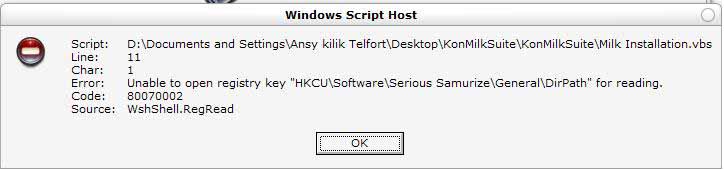
help :(

post-973-1077903320_thumb.jpg

error.JPG
error.JPG

#120629

@kilik101 and anyone else having this problem

You didn't restart windows, did you... :lol:

After installing Samurize, the installation requires you to restart so that all the necessary reg entries are made and dlls are registered.

My installation vbs is trying to write to the samurize key in the registry, but because you haven't restarted, that key doesn't exist.

What you need to do now is restart your computer and then reinstall/rerun my installation vbs.

[joke]

jot this down for future reference:

I will follow the instructions provided! :lol:

[/joke]

#120633

Duckie (and others) I had the same problem and restarting didn't help.

Go to regedit.

Go to the the samurize key. In the generals key add a value, Name = DirPath and then for the value input the location of the samurize folder (e.g. c:\program files\samurize)

Hope that helps.

Kei

#120634

Originally posted by amnesia@Feb 27 2004, 06:46 PM

Duckie (and others) I had the same problem and restarting didn't help.

Go to regedit.

Go to the the samurize key. In the generals key add a value, Name = DirPath and then for the value input the location of the samurize folder (e.g. c:\program files\samurize)

Hope that helps.

Kei

@amnesia

trust me, the 'DirPath' reg entry is placed there on installation of Samurize, it merely requires a restart of windows to take effect.

I'm just not sure, why it isn't being added for you guys?

But, if indeed restarting doesn't help, then follow amnesia's instructions or double-click the attached reg file and merge the info into your registry.

General.reg

Attachment: General.reg

#120639

Originally posted by Tadis@Feb 27 2004, 06:51 AM

Duckie that is a problem with the windows scripting host (WSH) I've nver encountered that as the '.shell' on wscript is one of the most used classes?!  :blink:

I suggest you goto your favourite website, Microsoft (:lol:) and download a new copy of the WSH (i think the latest was 1.3). That shouold fix the problem.

@All

I think Sam 1.25 is a requirement for these widgets as all the problems seem to occur to people not using 1.25. Sorry for not figuring this out sooner :( , I've temporarily hosted 1.25 at my site for you to download.

This totally solved my problem. I think this might solve a few more too.

#120677

I just remembered something about the new version of Sam. You can enable mouse cursor to change to the HAND pointing over links\shortcuts in Project Options in the config editor.

Just thought I would throw this in to add to the coolness of Samurize for youall. :smartass:

#120683

sweet.. very cool

#120721

is anyone working on a Panther style for this?

something that matches the real Konfabulator schemes?

#120748

Yes can someone please make a version that matches the real Konfabulator.. Thanks.

#120752

Very very very very nice Samurize widgets !

Congratulations and many thanks !

I think there is a very small bug in the second state of the weather widget for the third case. It takes the same information (on weather.com) as the last one.

(My english is so poor, if you don't understand, just tell me)

Discovered it while modifiying the widget in order to use weather2004 DLL (from Torsius of the samurize beta forum) instead of the VBS scripts.

I'f I'm wrong, kick me !

#120754

guys your script is amazing !!!!

but i can't load the three things in the same time i have to run a new samurize to have the three docklet. so i cant click on the refresh button that makes nothing

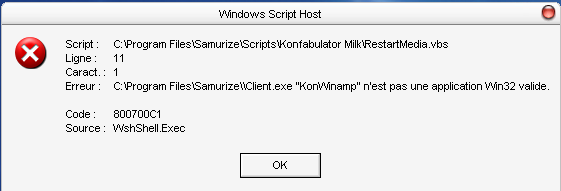
when i click on the icon on the desktop i have this error if u know how to make it succeed ^^

post-479-1077923488_thumb.png

erreur.PNG
erreur.PNG

#120780

Originally posted by Duckie@Feb 27 2004, 11:17 PM

is anyone working on a Panther style for this?

something that matches the real Konfabulator schemes?

Yes I'm currently working on finishing the 'skins' add-on to this widget so that people can download just the skins and with the click of a button change the appearance of the widget. I'd say 90% complete.

I've more or less completed the original Konfabulator skin and Good Grey is 100% complete, but I'm having trouble with getting permissions from the original creators (I don't want to be the centre of any ripping controversy).

Only time will tell.

@earnoud

Well spotted, expect an update tomorrow, I'm off to bed!

#120797

Originally posted by Tadis@Feb 27 2004, 05:55 PM

@amnesia

trust me, the 'DirPath' reg entry is placed there on installation of Samurize, it merely requires a restart of windows to take effect.

I'm just not sure, why it isn't being added for you guys?

But, if indeed restarting doesn't help, then follow amnesia's instructions or double-click the attached reg file and merge the info into your registry.

its placed here at the first launch of the config tool, samurize dirpath itselfs is located at the root (HKCU/soft.../serious sam/ )

about the errors, I would look into converting the desktop weather to a soft reload of samurize instead of a kill restart script as I noticed it is right now, like you did for your refresh script ;)

access violations for those getting some are always coming from plugins, so I guess it is more when using the media widget that it happens.

I'll look more into the details as soon as I get some more spare time, btw I'll provide you with the direct link to the main release which isnt hosted on the website server :

http://www.stormgod-online.com/samurize_125.exe

hope this helps :)

#120835

this is a great suite, i wouldn't even know where to start making this, i sure a glad that there are people like you, who do amazing work, and share with others, thank you so very much for this. :D

#120853

wonderful suite. one small problem for me. Mediawidget freeze everytime i toggle between modes. e.g. when in full mode, i toggle it up to mini mode, it scrolls up then freeze. same problem for compact to mini, mini to full, mini to compact. rightclick on the system tray icon can't even work

#120856