
Unpod For Itunes

Hello boys and girls,

i`ve spent the whole night working on this and i hope u`ll like it.

unPod is an iTunes remote with song title/artist/album info, bitrate, and clock.

Read the ReadMe and follow all instructions in it or config will not work/look good. You must have Samurize 1.16 (or 1.15) that will put a plug-in in iTunes folder. Also versions 1.15 and 1.16 come with AMPI (AdvancedMediaPlayerInfo) that is responsible for most of the widget`s info. You can also download AMPI HERE. Also install iTunes FIRST, then Samurize (since Samurize needs to put this plugin in iTunes` plugins folder)

DO THIS TO FIX THE TEXT GOING OF SCREEN PROBLEM:

BIG THANK YOU TO PE7ER, who fixed it!!!!

If you want it to work properly you have to do the following:

1. Right click samurize icon in the systray, from the menu choose 'Edit ConfigFile...'

2. Config Editor will appear. Scroll right and down to see the iPod.

3. Zoom in to see better if you want.

4. Now do Test>Test All Plugins. Fields should update with current song playing info.

5. Click the desired field (artist/track name/album name), then in the pane on the right, in Plugin section, from 'Select Function to Run' choose for example DiscName_Rotate (this _Rotate thing is important here) and input 1 in the window that appears.

6. Now a little bit to the up, in Meter Text Properties choose left for Horizontal Align.

Repeat steps 5 & 6 for all 3 fields.

Big THANK YOU goes to Seph for hosting it and testing it :bow:

BIG thanks to Andreas for inspiring me to do some real work and for making me his beta tester! :bow:

Enjoy

DOWNLOAD

MIRROR by corykg - THANK YOU

Another mirror by thanks to Viper (recomended for people with smaller screen resolutions)

EDIT: I made a BIG mistake with credits fot the iPod PNG. iPod PNG was Made by JuryK, and here i want to apologise to him and thank him for allowing me to use his PNG in this config. Once again JuryK, i apologise for this mess.

Looks like i made more than one mistake with credits:

THANKS Tadis for making volume control scripts and allowing me to use them in unPod.

PS More mirrors would be more than welcome!
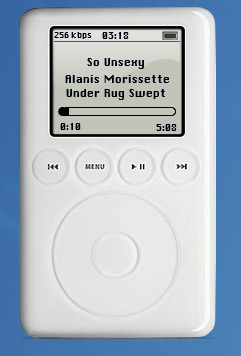
post-1068-1074946967_thumb.jpg

unPod.jpg
unPod.jpg

#104186

*Salute* Good work! The iPodaphiles will be pleased with this little beauty..

*Escapes before a drooling mass crush everything in sight to get to it*

#104187

GREAT JOB MAN! ;)

#104194

Originally posted by Seph@Jan 24 2004, 01:49 PM

GREAT JOB MAN! ;)

:shy:

thanks Seph, but you were there with me the whole time :D

@ es.xxi - :shy: :bow:

#104198

is there any way to make this work for winamp?? the other ipod skins suck and this one is amazing ::bowing down::

#104206

Just two pictures: :wub: and :bow:

#104207

Originally posted by scinsanit@Jan 24 2004, 02:07 PM

is there any way to make this work for winamp?? the other ipod skins suck and this one is amazing ::bowing down::

i`ll port it but after tuesday. i`ve got exams on monday and tuesday ;)

@ Andreas - :hug: means VERY much when it comes from you ;) :cry:

#104208

Looking good ;)

#104218

Downloading without thanking is leaching, leaching is not cool! >.

#104227

looks good in pics but for some reason its not working for me. Its prolly my fault but when I load nothing shows up then when I change configs the ipod flashes up then the new config loads

#104232

@ puckchump - i don`t understand? The song/artist info won`t load or the config won`t load?

Did u read the readme?

After you do what`s said in the readme you should right click the samurize icon in sys tray and in Select Config File choose unPod.

You need to have iTunes installed to use this, and you can start iTunes by pressing iPod`s Menu button.

Hope this helps.

PS 190 views - 9 replys :(

#104236

I did everything in the read me and have Itunes installed...and Samurize is putting the ipod out into its png output but for some reason its just not showing up on my desktop when the config is running...then if I load another config the ipod comes up for a second then the new config loads

#104237

Originally posted by Seph@Jan 24 2004, 03:49 PM

Downloading without thanking is leaching, leaching is not cool!  >.<

Trust me, you get used to it...

I'm talking about going without a thank you, not leeching :lol:

In the past two months, I've had approximately 550MB downloaded for the three widgets I've released, each one being between 2.1MB ~ 0.5MB.

like I said, trust me, you get used to it :lol:

#104239

I don't use Samurize, but I like the look. Very nice work and thank you very much.

Looking without downloading is okay, is it not? ;)

#104243

Originally posted by zerroeffect@Jan 24 2004, 05:18 PM

I don't use Samurize, but I like the look.  Very nice work and thank you very much.

Looking without downloading is okay, is it not? ;)

thanks.

it`s not about the praise, it`s just good to get some feedback from the community i respect. I tried to do my best with this and i would be happy with a simple thank you (or i hate it), just to know what people think about it.

and yes, looking without downloading is ok ;)

i respect your gesture zerroeffect :)

#104245

Let me install this thing... :pchawk: Gimme 2 minutes...

#104247

Originally posted by Pe7er@Jan 24 2004, 05:23 PM

Let me install this thing... :pchawk: Gimme 2 minutes...

Damn it Pe7er i was waiting for reaction ever since i made it! :lol:

i`m feeling like i`m sitting on needles, waiting for your grade! ;)

you are the grand master of samurize after all :bow:

edit: i feel like i`m in school again!!!

/biting nails, jumping nevrously

#104248

:naughty: It's working.....^_^ I have an iPod! It's very cool, definitely something that HAD to be done. Can I criticize? I would add more shadow, to make it more like standing on the desktop. I would make captions on buttons bigger (damn small on my 1600x1200 desktop). I would make it more real so I could grab it and take it with me outside :lol:

there is also a volume control. Left side of the wheel is vol+1, right is -1.
- readme. Are you sure? :D

Pretty trick with the progress bar (Y)

Chi, I like it more than my Toothpaste Player ^_^

#104251

A new Samurize artist emerges!!! Nice-looking work. I remain, unfortunately, un-samurizable.

#104253

:shy:

the master has spoken :D

i didn`t make the buttins, i just used Apple`s pic and put transparent fields ove the buttons but i guess it can (and will ;) )be done.

? - no volume control?

it`s working here :blink:

i`ll look into it!

i`ll try to add better shadow maybe tomorrow :D

thank you master :bow:

PS Any chance to have short chat? i need to ask you about the scrolling text.

@ ji eun - :shy: thanks

#104254

i downloaded it, and got the text to work, but i dont see the actual ipod. what folder do the images need to be in?

#104262

good work will enjoy :canadian: :rule:

P.S. The only gripe I have is that if you have a long file name for your MP3 file it overlaps on top of the skin.....

tried to attach a screenshot but it would not capture it for some reason.

#104288

ARGH!!! :cry:

I'm sorry Unbeliever... :sorry: I should have slept an hour later... I missed it just by an hour!! :rant: Oh well... I've tried it now and...

SUPERB! :woot:

Great work. ;) Looking forward to more from you! ^_^

@Pe7er: Your throne is under risk of being usurped by unbeliever!! :naughty:

#104299

Originally posted by silencedge@Jan 24 2004, 07:39 PM

@Pe7er: Your throne is under risk of being usurped by unbeliever!!  :naughty:

I'd say it's a big and comfortable couch for all of us. Currently the best place is reserved for crni, I'm just another sitting person :P^_^

#104303

You mean... it's bigger than this :sofa: ?? :naughty:

I wanna join you guys too! :orgy:

#104306