 Aqua-Soft Forums
Edit: this should be in the faq. I bet lots of people won't be able to get office icons working.
why, instead of simply saying this, don't you, a seasoned XWD user, create a new entry at Post Your Suggestions for Our FAQ (Q&A) Here... 

Edit: this should be in the faq. I bet lots of people won't be able to get office icons working.
why, instead of simply saying this, don't you, a seasoned XWD user, create a new entry at Post Your Suggestions for Our FAQ (Q&A) Here...
i'm getting an access violation when i try to open the preferences window. after i click ok, the preferences window opens but the OK button is inactive even after a setting is changed. and the list on the left of the window has no text, just icons.
not that big of a deal since everything is already customized how i want, but if i want to change something later or switch skins, can't do it.
this happened after i installed the XTasks v0.1 docklet. i thought that might be the culprit. so i uninstalled it and the problem persists.
=/


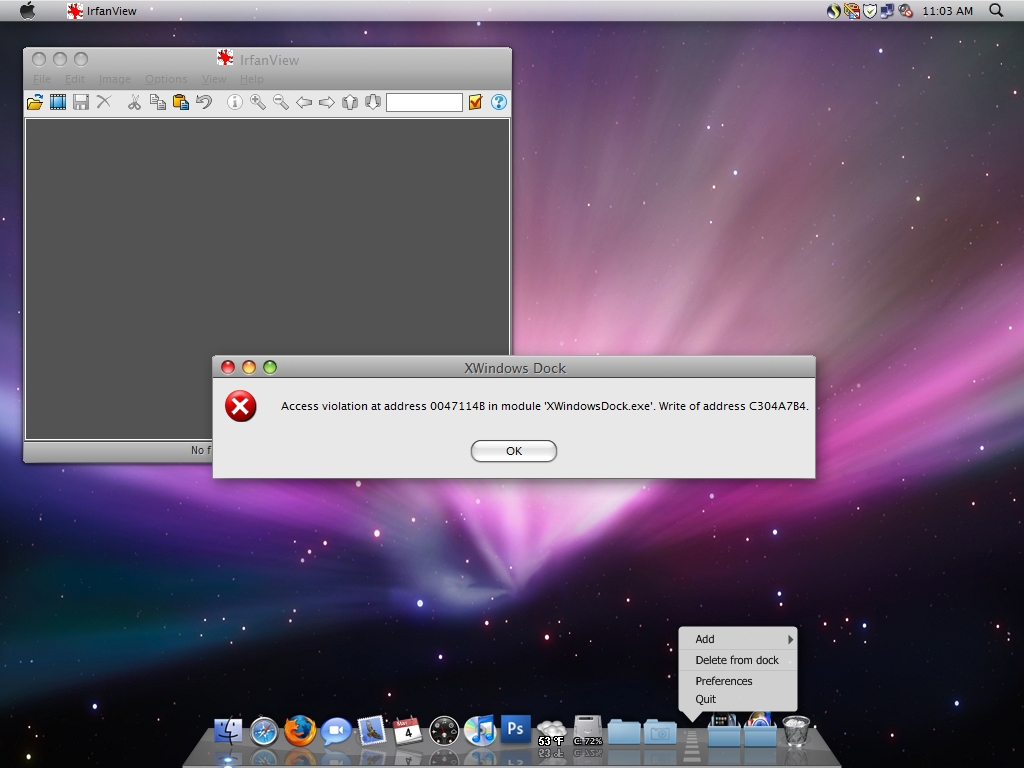
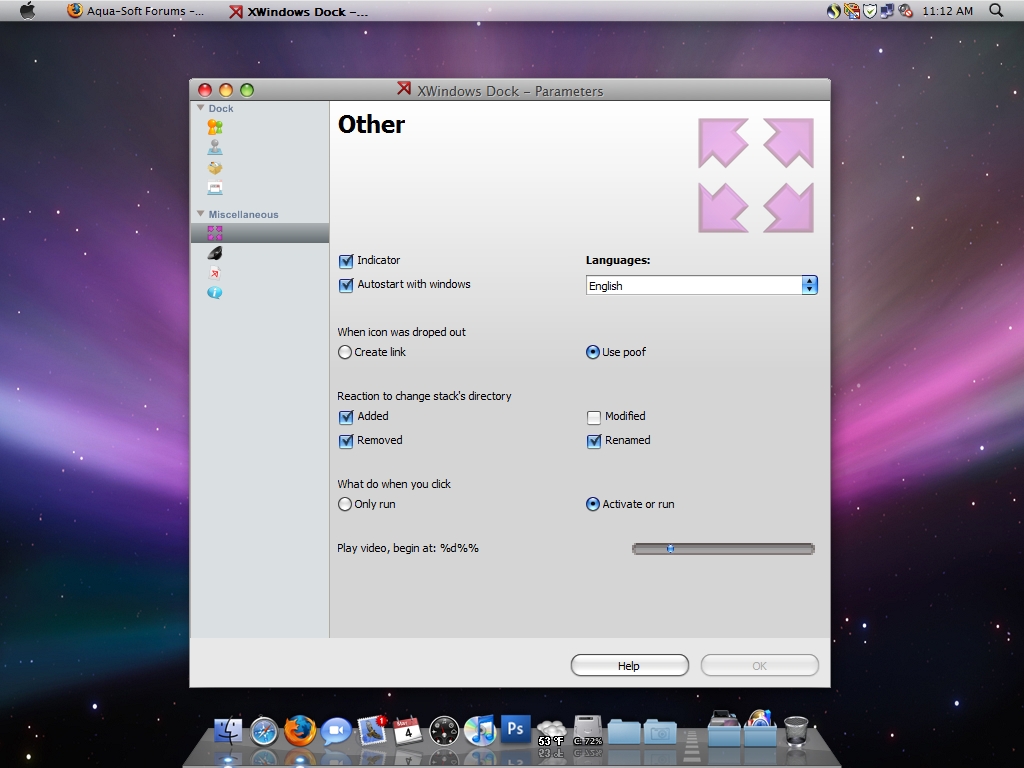
i'm getting an access violation when i try to open the preferences window. after i click ok, the preferences window opens but the OK button is inactive even after a setting is changed. and the list on the left of the window has no text, just icons.not that big of a deal since everything is already customized how i want, but if i want to change something later or switch skins, can't do it.
this happened after i installed the XTasks v0.1 docklet. i thought that might be the culprit. so i uninstalled it and the problem persists.
=/
try renaming the 3 xml files and see if any of them are messing with the dock? If not, backing up the xml files, re-installing XWD, and replacing the xml files should fix it.
edit: woops, fixed.
Hello, Could someone please tell me how to disable UAC for X Windows Dock? This question is of course in regards with the pesky (infamous) error message I receive upon startup.
-I know that trying a reinstall (in places other than Program Files) usually fixes this problem, but after many reinstalls, I am getting no where, I just want this to end so that this program runs smoothly.
Thanks! 
@newgriptape: I was talking to Andrew; now, please, stop double-posting! 
Regarding UAC, you don't disable it for a single application; this is done for the system as a whole.
@newgriptape: I was talking to Andrew; now, please, stop double-posting!Regarding UAC, you don't disable it for a single application; this is done for the system as a whole.
Okay, I have tried disabling UAC, and I have tried a clean reinstall many times. It still shows this error upon startup.
-Btw, I'm sorry for the double post. I am not deliberately doing that...
In my experience every time a clean install is done this message appears at the first run - I suspect it's due to the absence of the *.xml files (or, at least, DockItems.xml) - but if you click OK, then XWD will run normally (I'm on Vista 32-bit and this scenario always occurs, but only this one, as I have UAC disabled).
why on startup my dock having cut and moved to left side having icon cut and some are lost..im using objectbar.they put on left side..why in other dock is normal..stil in center. and also having error code like everyone does..mybe i have to rest shorty using this dock..til not stable.
why on startup my dock having cut and moved to left side having icon cut and some are lost..im using objectbar.they put on left side..why in other dock is normal..stil in center. and also having error code like everyone does..mybe i have to rest shorty using this dock..til not stable.
Can you give us a screenshot perhaps, and what OS version are you on?
here my screenshot.. actually shot on startup..im usingn 5.3 because im having error pop up in 5.4 or 5.6
can solve this????? 


Dont know if this has been mentioned before but there seems to be a conflict with avedesk and XWD, every time avedesk is open the magnification doesn't work
close avedesk and it works fine  Anyone else have theses issues? I'm running vista.
By Panta: moved.
Hi,
I got a little problem with minimizing to the dock. Normally if I got several windows of the same program running at the same time (like safari) and I want minimize one of them, the other ones will too! What can I do?
Thanks for ur help!
Dont know if this has been mentioned before but there seems to be a conflict with avedesk and XWD, every time avedesk is open the magnification doesn't workclose avedesk and it works fine
By Panta: moved.
It's a known bug, AveDesk 1.3 doesn't have the problem.
Sorry, perhaps a noob question, but how do you change the trash icon (empty and full)?
You can't. It's already described on skin file.
is there a way to change the highlighted item in the context menu from gray to blue?
is there a way to change the highlighted item in the context menu from gray to blue?
nope. Sounds like a feature request 
You can't. It's already described on skin file.
You can edit the skin file though, put in the paths to the new trash icons and drop the edited config file on skinmaker.exe to generate the updated skin.
Is there any way to have the dock at the top of the screen? I've only ever seen it at the bottom in screenshots.
Is there any way to have the dock at the top of the screen? I've only ever seen it at the bottom in screenshots.
Nope. This has been a frequently suggested feature in the past.
I hope it's implemented in future. It's the only thing stopping me from using this.
its also happen to me posted #186 post by mewky...
do u knw how to fix this on startup.its same like mine..
if u wna know what im talking about..just try objectbar and xwindows dock on startup.. while from other dock its start normal..
i have new version 5.6+ nw.
tnx
I've come up with a great fix for a bug in the latest version. I did have my settings like this:
Cache items in Ram for faster viewing (checked)
image width = 200 pixels
Image height = 200 pixels
Number of visible items = 5
Space between items = 11
Item to Reflection Ratio = 1/3
Things were working well except like every 1/10 images wouldn't render and it would preview as just a black image. The name would show up and if I clicked it my image would popup but no preview. Now I use xwindows dock primarily for the gallery feature so I was a little bummed but this time I can cache the items so they go faster. I mainly use this to change my wallpapers in an attractive manner I'm a big wallpaper guy. So anyways I fooled around and fixed the bug by myself. I set the settings to these:
Here are my gallery settings:
Cache items in RAM for faster viewing (checked)
Image width = 180 pixels
Image Height = 180 pixels
Number of visible items = 11
Space between items = 11
Item to Reflection ratio = 1/3
But this fixed the random black box (I think because I set the visible items higher and this in turn gave the gallery time to load the picture before it became visible to me. So there was no problem in rendering? that's just a guess. Anyways there was still a problem that remained. That was I couldn't then see my last two pictures in my gallery because although they were loading correctly they were out of view (due to the 10 items at once deal)
UPDATE:
You also have to create 3 bmp images and place them in the folder that you have a gallery. I'm not sure how to make them go to the end of the gallery because I cannot figure out Boobah's sorting system. If Boobah could tell me how he sorts the pictures then this would fix not being able to see the last 3 pictures.
UPDATE 2: After messing around some more I've found that they are generally sorted by date modified. So in some instances just making 3 new bmp files works but in others the bmp files end up in the middle of the gallery? Still curious about this and I'll get back to you if I figure it out.