Stacks Docklet 2.0

Wow, Stacks Docklet is awesome! Long time I was looking for something like this.

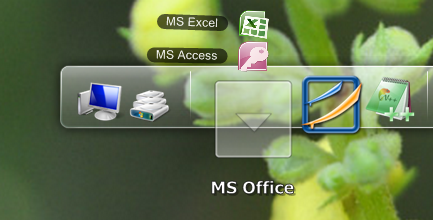
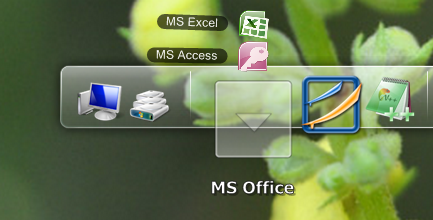
Unfortunately, I encounter a problem with fan mode. It spans only upward, and if I have the dock bar on top, the spanning is outside of screen. It also span up when the dock bar is on left or right.

For the print-screen I moved the dock a few pixels downside.

Can it be corrected ?

Thank you very much ! I can't wait to see the final release :D

post-122232-019794700 1286642649_thumb.p

docklet error.png
docklet error.png

#537571

Hi there

Is there a way to change the individual icons in the stack, like xwindowsdock?

Right now the dock can be pointed to a folder, but i would like to use custom icons for the items in the stack? Is it possible?

Thanks

#537578

Download link is dead, the installer from rocketdock site is no good without a live server. Can someone upload it for me please?

#537619

Can anyone give me the link to the latest version (not the installer)... all the links don't work!

#537620

No one can give me?

#537624

No one can give me?

Hope this is not against aqua-soft regulations. You can try to download it from here http://rocketdock.com/addon/docklets/22757

#537625

No... this is the link to the installer... and the installer try to download th files from files2go that don't work anymore...

so, i'm looking for the .rar with all the files inside...

no longer exists on the web so... if anyone can give me from his ..\dockelt\ folder...

THANKS

#537626

No one have v2 installed on his hard disk?

Please... share it!!!

On the web is unavaiable.

Please... thanks!

#537635

Hello MATONGA

I have some bug about stacks docklet 2.0 (Objectdock/rocketdock test):

The refresh of the files, problem about the content of the dock!

If i don`t use "follow the dock" when i switch between docks, the dock block him self.

I have one suggestion about the stacks docklet 2.0

Path can be visible, and editable.

#537642

Bug... the version of bSAYZ don't store the folder path... :-( (with objectdock 2.0)

Anyone have the same problem or is only a problem of mine?

Can anyone upload the last version?

#537649

No one can help me?

#537670

No one can help me?

I'm not sure I understand your problem. I installed the version bSAYZ posted on two different computers and it works perfectly. Do you mean the docklet doesn't retain the folder path? I had issues at first but found out I had to copy the file StackLib.dll located in the StacksDocklet2.0 folder to C:\Program Files\Stardock\ObjectDockFree. I haven't been able to find another version of this docklet anywhere, so thank you bSAYS for uploading it.

#537672

Crashes on 64 bit systems. Will fixed this bug?

#537683

I'm not sure I understand your problem. I installed the version bSAYZ posted on two different computers and it works perfectly. Do you mean the docklet doesn't retain the folder path? I had issues at first but found out I had to copy the file StackLib.dll located in the StacksDocklet2.0 folder to C:\Program Files\Stardock\ObjectDockFree. I haven't been able to find another version of this docklet anywhere, so thank you bSAYS for uploading it.

My system is a 64bit... maybe it is only for 32bit systems...

#537684

Bug... the version of bSAYZ don't store the folder path... :-( (with objectdock 2.0)

Anyone have the same problem or is only a problem of mine?

Can anyone upload the last version?

stack docklet 2 is not compatible with objectdock 2. use stactdocklet version 1 instead.

#537688

stack docklet 2 is not compatible with objectdock 2. use stactdocklet version 1 instead.

stack docklet 2 with objectdock 2. Confirmed ;)

screenshot201010212.th.png

#537689

On 64 bit systems will not start after reboot. Will the fix is made? I apologize for repeating.

#537693

stack docklet 2 with objectdock 2. Confirmed ;)

screenshot201010212.th.png

Thank you for your enlighten cSAYZ somehow i forget to copy StackLib.dll from my objectdock folder when i upgrade to objectdock 2. When i saw yours then i remember it. Thank you verny much. YES comfirmed! stackdocklet 2 is compatible with objectdock 2 !!!

stackdocklet1n2.jpg

On 64 bit systems will not start after reboot. Will the fix is made? I apologize for repeating.

copy StackLib.dll to C:\Program Files (x86)\Stardock\ObjectDockPlus2 and it will be fine...

#537697

My system is a 64bit... maybe it is only for 32bit systems...

copy bSAYZ extracted StackDocklet2.0 folder to C:\Program Files (x86)\Stardock\ObjectDockPlus2\Docklets or C:\Program Files (x86)\Stardock\ObjectDockFree2\Docklets

and

copy StackLib.dll to C:\Program Files (x86)\Stardock\ObjectDockPlus2 and you are Gold!

#537698

copy StackLib.dll to C:\Program Files (x86)\Stardock\ObjectDockPlus2 and it will be fine...

Unfortunately both flying and takes off. I would be grateful for a link to the program folder of owners 64 bit systems. Folder with icons can be skipped.

#537706

Unfortunately both flying and takes off. I would be grateful for a link to the program folder of owners 64 bit systems. Folder with icons can be skipped.

what version of objectdock you are using? try to change objectdock folder (and sub folder) permission to full control (for current user) and re-run OD

#537707

I apologize for my English. I am using version 1.3.5 and do everything according to instructions. The notebook 32-bit it works without crashes. 64 bit is outreach program for Stack Docklet v2 and crash when you restart at Stack Docklet first version. Without bugs is only grandfather standalonestack2

#537708

I apologize for my English. I am using version 1.3.5 and do everything according to instructions. The notebook 32-bit it works without crashes. 64 bit is outreach program for Stack Docklet v2 and crash when you restart at Stack Docklet first version. Without bugs is only grandfather standalonestack2

Oh... its mean you are using RocketDock, did you follow below instruction?

Installation Instruction:

Place the StackLib.dll and StackDocklet.dll files according to the following floating dock applications:

RocketDock

C:\Program Files\RocketDock\StackLib.dll

C:\Program Files\RocketDock\Docklets\StackDocklet2.0\StackDocklet.dll

C:\Program Files\RocketDock\Docklets\StackDocklet2.0\Stack.png

C:\Program Files\RocketDock\Docklets\StackDocklet2.0\Open.png

or on x64

C:\Program Files (x86)\RocketDock\StackLib.dll

C:\Program Files (x86)\RocketDock\Docklets\StackDocklet2.0\StackDocklet.dll

C:\Program Files (x86)\RocketDock\Docklets\StackDocklet2.0\Stack.png

C:\Program Files (x86)\RocketDock\Docklets\StackDocklet2.0\Open.png

Your installation directory may vary from the example given.

#537713

I'm a hundred times to distribute this combination of file folders, to again enjoy the next flight programs at startup Stack Docklet B2

Load me your folder with the program - last will and testament drowning ...

a754821b37452393d9dd2053b362536b.gif

In the video, more about the outreach program: http://depositfiles.com/files/z8378sh1d

#537714