 Aqua-Soft Forums
Is there any difference between matonga's latest release of xweather from the previous? I can run the previous version on 5.2.3, so...
Help Center - Ask for help ONLY here!
No, it's the same one that has been moved to the new docklets thread (apparently matonga forgot to edit the old post, to just redirect to the new one; let's see if he'll fix it, otherwise I'll do).
Thanks for the heads up!
Very soon the new version 5.4 will be published and I decided to inform everybody how to use Gallery:
1. At frist you should look at the preferences.
2. You can create gallery from Menu->Add->Gallery or use Menu->View as (Stack)->Gallety for Stack from Exlporer
3. When you have added gallery, you can:
a) Move mouse to the left or to the right to looking through Gallery
 Click left button of mouse and open file in windows (as usual in stacks)
c) Click right button of mouse and then if file is:
Picture) it will be installed as your desktop's wallpaper
Video) it will be started playing in Gallery. If you click again it will be emmidiatly stooped or if it was playing, it will be continued playing. Also you can move your mouse over playing video file and click Right or Left button using keyboard to change current position of playing file.
I hope everybody will understand me  Thanks all.
Very soon the new version 5.4 will be published and I decided to inform everybody how to use Gallery:1. At frist you should look at the preferences.
2. You can create gallery from Menu->Add->Gallery or use Menu->View as (Stack)->Gallety for Stack from Exlporer...
I hope everybody will understand me
I think I got it, but seems to me that we´ll have to try it to see how it works, but looks awsome, you´re right this isn´t a M*c Dock clone, this is waaaaaaay better!
Congratulations again! I´ll be waiting for next release!
3. When you have added gallery, you can:a) Move mouse to the left or to the right to looking through Gallery
Ooooh shh***t!!! You mean like in iPhoto? 
Oh no man  iPhoto is too easy if you compare it with XWD Gallery
Hello,The mask doesn't seems to work here.
I tried both of the default skins (gradient mask, black and white mask),. and one i made with 100% transparency mask and there is no part of the reflection hide in each case.
I miss something?
I don't know what's wrong... It works here o_O except there's this strange glitch that shows up after you mouseover the dock.
Hey andrew. Thanks for your reply. Could you show me a screen capture to see the matter please?
Hey andrew. Thanks for your reply. Could you show me a screen capture to see the matter please?
Here:
http://www.aqua-soft.org/board/showpost.ph...6&postcount=241
It's not the same problem that you are having, but it has to do with the new window reflections as well.
i got a question how do you activate wallpaper reflection it was working in the older version 5.2.3
I need some help here. If I use a Stack in grid mode it doesn't show absolute anything. other modes working great
(I love the gallery mode)
xp sp2
EDIT:ups, Found it. I didn't add all the new images for the grid mode to my customized theme
I loaded up the skin and then saved it but it still doesn't show up.
I loaded up the skin and then saved it but it still doesn't show up.
You need to have all of the components, including the mask pngs and the grid pngs that didn't exist in previous versions.
Then I shall have to wait for the next version to come out.
...Or you could re-create the skins with the extra parts of the default skin o_O
Does anybody know how to turn icon reflections on? I've looked thru the preferences menu and I can't seem to find it.
Does anybody know how to turn icon reflections on? I've looked thru the preferences menu and I can't seem to find it.
you probably have the icons sitting at the bottom. Just set "space between icons and bottom of panel" to 15 or something like that.
To actually turn on icon reflections, set "opacity of icon reflections" to something besides 0
This is all done in the "Icons" tab
Thank You
I couldn't figure out how to do windows reflections. I click the button for windows reflection but I do not see a difference.
By Panta: moved. I'll start deleting posts at the wrong thread!
how do I get the reflection of the icons?
Dock does not appear in my reflection!
By Panta: moved. I'll start deleting posts at the wrong thread!
how do I get the reflection of the icons?Dock does not appear in my reflection!
Go to "Settings" -> "Icons" -> set the value "Space between icon and bottom of panel" to ~15px.
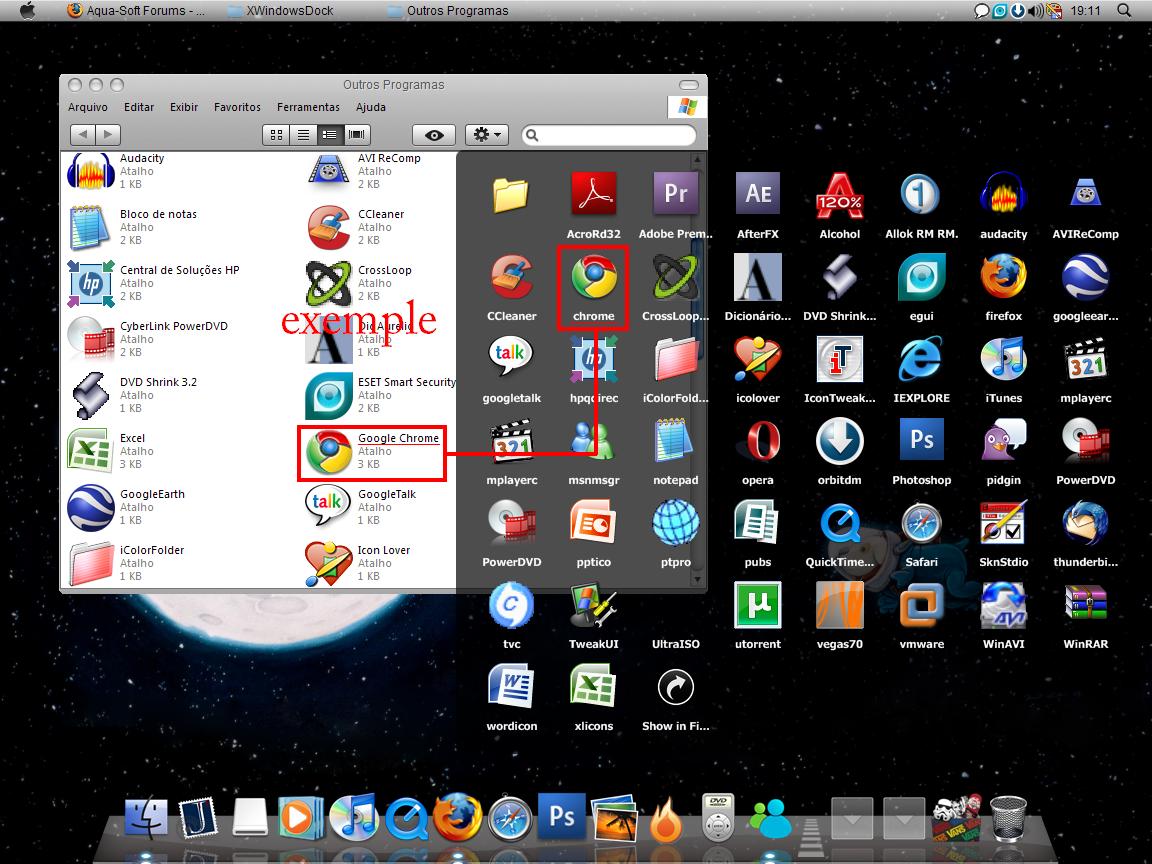
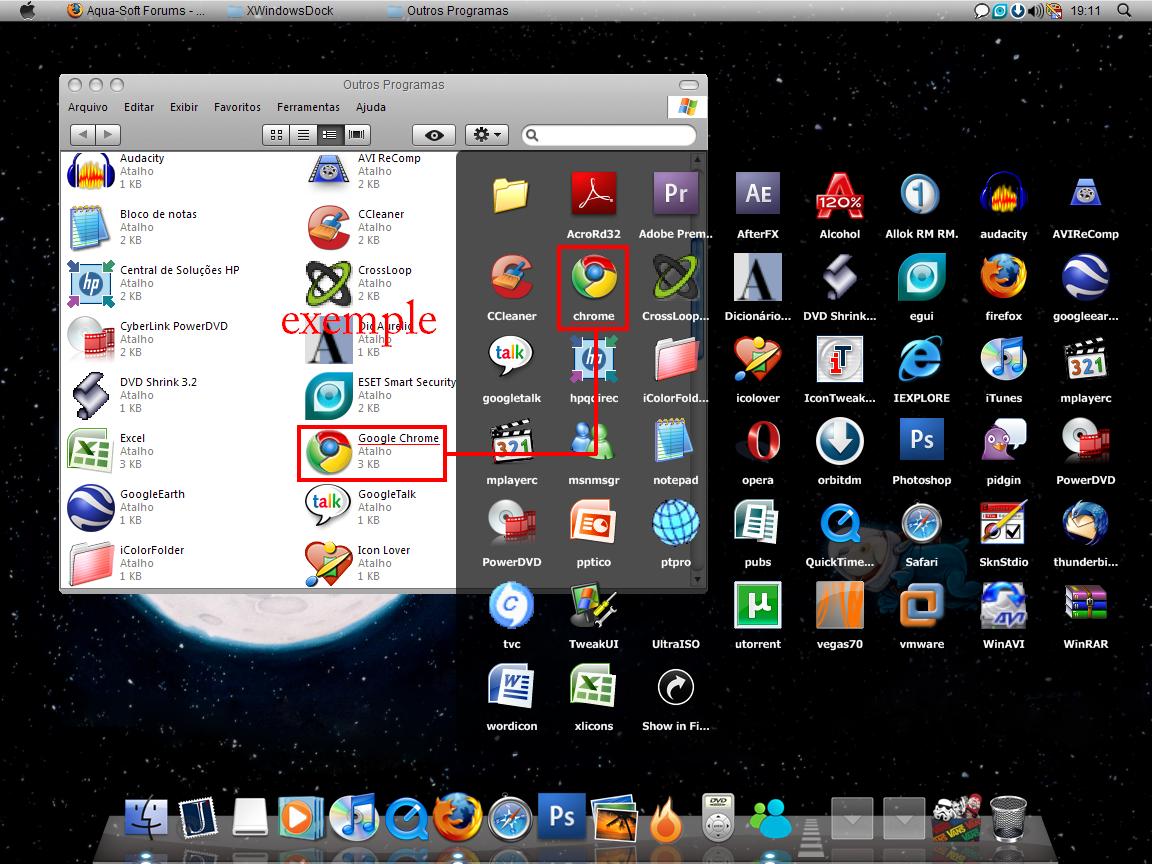
well, i have created a "stack from explorer".
the files are shortcuts. and they don't have the same name as the .exe
to problem is the stack is showing the .exe name.
i want to know how to rename. if it is possible.
screen shot attached.
sorry my english.
how do you make masks( for the skins) in photoshop?
how do you make masks( for the skins) in photoshop?
Grab your Gradient tool use FG to BG, black and white from top to bottom. The reflection will show wherever the black is.
well, i have created a "stack from explorer".the files are shortcuts. and they don't have the same name as the .exe
to problem is the stack is showing the .exe name.
i want to know how to rename. if it is possible.
screen shot attached.
sorry my english.
I think it's not possible to rename Items in a "Stack from Explorer". This is by design, because this stack -methode is supposed to reflect your files "Explorer-like".
But I have a other solution, which I use for my own "Programs"-Stack: Do not use a "Stack from Explorer", but a normal "Stack". Then open your "Outros Programas" in Windows Explorer. Select all the shortcuts in your "Outros Programas" and drag&drop them on the empty Stack you created before. For theses Items, you now can change every Name and Icon by rightclick on them -> "Edit".
This methode has another advantage (in my opinion): the "Open" - Icon is gone.
ok, my problem is that I was trying to add a file to Xwindowsdock, when I couldn't find it I just typed it into the file name bar, upon doing that it added an invisible icon (that i can not right click) pictured below. How to I delete that icon?
Update: fixed it

