 Aqua-Soft Forums
I just started using Xwindowsdock and I have a couple questions:
1.How to you add new applications to the dock?
2.How do you add and use skins?
I just started using Xwindowsdock and I have a couple questions:
1.How to you add new applications to the dock?
2.How do you add and use skins?
I just started using Xwindowsdock and I have a couple questions:1.How to you add new applications to the dock?
2.How do you add and use skins?
1) To add applications just drag and drop the application into the dock.
2) Search for "Leopard skin for XWindows Dock" on Aqua-Soft forums.
The directions to install are in the package. You also have to play around with the settings to learn your way around and to figure what each thing does.
If you have anymore questions, just ask.
Could you give me a download link? I cant seem to find a link in the Leopard Xwindowsdock thread.
and if you can't can you just explain the process of adding and using skins in Xwindowsdock
Could you give me a download link? I cant seem to find a link in the Leopard Xwindowsdock thread.and if you can't can you just explain the process of adding and using skins in Xwindowsdock
He's currently updating v5.2.3 to v5.2.4, it will probably be available tommorow, but just search around for some.
PS: Mattey just released like 25, but I can't find the link
TO add and use a skin extract the skin.smxd file to your skins folder in the XWindows Dock directory, reload the dock and choose the skin from the settings panel.
I ve added to skins to the Xwindowsdock directory but when i go to dock preferences and try to change the skin the only skin I can choose is the default, how do I change the skin?
I ve added to skins to the Xwindowsdock directory but when i go to dock preferences and try to change the skin the only skin I can choose is the default, how do I change the skin?
In the preferences settings click refresh in the dock settings, if nothing happens then,
1) Make sure you extracted to C:Program FilesXwindowsDockSkins directory
IVe done both of those but it still only shows default as the only skin I can pick
IVe done both of those but it still only shows default as the only skin I can pick
Well if everything failed, I would reinstall everything and try again. Sorry I couldn't be anymore helpful.
Is there a uninstall module or do you delete the folder containing Xwindowsdock? because everytime I try to delete it I get the error message below
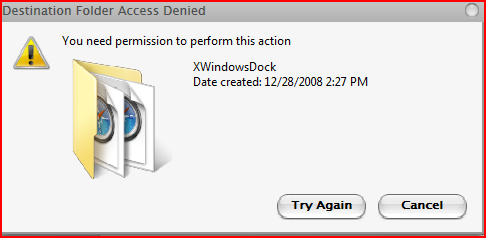

I hated Vista for things like that...
First, exit out XWindows Dock and make sure it's not running in the background.
Next, delete the whole XWindows Dock folder, then reinstall.
I'm also not using Vista so I wouldn't completely know.
Well it read the dock skins you send me, so could it be a problem with the skins I'm trying to use?( could you send me a leopard skin for Xwindowsdock?)
It won't let me upload for some reason.
could you e-mail it to me?
Have the same problem...
whats your problem?
I mean i can't use skins in xwindowsdock. They not appear in change skin option.
My english bad sorry
stack icon blur. Can i fix this? and ı change stack icon but bakground in folder but i didn't want...
this screen... Rk Laucher and XWindows Dock

1. I want to delete this: The 'background' items you wish to delete are the icon images contained within the stack folder, correct? Currently Matonga's Stack docklet provides you the option of only displaying the front 3 icons, thus feeling less cluttered. With XWD, it would seem all icons are shown in a closed stack, even with an 'overlay' stack icon assigned. I believe, currently there is no alternative to this. Your best solution might be to change the contents of your stack folder, or assign less noticeable icons within the stack, (See below.)
2. Icon's blur in XWD is due to how XWD handles windows icons. To fix this blur, right click on the stack icon (firefox) choose EDIT and change the icon with a Firefox.PNG icon. This is currently the recommended solution, I believe.
make sure that the skins are in the XwindowsdockSkins directory, that the skins you are trying to use are for the current version of xwindowsdock, and press the refresh button in preferences
Yo tengo 2 problemas y quiciera ver si me ayuda Matonga, Briareo o Mattey ya que hablan español. 
Me a encantado esta dock que trae integradas las stack (sin ser un pegoste) y es con ellas con las que tengo problemas y a ver logro hacerme entender.
1.- Si yo pongo mis iconos a 50 y la maxificacion a 120 (y no se diga a mayor) sucede algo que no me agrada.

Intento mostrar en la siguiente imagen como doy click en la stack y al apuntar al primer icono de aplicacion FIREFOX , el icono de la stack regresa a su tamaño original y mi puntero se queda fuera de FIREFOX, si intento bajarlo el icono de la stack aumenta y nunca puedo llegar a FIREFOX ... esto es normal o algo estoy haciendo mal ? porque en otras dcoks el icono de la stack queda fijo sin cambiar de tamaño hasta dar un click sobre alguna aplicacion.
A mi me agraga mucho ver como crecen mis iconos al pasar por ellos y tengo que ponerla muy corta para poder llegar a mi primer aplicacion de la stack.

2.- El segundo problema es que genere una carpeta con accesos directos a aplicaciones de windows, pero al agregar esta carpeta a una stack aparecen como en la imagen de la izquierda ... es la derecha muestro la misma carpeta desde rocketdock u objectdock.
Esa carpeta desde xwindowsdock no muestra los iconos, ni los nombre de las aplicaciones ni tampoco me lleva a las aplicaciones ... se pierde, asi que tengo que poner solo un acceso a panel de control.

Espero no haber posteado donde no debia, pero no me quiero dedar con la duda ya que vale mucho la pena despues de estarcon yzdock varios años y migrar a objectdock y rocketdock, trabajar con esta dock que pinta muy bien. 
Es frustrante tratar de enterarse de lo que aqui escriben y estender muy poco
Gracias de antemano por su ayuda.
How do I extract smxd resources?
I have a nice skin, but I would like to change the colors.
The XWDSkinEditor only allow me to replace resources but not to edit. 
Any help?
Thanks.
Apply the skin and then go to the Skins folder and extract the images.
Yo tengo 2 problemas y quiciera ver si me ayuda Matonga, Briareo o Mattey ya que hablan español.Me a encantado esta dock que trae integradas las stack (sin ser un pegoste) y es con ellas con las que tengo problemas y a ver logro hacerme entender.
1.- Si yo pongo mis iconos a 50 y la maxificacion a 120 (y no se diga a mayor) sucede algo que no me agrada.
Intento mostrar en la siguiente imagen como doy click en la stack y al apuntar al primer icono de aplicacion FIREFOX , el icono de la stack regresa a su tamaño original y mi puntero se queda fuera de FIREFOX, si intento bajarlo el icono de la stack aumenta y nunca puedo llegar a FIREFOX ... esto es normal o algo estoy haciendo mal ? porque en otras dcoks el icono de la stack queda fijo sin cambiar de tamaño hasta dar un click sobre alguna aplicacion.
A mi me agraga mucho ver como crecen mis iconos al pasar por ellos y tengo que ponerla muy corta para poder llegar a mi primer aplicacion de la stack.
2.- El segundo problema es que genere una carpeta con accesos directos a aplicaciones de windows, pero al agregar esta carpeta a una stack aparecen como en la imagen de la izquierda ... es la derecha muestro la misma carpeta desde rocketdock u objectdock.
Esa carpeta desde xwindowsdock no muestra los iconos, ni los nombre de las aplicaciones ni tampoco me lleva a las aplicaciones ... se pierde, asi que tengo que poner solo un acceso a panel de control.
Espero no haber posteado donde no debia, pero no me quiero dedar con la duda ya que vale mucho la pena despues de estarcon yzdock varios años y migrar a objectdock y rocketdock, trabajar con esta dock que pinta muy bien.
Es frustrante tratar de enterarse de lo que aqui escriben y estender muy poco
Gracias de antemano por su ayuda.
El primer error es un bug de XWD que ya ha sido posteado por atreiu y otros
That's true. It seem like XWD uses the magnificated dimension to trigger the magnification. For example: if I have icon size=40px and icon size when hovered=150px, then the magnification starts when my mouse-pointer is 110px above the icon itself. I hope Bobah will fix this in a later release
y es debido a que la magnificación de dock comienza cuando el puntero se acerca al límite del tamaño máximo establecido ( en tu caso 70 pixel por encima del tamaño del icono). Cuando el puntero entra o sale de esa zona la pila y todos los demás iconos cambian de tamaño, lo que hace difícil pulsar el primer icono.
Para solucionar el segundo problema debes crear una pila (NO una pila desde el explorador) y añadirle, arrastrando y soltando, los ejecutables de los programas que desees (secrearán accesos directos en la pila). Si creas un acceso directo en la pila enlazado a otro acceso directo (incluido en una carpeta situada en otro lugar, como es tu caso) no funcionara el de la pila ( no abre o ejecuta el programa o carpeta al que se enlace el segundo acceso direto. Cuando haces lo de crear una carpeta con accesos directos y agregarla al dock estás creando una pila desde el explorador que no enlaza con los programas que te interesan sino que crea un acceso directo a otro acceso directo, y eso no funciona en este dock.
Espero haberte ayudado.