 Aqua-Soft Forums
which apps?
Focusin Xp
Okay, I really like the new FocusinXP app, especially with the themes that are compatiable with Aero but there's a few problems I've encountered.
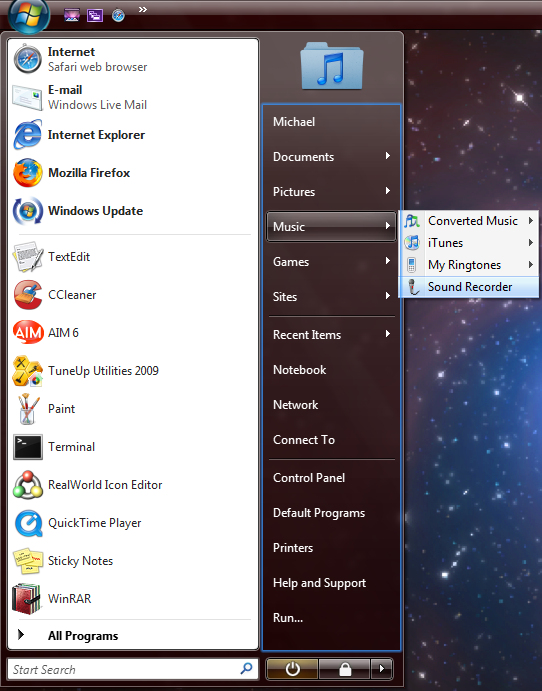
Bug1: When u go to the startmenu and open a submenu of a folder, Focusin highlights the square area (as shown in image1). This also happens and the left side of the startmenu, Ex: clicking all programs at the bottom.
Bug2: When u open an explorer window and start to type a search the area doesn't cover the entire search box. (image2)
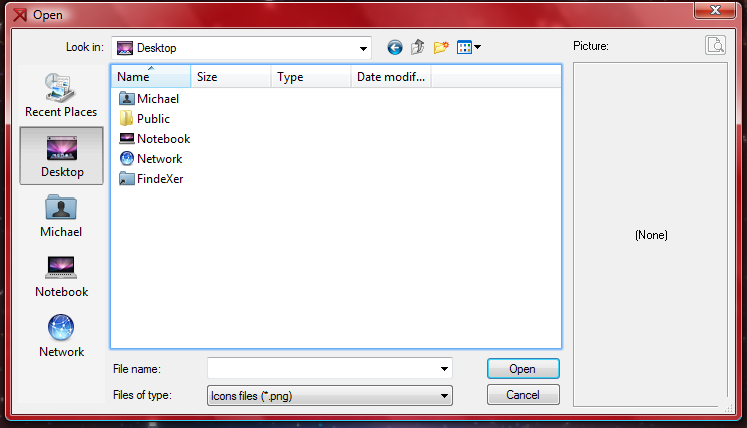
Bug3: this was present in Notepad but then fixed. This is very similar but present in the Open/Save dialogue. (Image3)
Bug4: Exactloy the same as in bug2 but in the form of the start search. (image4)
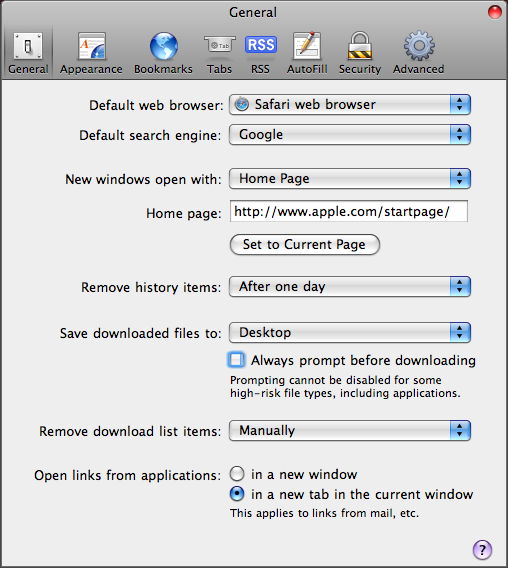
Bug5: I use Safari and this happens when I click/unclick checkboxes and some Buttons. I think this can be solved with an App-Exclusion feature. (image5)
Other than that it all works fine on Vista with a 1.5GHz 2CoreDuo Processor with 2GB of RAM


@mvosx1094:
Number 3 is not a bug, it is supposed to look like that, because the file list has the focus.
The others are bugs. I'll contact you soon so you can help me bear with them.
Number 5 is pretty solvable with an exclusion list, you're right on that. But another way would be to have the ability to apply skins per app (though more complex to implement... you'll have to wait a while for that one).
Hey Matonga, I had a question... you know the way you're able to mask the rename file text field to remove the box border when drawing your halo? Would you possibly be able to, when in detail view, 'indent' the left border of the drawn halo inward so that it does not terribly overlap the icon?
To see what I'm talking about, set explorer's icon view to "details" then try renaming one of your files. The halo (due to the text box position,) is too close to the icon on the left, however, there is a little bit of room between the text box left border and the first character. If you could make an x-adjustment just on the left border, but also, only in 'detail' view since in other icon views, the halo effect fits just fine.
Hey Matonga, I had a question... you know the way you're able to mask the rename file text field to remove the box border when drawing your halo? Would you possibly be able to, when in detail view, 'indent' the left border of the drawn halo inward so that it does not terribly overlap the icon?To see what I'm talking about, set explorer's icon view to "details" then try renaming one of your files. The halo (due to the text box position,) is too close to the icon on the left, however, there is a little bit of room between the text box left border and the first character. If you could make an x-adjustment just on the left border, but also, only in 'detail' view since in other icon views, the halo effect fits just fine.
Mmm... yes, I guess I understand.
The halo left border should be about a couple of pixels away in such cases.
I'll see if it's possible.
Please forgive me if I'm not updating Focusin XP with your suggestions (yours, mvosx's and others). I'm trying to finish Stacks Library grid functions first (and probably rewriting Stacks Docklet to use Stacks Library).
@mvosx1094:Number 3 is not a bug, it is supposed to look like that, because the file list has the focus.
The others are bugs. I'll contact you soon so you can help me bear with them.
Number 5 is pretty solvable with an exclusion list, you're right on that. But another way would be to have the ability to apply skins per app (though more complex to implement... you'll have to wait a while for that one).
Alright thnx, I'll wait for the update  . Also can you or anyone else make a "Graphite" versions of the 2skins? That would go great for Graphite lovers
@matonga, no problem, don't feel pressured at all  I seem to remember you mentioning you're also working on a breadcrumb toolbar? I simply can't do a windows XP install without Explorer Breadcrumbs. The only drawback to this app is that it doesn't want to skin itself. :confused: If you end up releasing something like that but with your attention to detail, i'm sure an i-angel somewhere will get her wings! no pressure 'or noth'n
@mvosx1094, it's pretty easy to make that adjustment yourself with something free like paint.net
but I can make some 'graphite' versions and post them within a week or so, if you like.
@firecracker6:
Man, that breadcrumb think looks really interesting. Though I have a little problem with it.
You are used to use very long file names, as far as I can recall.
Well, I'm used to put lots (and by lots I mean thousands) of folders inside most of the folders I have.
If a folder has subfolders, it has lot's of them. That's true at least in my computer.
So I would need something like a ZUI (zoomable user interface) on the flyout menu. Or something like that. I suggest to myself taking a big overdose of chocolate (I don't use drugs... because I already have their effects without them, I can't imagine what would happen if I suddenly smoke something).
oh, I know! do a filter by text search field ala win7 startmenu, but per submenu.
So, for instance if you have a path:
Desktop > My Computer > C: > Documents & Settings > Me > Many Many Files > etc
and you clicked on the > just before the "Many Many Files" folder, then a menu listing the contents of the folder pops up with focus on a search box which filters as you type. (the first result in the list being highlighted so that you can use keyboard navigation to arrow up/down & 'enter.') you could maybe assign keyboard shortcuts based on the arrow count from left. (for instance hotkeys: d+5 = "Many Many Files") ..with some nice fade in & outs it'd be kinda cool looking when you got fast at using it.
And it would be handy for your style of filing
Doesn't do much for mine tho ..hha
In Leopard "Breadcrumps" looks like this:

and with long filenames:

and a video that shows how long filnames are shown:
So will Focusin get an update any time soon Matonga? Just wondering if you were able to fix those bugs I told you about