 Aqua-Soft Forums
Nice Raats!!!
Thats what ive always wanted to do but never could...
A "Final" release!!!
Cheers!!!
Nice Raats!!!
Thats what ive always wanted to do but never could...
A "Final" release!!!
Cheers!!!
Raats, this is a great contribution - thanks a bunch... 
I've noticed on the default skins for Firefox 3 that there's a little down button after the forward button to help accessing previous pages... Is there any chance that you or others could implement that in your FF3 skin in a Leopardish kinda way?
Raats, the compact menu worked fine but I dont have an original tmp.xpi file to replace. I am using the GrApple theme. Looks identical to yours however I cant get the replacement buttons.
Hi,
please remove it and build your own version.
Similar like this for example:
https://addons.mozilla.org/en-US/firefox/addon/8055
Change in particular the install.rdf and the contents.rdf
Change the name, the number, the homepage - everything
by the way,
on result from your incomplete work is,
the auto update will replace this version the next time with my version.
Cheers
Removed at the request of the author
Aronnax mate no problem.
Yep, admittedly not the most elegant mod - rather just shooting from the hip. This was never intended to be anything complete but rather an add-on to the other mods contained in this thread.
I respect your concerns mate and this is why I made sure to heavily credit your work from the very first - you have done a spectacular job with this.
Aronnax, you've made an incredible job, but plz let us adapt it to windows...
I think it is better to release a mod than a complete new theme...
Because if someone release a "new" theme, probably it would be posted in other sites without your name,
and all the credits would go to the person who release it again...
Thing that would never happen here, cause in most of the post and even on the mod releases have your name and link for your homepage...
So, plz think about it and reconsider it...
and why dont you collect some of the mods we released here and make a windows version of it??
Because i think with all the codes here it is ready to go...
Aronnax, you've made an incredible job, but plz let us adapt it to windows...I think it is better to release a mod than a complete new theme...
Because if someone release a "new" theme, probably it would be posted in other sites without your name,
and all the credits would go to the person who release it again...
Thing that would never happen here, cause in most of the post and even on the mod releases have your name and link for your homepage...
So, plz think about it and reconsider it...
and why dont you collect some of the mods we released here and make a windows version of it??
Because i think with all the codes here it is ready to go...
yes !!!.. I agree 1000 %
@ Arronnax : I think you'd better/it would be nice ask Raats/whoever to get permission from you maybe ?
Aronnax, you've made an incredible job, but plz let us adapt it to windows...I think it is better to release a mod than a complete new theme...
Because if someone release a "new" theme, probably it would be posted in other sites without your name,
and all the credits would go to the person who release it again...
Thing that would never happen here, cause in most of the post and even on the mod releases have your name and link for your homepage...
So, plz think about it and reconsider it...
and why dont you collect some of the mods we released here and make a windows version of it??
Because i think with all the codes here it is ready to go...
When someone want to port it: Do it, but please make it complete.
I have no problems with ports, but use then an own name, number and so on
----
Themes needs a lot of time to build it, test it (as well with a few of the thousands of extensions for example) and then comes for sure user support questions.
And this again and again with every Firefox update.
I can do it for one platform, but not for all: It is simply a question of time.
---
About credits:
There are only a few guys who build really complete themes and most of the other themes are based on these few themes. They will be anyway sooner or later countless variations based on windows port of for example GrApple Yummy. Or in other words, it would make no difference when one include "credits". The other ones would not have it and therefore ... build a port with credits, but without credits make it no difference for me.
How would you even go about installing Aronnax's theme on windows?
same way you install any Firefox theme on windows.
No skin will work on Firefox 3.0.1, they install but when I apply theme I get the default look. I disabled all my plug-ins
but still the same. All Mac skins I have are the latest anyone have an idea why they wont work for me. (Also have Windowblinds 6.0 but that is not the problem either).
No skin will work on Firefox 3.0.1, they install but when I apply theme I get the default look. I disabled all my plug-insbut still the same. All Mac skins I have are the latest anyone have an idea why they wont work for me. (Also have Windowblinds 6.0 but that is not the problem either).
Well, perhaps Version 3.0.2 can solve your issues...?
Updating now so I will find out. The link mps69 posted was helpful but did not resolve the situation.
Nothing worked so I uninstalled it and reinstalled now everything is fine.
@kinsemonwithout the "fix"
with "fix"
Anyone find a fix for this or did I miss something in this thread.
see Darkfire's post #97, if you still haven't tried it...
That is what I used and everything is fine except this........

Also I would like to know how to flip the tabs as seen in Proto, and change the color of a skin. I want the tabs to be more like the Snow Leopard WB theme.
I'm using GrApple Delicious (Blue) if that makes any difference.
^^
- Hmm, i have not been inside GrApple Delicious Blue, but that bookmark item hover scripts should be inside browserbrowser.css.
- flipping the tabs??? move tab close button to the right, or 'inverting the tabs' (like in Windows dialog boxes-attached to the page instead of the bookmark/menu bar)?
-editing the tab images to conform to OS theme- in grapple yummy blue, images are found in browsertabbrowser. you might then have to also edit images found in globaltoolbar... then checkout out the corresponding .css files. real messy...:confused:, but worth it when accomplished 
'inverting the tabs'
Thanks man for the start I will start digging. I have already modded raats syler leopard theme to use inverted tabs (looks good) to go with Snow Leopard WB theme. I just need Firefox to match.
For those who want match the color of your WB Theme or msstyle, with your FF3 Skin...
The code for Stylish or the usual userChrome.css :
/* background color for all toolbars */
toolbox,
#toolbar-menubar,
#nav-bar,
#PersonalToolbar,
#FindToolbar,
tabbox,
sidebarheader,
#sidebar-box,
window statusbarpanel {
-moz-appearance: none !important;
background-color: #B1B4B3 !important;
}
Just change the hex color value in the italic type field with a color choice of your own.
Ex. " #C0C0C0 " for a silver aproach or " #A9A9A9 " for a Dark Gray lyke.
Here a link with some examples of color to match your skin with your windows theme:
http://en.wikipedia.org/wiki/Web_colors
You can use a color match lyke there´s in PhotoShop, or XN View to grab the exact color of the top of the window. If necessary, just make little adjust´s in the hex color to get the exact match.
BTW... dont forget to put the " # " before the numbers/letters of the color.
Sorry any lack in my english!
[]´s
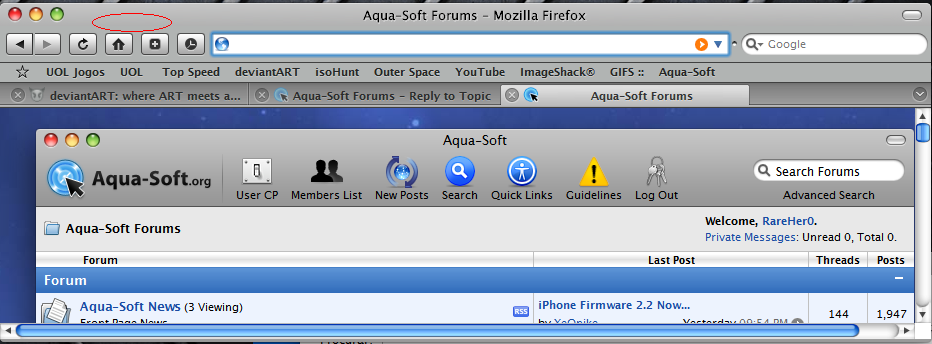

er.. darkfire.. where is the dload link to the transformation pack?
Hey guys, how about cursor in these themes? When I include a code for stylish at scrolling of page the cursor has a "grey" background. (The average button of the mouse). Please help to correct it?


