 Aqua-Soft Forums
version 9.2.2 did not work well with my pc. i returned to 9.2.1.
@dennisalcayde
Tell me please, what bugs you saw in this version which makes this version worse?
version 9.2.2 did not work well with my pc. i returned to 9.2.1.
@dennisalcayde
Tell me please, what bugs you saw in this version which makes this version worse?
Hey man, i was wondering if you can implement a little function.
Im am trying to replace the startmenu's function of searching apps "on the go" while the menu is opened. At least in windows vista thats a feature i have used a lot to launch any application that is on my drive C: Is it possible to do this as well? say you pull RunMe menu and just start typing to start the search within the menu, just like the run command works. If you have MS Vista you will probably know better what im talking about.
Hey man, i was wondering if you can implement a little function.Im am trying to replace the startmenu's function of searching apps "on the go" while the menu is opened. At least in windows vista thats a feature i have used a lot to launch any application that is on my drive C: Is it possible to do this as well? say you pull RunMe menu and just start typing to start the search within the menu, just like the run command works. If you have MS Vista you will probably know better what im talking about.
Yes, I working in Vista for some time and I think you mean that you want to add not just "C:" there but "Start menu". If I've understood correctly then you can find folder where are placed Start menu shortcuts in Vista and add it instead of all "disc C" in Settings->Indexind. So you will see only files from this folder.
If you mean that you type "cal" and you see "calc.exe" above or "explorer" launch "Windows Explorer" that it's really more difficult 
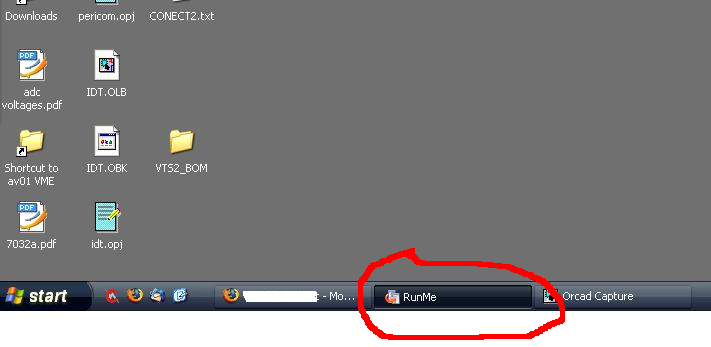
With version 9.2.2 i have found a few bugs, sometimes the first time i click on a application Runme appers in the taskbar and there is no way or removing other than exit the application and restart it; see image.
I found the "config.ini" file for 9.2.1 did not go too well with 9.2.2 and had to make a new one. Runme was having a fit on the edge of my screen.
Also the groups do not decend, as i click on it and nothing happens.
It seem that you have disable the function to drag and drop external apps onto runme all together, i do not mind this but what about the people whom use this function?

If you mean that you type "cal" and you see "calc.exe" above or "explorer" launch "Windows Explorer" that it's really more difficult
this is what i meant, can you implement it?  please? is the only function in order to replace my taskbar lol
With version 9.2.2 i have found a few bugs, sometimes the first time i click on a application Runme appers in the taskbar and there is no way or removing other than exit the application and restart it; see image.I found the "config.ini" file for 9.2.1 did not go too well with 9.2.2 and had to make a new one. Runme was having a fit on the edge of my screen.
Also the groups do not decend, as i click on it and nothing happens.
It seem that you have disable the function to drag and drop external apps onto runme all together, i do not mind this but what about the people whom use this function?
Hello,
Thanks for information!
Please try new EXE below this post. Now you can drag and drop files at least on first form. It's bug, I've not remove/disable this function.
>>Also the groups do not decend, as i click on it and nothing happens.
If you mean that click on group (not folder menu) do nothing - that's ok.
Working on other items.
this is what i meant, can you implement it?
Please try EXE below. So now you can add your programs as I said before and run "explorer","dxdiag","calc" etc. Just type and press Enter
On "cal" to "calc" autocomplete, I think it's unreal now. But all system commands should works well.
Thanks!
RunMe v0.9.2.2.3:
Hello,Thanks for information!
Please try new EXE below this post. Now you can drag and drop files at least on first form. It's bug, I've not remove/disable this function.
>>Also the groups do not decend, as i click on it and nothing happens.
If you mean that click on group (not folder menu) do nothing - that's ok.
Working on other items.
Please try EXE below. So now you can add your programs as I said before and run "explorer","dxdiag","calc" etc. Just type and press Enter
On "cal" to "calc" autocomplete, I think it's unreal now. But all system commands should works well.
Thanks!
RunMe v0.9.2.2.3:
hi,i cant get RunMe...
because i open your web will get the page look like 503 error...
can you send runme to my mail?
my mail is llqoli@gmail.com,thx.
open your web will goto http://www.pochta.ru/error.503.html.
@dennisalcaydeTell me please, what bugs you saw in this version which makes this version worse?
sorry for late reply...
after installing v9.2.2 RunMe was frozen. its not reacting to mouse or keyboard. needed task manager to close.
but im 9.2.1 is running smoothly.
thanks for your program.
dennisalcayde, thanks for reply!
I'm not sure why it should be, maybe something with links or config. I will try to upload full archive with all files later.
cctrv, please try this mirror link: http://www.freewarefiles.com/downloads_cou...programid=41350
Ksoft.nm.ru placed on free service so it works accordingly  They will correct it soon there, I am assured.
Edited: If You mean only v0.9.2.3 exe then I've uploaded it here:
It tried v0.9.2.3 and the lock stopped working, so i have gone back to 0.9.2.2.
The main bug with this is when RunMe appearing in the taskbar after the first click on a application, just after booting my pc, this is happening everytime i restart the pc, as highligted in pervious post.
I am using dual mointours and with the settings and about menu appear in the centre of the two monitours. This can be changed easily in delphi to form postion centre screen or desktop (can not remeber off the top of my head).
Hey man, i tried the last buil a while ago, downloaded again a couple of days ago but dont know how to do the search app vista-start-like you mentioned before.
didnt post before cuz i thought i was doing something wrong but cant make it work 
Thanks for the app tho! it looks pretty cool 
Church Punk, can you please specify what do you mean on Vista-start-like? Maybe I've understood wrong. For example: links to programs you have on you pc (programs folders) for all users is in c:usersAll UsersMicrosoftWindowsStart MenuPrograms, right? If you add it to runme's index, in Settings, then you can search in this folder for programs shortcuts. What places do you want to search also?
This is a new version with minor fixes. Who have problem with RunMe when it's not answer on cursor movement. Now it should
http://ksoft.nm.ru/runme0.9.2.4exe.zip
PS: Whoops, I've understood to change file extensions in cache from PNG to TMP. You can clean Cache folder before RM running (there are unnecessary files, it will be recreated after first running).
Hello, my friend!
I've installed last version 0.9.2.4, but there are several bugs or something like that.
1 - items with broken links displaing with no icon, instead of round icon with sign "?".
2 - it's almost unreal to use context menu, if mouse isn't on any item. RunMe slides out(it's bug, a think, of "slide out only on mouse leaving" option)
3 - games often mimizing then mouse finds runme. maybe it worth to do some application filter? if some app is launched, runme don't tries to stay on top of it
I've tries to explain it as clearly as possible, any way you can ask me directly, if you want.
As for the rest RunMe rules, keep a great work! Waiting for new versions =))
Hello!
I'm glad to see you on forum, my friend!
And I'm glad that you still use RunMe after all this bugs
1)I can't reproduse it unfortunately. I've tried to create a new link and input something like "c:sdjhgf.txt" and I see "?"
2)Yes, I see, this is a bug. It "works" only with "slide out only on mouse leaving" option and 2nd and 3rd form.
3)That's strange because I've thought that I've created super-mega algorthm Maybe after all this bugs I will think more on this alternative feature.
Thanks for all info, I'll see in code soon
Yes, I cant work on PC without RunMe, it's irreplaceable soft, like PuntoSwitcher and some other )) Even if it contains several bugs.
About 1st bug, try to restore icon, it's clears icon even for new item. As I remember this button should display this "?" icon by default.
Please try this version. There are corrected SlideIn-Out sliders, but with "?" (can be buggy anyway) and context menu
Yeap, it seems that sliding is fixed, thanks!
But default icons still are not displaing(see attachment pic). I can't say that it's a big bug, but it will be better without it ))
And, please, delete this little "peep" on slide-out )) I think it necessary only for testing =)
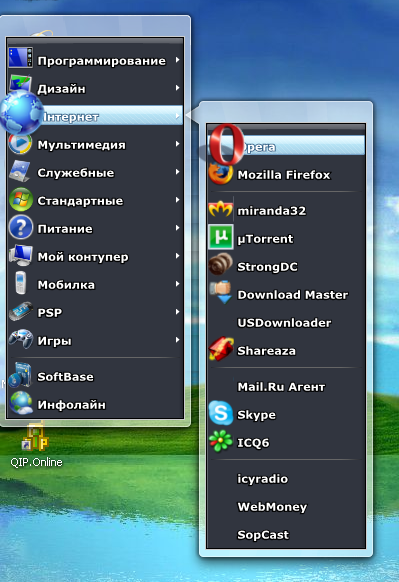

Wow! All this icons looks cool
Oh, no! You've deleted IcyRadio
Please try this Beep-free and icon-fix build (I've replaced older file):
No =) I've bought new hardware and reinstalled OS, so many programs are missing. That's why I found this bug, with icons. Thanks for new version, this 2 bugs were fixed! Nice job, my friend!
No =) I've bought new hardware and reinstalled OS, so many programs are missing. That's why I found this bug, with icons. Thanks for new version, this 2 bugs were fixed! Nice job, my friend!
My congratulations on new hardware!
And I'm glad that now it similar with "working" version.
PS: Please check your email ("reg" box), I've sent letter about new Start Menu (almost offtop)
oops, found other bugs. On windows start RM button displaing on taskbar, like jlix posted. on manual RM restart it disappears.
and on pressing Win+D, sometimes RM dissappears too. If i click on place, there it seems to be, RM shows. but in older version i don't remember such behavior.
I have tried out 0.9.2.5 and when i unlock RunME and drag anything onto it, it disappers. The lock/unlock does not seem to work correctly.
Are groups intentionally turned off as the have been disabled in all the 0.9.2.* versions, i have used?
jlix,
On groups click. I wrote above that it's normal for groups. What do you mean should happens on group click?
Lock/Unlock should lock items and you can't move it or delete with mouse drag'n'drop. How it works on your PC?
Also can you please send me your config.ini file, please? I'm not sure but maybe it's related with configuration settings. (ksoft(a)nm.ru) I can dra'n'drop any file to RunMe.
Thanks much!
I am using XP sp2.
The groups do not open the next level when the mouse is over them but works fine with 0.9.2.
I think it would be great to make macros item,which launches several programs one by one. For example I need to start every day Opera, Miranda, uTorrent, StringDC++ after windows load.
And another bonus feature could be some simple operations, like copy file, move and so on. So some usual operations will be much easier to make with new RM macros features