Miranda Skinning Guide

Hi first I want to say that this tuto is great! This the first time that I can actually use miranda. I just have one question, is there a way to make the background of the messege box white? I tried changing all the backronds in fonts and colors to white but it doesn't change.

miranda8ka.th.png

#348298

Hi first I want to say that this tuto is great! This the first time that I can actually use miranda. I just have one question, is there a way to make the background of the messege box white? I tried changing all the backronds in fonts and colors to white but it doesn't change.

you must change the *.css file manually. that'll fix ya good.

#348317

hey thanks man, i finally did it :)

Great guide!

#348658

you must change the *.css file manually. that'll fix ya good.

Thanks, it took me a while to figure out what to change but finally it's finished:D

#349326

This tutorial is wonderful but I still have a problem

No matter what template I choose (.ivt, .css, .html) the chat window does not change and I followed all the instructions

also, the chat in my chat window is centered and not left-hand-set..

see here

ss6fy.th.jpg

it's making me nutso that I can't get tese 2 things to work

any help would be appreciated

Cheers

Amber

#349613

Great tutorial - I did this once before and gave up after messing around for a week. Your tutorial sorted it for me in 10 minutes.

the only problem I have is that I don't connect on Miranda launching - I have to do it manually... I've looked all over but cant find a "connect on start" button... anyone help me out?

Also how to I change the Close button to minimize and not shut down Miranda? done that about 10 times now - DOH!

#349682

Tricky--not sure about your second question (haven't seriously opened the Miranda config options in months, hehe), but I recommend using the plugin StartupStatus.

Quite handy and configurable, find it here: http://miranda-im.org/download/details.php...iewfile&id=2207

-NC

#349684

NC - you don't hang around mate! even got a link for me too!! Cheers for that - working properly... now to sort that close button out!

********** EDIT

Ok apprently its built into the skin each command... anyone know how to edit a .dll file?

#349687

@Amber: did you check to use "ieview as default message log"?? My guess would be that you didn't do that...

Thanks for the compliment Tricky. I figured after I spent a few hours figuring out for myself, I might as well share the wealth.

And thanks for the help NC, although I personally recommend using the RealReconnect plugin found here: http://miranda-im.org/download/details.php...iewfile&id=1783

#349689

@ppoppe: Yes that is checked

am wondering if I should do a complete reinstall with freshly downloaded files

EDIT: This is weird. I just rebooted the pc and the template for ieview all of a sidden worked..weird but I will test it further!

#349798

Sorry to reopen the thread after two weeks of inactivity, but I have a few quick questions. I'm having trouble setting my own avatar, could anyone give me some advice?

Also, I'd really like some help on setting up a transparent background for Miranda. It looks absolutely stunning in this screenshot. Thanks in advance for the help!

#355063

Hey all,

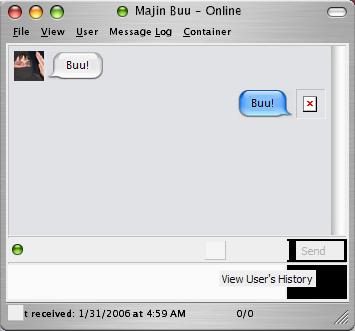
I am having an icon issue in the actual chat window.

I cannot see the button icons for various functions, like viewing a profile and stuff.

Any ideas?

- Buu

post-33699-1138701988_thumb.jpg

no buttons.JPG
no buttons.JPG

#355082

@crash: what protocol are you trying to set an avatar for? and, you can use clistmodern to make the contact list transparent.

@NSS: right click on the titlebar of the message window, and go to "container options." Make sure you have the toolbar and all checked so it will display.

#355125

Hi I'am new in Miranda. I've followed ya instructions, but my preference don't appear 'customize' menu :( [see attm.]

post-27115-1138719472_thumb.jpg

miranda.JPG
miranda.JPG

#355143

@bsayz: what are you trying to accomplish? When you say "my preference don't appear 'customize' menu" I honestly don't have a clue what that actually means. If you follow my instructions step by step, they will work. I know, 'cause I did it, and there's quite a few others who have managed to do it too.

#355196

I've been trying to set my avatar using ICQ. I've set the avatar under my details, but it's not displaying in the chat window.

Also, the transparency effect you described isn't quite what I'm going for. It fades both the contact list and the contacts themselves. If you look closely at the screenshot I posted earlier, only the background to the contact list is transparent, and the contects themselves are still at 100% opacity.

Thanks:)

#355198

in that case, you will need to make your own clist_modern skin. alternatively, you could take whatever skin you are using, and edit all the appropriate pngs so that they are completely transparent. That way, when they display, voila, the background is transparent.

Also, I believe that the reason the avatar does not display in the message window (and someone can correct me if I'm wrong) is that the ichat window has it hardwired. That is, the ichat theme just looks in its subfolder for an image file entitled "me.jpg" or something similar, and that's what it displays for your avatar.

#355242

Thanks, I've got it now.:D I'll try making a new skin soon, and if it turns out, I'll let you know. Thanks again!

#355375

you must change the *.css file manually. that'll fix ya good.

could somebody please explain to me how?

#364640

I know this is a bit late to the party but I just had to congratulate you ppoppe on an excellent Tutorial.

Got me up and running in next to no time and it was fun for the novelty and cool factor. (but in the end had to move back to MSN and MSN Plus, but I'm sure to use Miranda occasionally ;) )

Thanks!

#364863

awwww, c'mon Zaft, you know you like it ;)

thanks for the props though man, I appreciate it

#365121

I love this tutorial. Finally I can switch to Miranda. :)

#365136

could somebody please explain to me how?

open *.css file using Notepad (or if you like, Dreamweaver). they're bunch of text and whatnot. the important thing here is you know little HTML coding. if you want to change some colors, look for formats such as this:

#999999

this number outputs a color (for this, light grey). play with it and see if you find what you like. #000000 is BLACK, #FFFFFF is white. for other codes search google for codes.

#365143

thanx, "Kaloyster". I'm not very good with html coding, but i will take ur advice.

#365174

About tabsrm, where is the option that enables this plugin to popup, rather than looking at the system tray to see it blink?

#365280