 Aqua-Soft Forums
How`s the 3.5 skin goin Timan?
Aqua-Soft vB3 Skin Re-Released
Slow, the Ajax inline modding stuff is driving me insane, I've broken a few bits of the forum just moving things around.
How to fix Avatars in vb3.5
Login to your forums, goto the edit templates section for the Aqua-Soft skin,
Next expand Postbit Templates, and select Legacy Postbit
Find
Replace with
Press save and you're done.
Slow, the Ajax inline modding stuff is driving me insane, I've broken a few bits of the forum just moving things around.
Wish I knew enough to help m8, but unfortunatly html ain`t the best of my abilities LOL .... learning it at the moment 
Hey . thanks for your skin , i have some question to ask :
First : I have some problem with display subforum in Forum Home ( it doesn't work ) , and when i creat multi forum , it doesn't change color as thread .
Second : I have some Javascript error when Login and Logout
Third : Where can i change the font when display text in thread ?
Note : I am using VBB 3.0.7
Waiting for your reply ...
To add subforums to the forumindex do the following.
Login to your forum, goto stylemanager, and select edit templates next to the aqua-soft skin.
Once there, find and expand Forum Home Templates, and select forumhome_forumbit_level2_post.
Once there
Find
$forum[description]
And ADD BELOW IT
$vbphrase[subforums]: $forum[subforums]
And Press save, that should fix it.
You have to give your forums the propper display order for them to be colored
correctly, (alternating for blue to white)
IE.
Category 1
- Forum 1
- Forum 2
- - SubForum 1
Category 2
- Forum 1
Thanks a lot , but what about javacript error when login and logout ?
Not sure about the javascript errors, I am not recieving them on the current forums here, and on the vb3.5 dev forums.
uhmm , I get javascript error even with this forum , i am using IE6 with Window Server 2003 , anyone more have this problem ?
Can you be a tad more specific on this error? I am not seeing this on my end so I can not fix it.
ok , first i set the security for Internet Zone in my Internet Explorer 6.0 to Default Level , so i still get javascript Error When i press Login at this forum :mad:
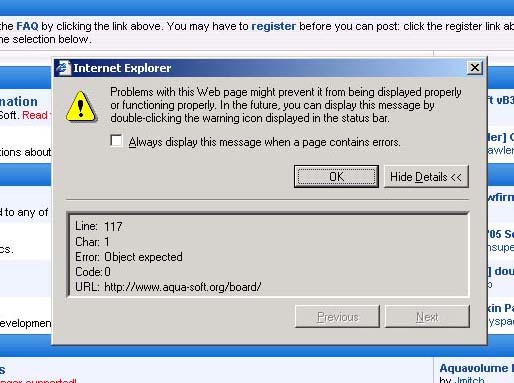
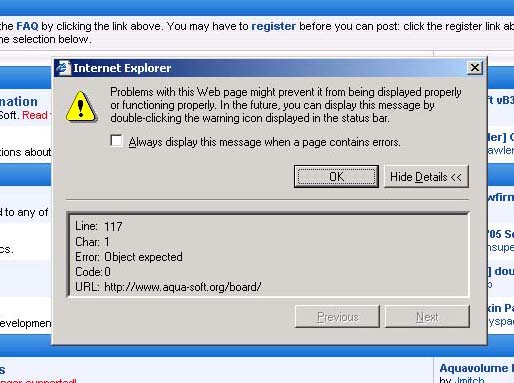
Zhaowei, I can not reproduce this error, I've tried it on to Window machines and nothing.
Anyone else have any idea what is causing this do post.
OK , and how to change the font in thread bigger as this board ? My font in post is too small .. sorry but i can't find where to change that font
Hi Timan,
I have searched this thread, but didn't see anything posted to this issue, as I know that you take 'special care' so that the entire site renders properly with the 3 Main stream browsers, Opera, FF, and IE...
I have become quite fond of Opera, and with its latest TP1 version of 9 (Merlin), I am getting this one minor rendering b0rk:

Can i ask more question , when i click on register button in this forum , the header navigation bar is hide , i want the header show in all page .. how to ?
Hey Zhaowei, I see what you're saying about the toolbar not showing up on the signup process.
This is nothing I can fix, its something VB3 does, it is however fixed in 3.5
^^ , and how to show "last post by" in Forum Display ?
^^ , and how to show "last post by" in Forum Display ?
http://www.aqua-soft.org/board/showpost.ph...2&postcount=115
Thanks very very much ^^ , and how to replace text EDIT , QUOTE , REPLY as aqua button ?? and replace YiM , aIM text as image icon ?
how can i hide the post count for all users? i know it's something in postbit, but i can't manage to find it..
How to fix Avatars in vb3.5
after vb 3.5 upgrade you just need to revert one postbit template
hope this helps
nice litlle thingy with that intellitext.. is it hard to implement ?
ok to fix the problems with the posbit legacy just do the following:
1. Go to admin cp
2. Open style manager
3. Click edit templates for the aqua-soft.org skin
4. Find postbit templates and click it
5. Find postbit_legacy and click on it
7. Replace everything there with the code in the fix.txt file attached to this post
to delete the post count do the stuff written above, and find this:
$vbphrase[posts]: $post[posts]
and delete it!
ok to fix the problems with the posbit legacy just do the following:1. Go to admin cp
2. Open style manager
3. Click edit templates for the aqua-soft.org skin
4. Find postbit templates and click it
5. Find postbit_legacy and click on it
7. Replace everything there with the code in the fix.txt file attached to this post
to delete the post count do the stuff written above, and find this:
$vbphrase[posts]: $post[posts]and delete it!
RazorFold it can be done with one click.. >> Revert