 Aqua-Soft Forums
can anyone give me the aquasoft theme that have been modified..
i dont know to edit it..
thx !
can anyone give me the aquasoft theme that have been modified..
i dont know to edit it..
thx !
A great way to re-produce the effect of the seperators is to use the "dotted" property for CSS seperators.
Timan;
ive been reading and most of the posts here show the same problems i am having:
1. The spotlight_left image is not showing
2. The spotlight_clear image is not showing either
3. livetype doesnt work
4. I got a bunch of links to aqua-soft.org where do I change them?
Thanks!
thanks very nice .. really wonderfully
Timan if i can ask what about that new WP theme that some time ago i've heard you was doing ?
Hi, I love the theme. Its excellent.
Only trouble is I do not understand how i can change the links ect. I read earlier in this thread that someone had troubles with their links and images. I am quite new to this any help will be excellent.
Thanks
Mankie
Thanks Tim! I got some bugs when I try to use it though. The Live Search is missing images, and the seperators in the header and footer don't show.Thanks!
Check out my blog using the template (modified)!
erm... that link leads to a porn site!
Ok I play with the style and it looks like this :
Do you release it?
That's what you get for clicking a year old free URL redirect link that I deleted my account for.erm... that link leads to a porn site!

My new site is http://www.justdreams.be , but I'm not using the Aqua-Soft template anymore.
Timan;ive been reading and most of the posts here show the same problems i am having:
1. The spotlight_left image is not showing
2. The spotlight_clear image is not showing either
3. livetype doesnt work
4. I got a bunch of links to aqua-soft.org where do I change them?
Thanks!
timan you have a bug here. In the file sidebar.php the path to the images
reads: /images/spotlight_left.gif and /images/spotlight/spotlight_clear.gif
and it should read:
www . yoursite . com/wp-content/themes/aquasoft/images/spotlight_left.gif


and


www . yoursite . com/wp-content/themes/aquasoft/images/spotlight_clear.gif
Yes i was wondering if i could have the psd of the logo and the attachment is a pic of the errors i am having and i need sumone to tell me how to fix it and the images are in the right folder but not showing up on the blog
just look at the red circles and it iwll show my problem
plz reply with solution
or reply with a modified working version of aquasoft theme for wordpress v2.0.2
To contact me via live chat u can contact me using Msn Messenger my msn is: stokesandrew@msn.com
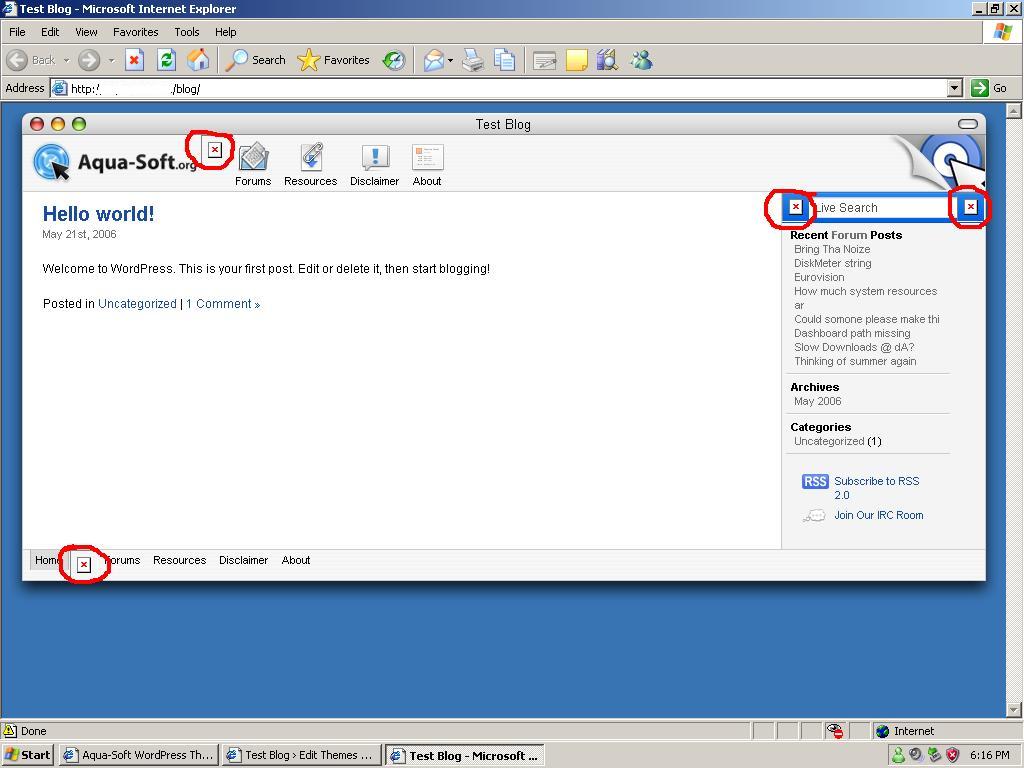
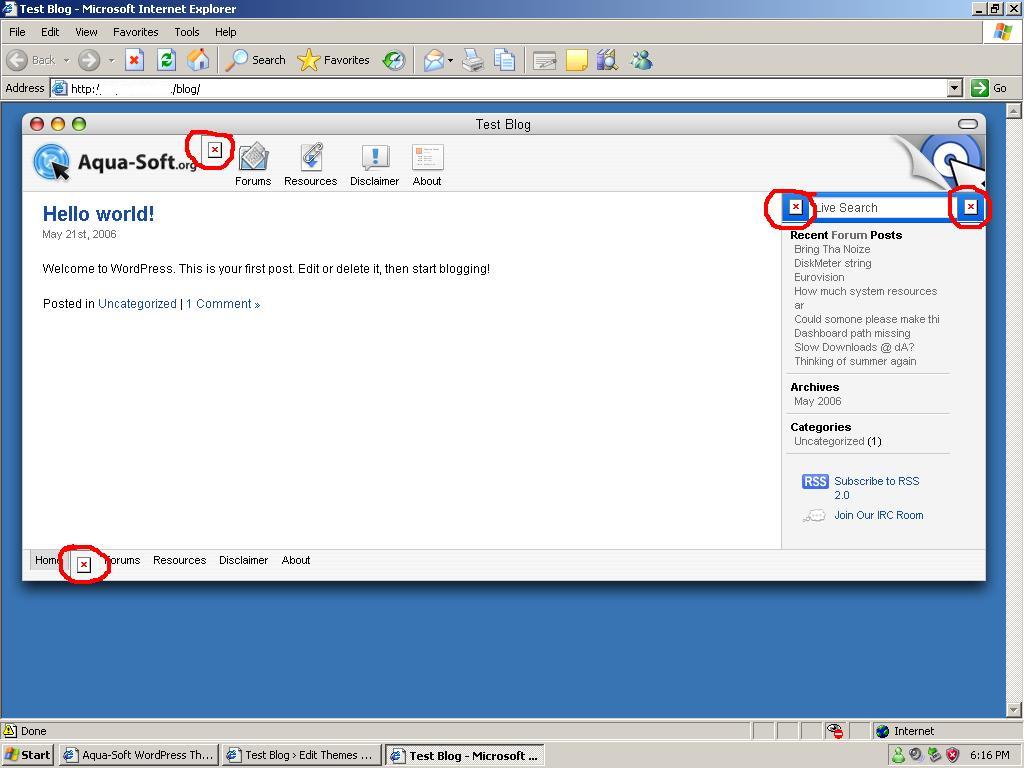
People have already posted a fix for this. You just need to make the path names to the missing images full path names as opposed to relative. That's all I did and now the images appear correctly. Hope this helps.
plz tell me what to do to fix it?
Yes, very nice of you to share this with everyone and distribute it. This forum seems very popular, and I've never seen this go around.

Aqua-Soft WordPress
Here is the theme I have created for the main page of Aqua-Soft. Feel free to use it on your site and modify it what so ever. But I do ask you do not sell or redistribute this theme without our permission.
This skin also includes LiveSearch, just upload the files to your WordPress directory, select the skin, and everything should work out of the box.
If you would like to donate, you can do so by sending donations to Tim@vastyles.com
If you have problems you may post here, but I can't guarantee they will be answered.
Im new to the forum, but not new to this awesome site of ur'z..
I search'd for the aqua wordpress themes but.. Some of the the themes which i found was not good enough for me.. But gave some search of google.. & ya like the 1st hits was found here..
I really love u guy'z work.. Its soo neat as & apple product.. ;-) lol
Thankx agin soo much..
Keep rolling guy'z.. Need the very best stuff from you..
KIT
thx
When I download it in Safari, it just downloads Attachment.php.
Hi guys,
I was wondering if this them is actually fixed width, or does the width get adjusted dynamically ?
Alos I noticed on the Aqua-Soft front page that you have a list of recent posts from the forum in your blog, how did you actually do that ?
Regarrds,
Stefaan
Its fluid, you can make it a static width simply by changing a value in the css.
vBulletin has javascript syndication built in. so you put a little like on javascript on your pages and it can get recent posts from forums.
Hi,
Ah, true, I forgot your were using vBulletin :-(
For now I won't be able to afford that, so I have to settle with phpBB. I'll have a look around on the web if there is some way to integrate those two with eachother.
Regards,
Stefaan
Hi again,
I tried setting this theme up. The phpBB part was easy, and I did manage to fix the image stuff in the WordPress theme as well ( http://test.itutorpodcast.com/ ). I do have a few additional questions though.
First of all, here on my big screen mac, if I open up the Blog page, only a small part of the safari window seems to get filled, unlike the forum page will display in the complete safari window. Is there anything I could do to change that ?
Additionally, does anyone know if it would be possible to create a list of recent forum posts for a phpBB board ? I like that feature in the theme, but for now I havn't been able to get it working on my test forum :-)
Any input is always appreciated.
Regards,
Stefaan
Hi, merry xmas!
I made the Theme Widget Ready. (Widgets Plugin must be enabled)
Yust add a functions.php to the theme folder with this:
<?php
if ( function_exists('register_sidebar') )
	register_sidebar(array(
		'before_widget' => '<div class="rc_section">',
		'after_widget' => '</div>',
		'before_title' => '<p class="rc_title">',
		'after_title' => '</p>',
	)

);
?>

<?php
function widget_myuniqelinks($args) {
	extract($args);
?>
		<?php echo $before_widget; ?>

<p class="rc_title"><?php _e('Links'); ?></p>
<ul class="rc_list">
<?php get_links(); ?>
</ul>

		<?php echo $after_widget; ?>
<?php
}
register_sidebar_widget('My Unique Links',
	'widget_myuniqelinks');

?>
Edit wp-content/plugins/widgets/widgets.php and change the most
Thats it!
Best regards, Jens
Anyone come to find that some of the files namely header.php footer.php and sidebar.php weren't coded correctly ?
However i have fixed these problems and have put them into a zipped folder for people who might need the fixes.
I might have downloaded an old version if i have let me know lol
.....
