Aqua-Soft V5 Wordpress Theme *updated

Aqua-Soft v5 Wordpress

Last Updated 01/18/10

Here is an updated version of the skin. Nothing too fancy, just has the new updated snow leopard look. This is a free skin and is not really supported. So if you have a problem I can't really help you out with it, but you can still post in this thread and I may take a look. Make sure you download WP Aqua-Soft v5.zip

Please Donate

Screenshot

181a4ff84dedfaf40acb1a0.png

Old Version

Aqua-Soft v2 WordPress

Here is the theme I have created for the main page of Aqua-Soft. Feel free to use it on your site and modify it what so ever. But I do ask you do not sell or redistribute this theme without our permission.

Just a heads up, as_wordpress.zip theme is 4yrs old and is no longer supported. So use at your own risk.

as_wordpress.zip

WP Aqua-Soft v5.zip

Attachment: as_wordpress.zip

Attachment: WP Aqua-Soft v5.zip

#287257

Ah cool!

I love the Aqua-Soft style, this will be amazing to use on my blog. Thanks a lot, I donated and everyone should do the same. :)

#287258

It's very nice of you to distribute your work. I hope people appreciate this, and don't take these kinda things for granted.

Well done Tim.

#287260

wonder thanks a lot

will try it for sure on my blog

#287266

can we get a screenshot

#287315

http://www.aqua-soft.org/

^ Interactive screenshot ^

Good work on the layout, by the way.

#287317

oh heh! ok

#287379

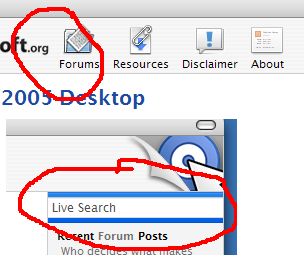
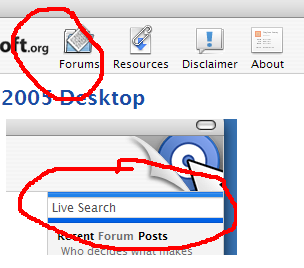
Thanks Tim! I got some bugs when I try to use it though. The Live Search is missing images, and the seperators in the header and footer don't show.

Thanks!

post-2930-1117333942_thumb.png

bug.PNG
bug.PNG

#287436

Well I was able to get the missing Live Search images to show by changing it to the full pathname instead of just "images/spotlight_clear.gif"... not sure why it wasn't working before.

The Live Search itself doesn't seem to be working... the dropdown menu won't show. :( Both Live Search files are just uploaded into the base WordPress directory, right?
#287452

Hi , the theme is great .... Timan thanx for published it.

I have that small problem ....

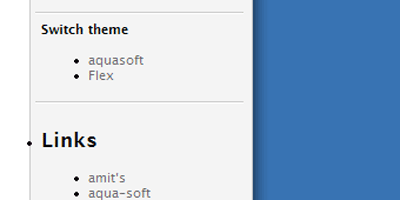
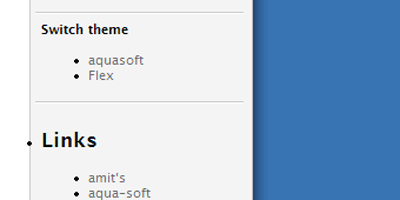
I cannot change the style of 'Links'. 'Links' is the name that i write in my admin panel of wordpress for the links group.

So it is the :

php get_links_list();

But the 'Links' ... i would like it to be the same syle as the 'Switch theme' .... see the image.

post-7210-1117372185_thumb.png

error.gif
error.gif

#287532

Hi , the theme is great .... Timan thanx for published it.

I have that small problem ....

I cannot change the style of 'Links'. 'Links' is the name that i write in my admin panel of wordpress for the links group.

So it is the :

php get_links_list();

But the 'Links' ... i would like it to be the same syle as the 'Switch theme' .... see the image.

You can just use ?php get_links(); ? to get the links without the list and categories and just wrap it in a div with p class="rc_title".

#287582

Well it doesn'r work :(

This is because the 'Links' is pointing by php , by the links category name.

#287589

[div class=rc_section]

[p class=rc_title][?php _e('Links'); ?][/p]

[ul class=rc_list]

[?php get_links(); ?]

[/ul]

[/div]

#287592

Ok thanx it is working :)

#287594

Thank you so much Tim for your hard work. You just made my day better :)

#287681

Nice of u to share this :)

I sendt u a little donation as thanks.

//zmeden

#287906

Ok I play with the style and it looks like this :

http://coxis.webhop.net/wordpress

#287975

Hey i have this question , is there a chance someone change the theme to fit other sites that the main page

Well i mean i have on my page many subcategorys pages , and that pages are not so good lokking as the main.

The best it should look like the main page , post + comment +space ... post+ comment +space .....

The second problem :

Also add the css style for the title of this pages.

Example i have a fvwm section , i click on fvwm and in the top it is fvwm text , it should have a style ... how to add that css style

I know it is a big request ....but still i am not a good programer at all .... so please help me

If the hack with the comments will be add it will be absolutly 100% extra for me.

#288720

I can tell Timan used Kubrick as a base for this theme. Kubrick has a feature the_excerpt that strips archives of HTML for faster browsing. To remove it, edit the Archives Template and change < ?php the_excerpt() ? > to < ?php the_content('Read the rest of this entry »'); ? >.

I don't understand WTF you're trying to say for your second problem.

#288955

Well i don't have that entry in Archives Template :

< ?php the_excerpt() ? > to < ?php the_content('Read the rest of this entry »'); ? >.

Second problem , i click on the menu of my site About , in the button of that page i have text: 'About' ... i want ot add the css style to that text

#288968

Well i don't have that entry in Archives Template

Look harder.

Second problem

Screenshot.

#288986

i had this in Archives Template ,

< ?php the_excerpt() ? >

Nothing else

#289053

i had this in Archives Template ,

< ?php the_excerpt() ? >

Nothing else

That's what I said to look for... I said to change it to < ?php the_content('Read the rest of this entry »'); ? >.

#289070

upps ok , i did not understood that ,

ok now i change it , what now , that happend , i did not see the changes

is that change it like here :

http://amit.needlemen.com/wp/

because this is a good example

The amit site has better post sytem for me ... i was wondering how to apply that system to aqua-style .... please help

#289072

I don't understand what your problems are, or you don't know how to say your problems correctly. I thought you were talking about how when you click on categories, it doesn't show images and stuff like that. That change made it so that images will show when you browse by categories or archives.

If you want "Read the rest of this entry" like at amit, it's not a style to be applied... it has to do with how you post. Look at the options on the Write page.

#289203