Aqua-Soft Forums
Thank you for replying.
1)I got it just from this thread.
2)Besides TabExtensions, i also use Fusion and Compact Menu.
3)Safari fx preview release 1.0 by Eric Chu.
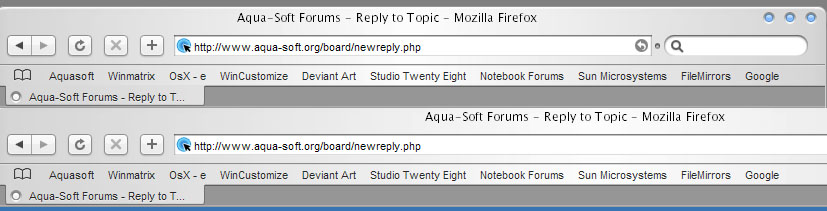
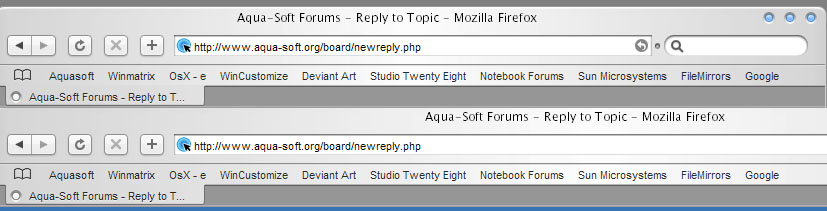
If i uninstall TabExtension, tab color is all right again.
Thank you for replying.
1)I got it just from this thread.
2)Besides TabExtensions, i also use Fusion and Compact Menu.
3)Safari fx preview release 1.0 by Eric Chu.
If i uninstall TabExtension, tab color is all right again.
...
Ok, it may be a setting Eric is using for Fusion that is causing the colour change... As I said, this is so that people can still use Hills' and Susumu's themes.
I will try his theme without Fusion, and then try one of Hills' themes with Fusion and see what happens.
[EDIT]
...Well, Fusion doesn't like any of the SafariFox themes, that's for sure.
[EDIT 2]
Hmm, Now I'm stuck again... It works perfectly fine my end again
[EDIT 3]
If anyone else is using SafariFX (not SafariFOX) I suggest you try Tab Mix instead of TabExtensions.


Thanks,Acaeris
does the SafariFX of anyone a right click popup bug? i can´t save images.
having same problems as wyh and im not using Fusion only tab extension and compact
does the SafariFX of anyone a right click popup bug? i can´t save images.
yes! I have,too. :confused:
sorry for the off topic, this was already fixed
Just so that people posting here know...
I am using:~
A clean install of Firefox 1.0.3
Windowblinds with Firefox on Per Application skin (BzPanther 4/Safari)
stop-or-reload button 0.1
Compact Menu 1.7.2
Tabbrowser Extensions 1.14.2005032501
Themes I've tested with this setup:
Hills' Milk Safari
Hills' Safari
Eric Chu's Safari fx
The Tabbrowser Extension is my own SafariFox mod found in the first post of this thread.
If anyone wants me to test a theme the post a link to the theme and I will post a screenshot of it running on my computer. As I seem to have only 1 glitch with my setup (which is caused by part of TabExtensions I haven't modded (It's the find bar problem from long ago)), I am finding it very hard to fix these errors as I have no way to replicate them or understand what's causing them in the first place.
It may be somewhere in your settings for TabExtensions as the screenshots are from a fresh install of Firefox 1.0.3, TabExtensions (SafariFox Mod) and SafariFox.
yes, you are right. after a new installation of ff, everything looks like in your screeni! 
thanx a lot!
cysco
...any chance for an update of the mod?
No, Mozilla have even stated that TabExtensions causes more problems than it's worth. If Firefox updates and TabExtensions doesn't work anymore, I'll jump to Tab Mix, until then I'm using the SafariFox version I made on page 1 and just don't update the mod.
Sorry, but I've got so many things to do, I can't be doing such a small mod to this every time there is a minor update.
oh ok. i was only asking again, because you said in a previous post that youd look into posting an update.
and updates to this extension arent very frequent nor minor.
I have updated this for the last version with the one in first post of this thread (instructions by acaeris in other thread). Please someone test it with a safarifox theme (not safari fx)
I have updated this for the last version with the one in first post of this thread (instructions by acaeris in other thread). Please someone test it with a safarifox theme (not safari fx)
Many thanks for you,it's working fine.
thank you very much for your contribution!
There has been another update...
this extension is updated twice at month, so you have to update it by your self, very easy just replace the skin folder and the referenced part of the tabextensions.xml file referenced in this thread in to the new tabextensions.jar with the ones moded by acaeris in the first post.
eh, i tried the xml coding part twice, and it screwed up.. im not a coder, though i did what the help file said to the best as i understood it.. ah well, maybe if someone can just do a monthly update, i dont think thats too much to ask.
Updated.
You don´t need coder skills to replace in the tabextensions.xml this:
<binding id="tab"
	extends="chrome://global/content/bindings/tabbox.xml#tab">

	<content>
		<xul:image class="tab-icon"
			tabclass="tab-icon-hidden"
			xbl:inherits="src=image"/>
		<xul:hbox class="tab-middle tab-image-middle box-inherit"
			xbl:inherits="align,dir,pack,orient,selected"
			flex="1">
			<xul:hbox class="tab-dropmarker-before"/>
			<xul:stack class="tab-icon">
				<xul:image xbl:inherits="validate,src=image"
					class="tab-icon-image"
					tabclass="tab-icon-active"/>
				<xul:image class="tab-extra-status"/>
				<xul:spacer/>
			</xul:stack>
			<xul:stack class="tab-text-container" flex="1">
			 <xul:hbox class="tab-text-background" flex="1"/>
				<xul:progressmeter class="tab-progress"
					flex="1"
					mode="normal" value="0"
					xbl:inherits="value=tab-progress"/>
				<xul:label class="tab-text"
					flex="1"
		 	 xbl:inherits="value=label,accesskey,crop,disabled"/>
			</xul:stack>
		 <xul:toolbarbutton tabclass="tab-closebutton" class="tabs-closebutton close-button"/>
			<xul:hbox class="tab-dropmarker-after"/>
		</xul:hbox>
	</content>
by this:
<binding id="tab"
	extends="chrome://global/content/bindings/tabbox.xml#tab">

	<content>
		<xul:image class="tab-icon"
			tabclass="tab-icon-hidden"
			xbl:inherits="src=image"/>
		<xul:spacer class="tab-image-left" xbl:inherits="selected"/>
		<xul:hbox class="tab-middle tab-image-middle box-inherit"
			xbl:inherits="align,dir,pack,orient,selected"
			flex="1">
			<xul:hbox class="tab-dropmarker-before"/>

		 <xul:toolbarbutton tabclass="tab-closebutton" class="tabs-closebutton close-button"/>

			<xul:stack class="tab-text-container" flex="1">
			 <xul:hbox class="tab-text-background" flex="1"/>
				<xul:progressmeter class="tab-progress"
					flex="1"
					mode="normal" value="0"
					xbl:inherits="value=tab-progress"/>
				<xul:label class="tab-text"
					flex="1"
		 	 xbl:inherits="value=label,accesskey,crop,disabled"/>
				<xul:label class="tab-text2"
					flex="1"
		 	 xbl:inherits="value=label,accesskey,crop,disabled"/>
			</xul:stack>

			<xul:stack class="tab-icon">
				<xul:image xbl:inherits="validate,src=image"
					class="tab-icon-image"
					tabclass="tab-icon-active"/>
				<xul:image class="tab-extra-status"/>
				<xul:spacer/>
			</xul:stack>

			<xul:hbox class="tab-dropmarker-after"/>
		</xul:hbox>
		<xul:spacer class="tab-image-right" xbl:inherits="selected"/>
	</content>
is allways better if you do not need anybody doing this by you.
These do not work with Firefox 1.0.5. The "Open in New Window" and "Open in new Tab" menu options, as well as the ability to ctrl-click, do not work. Can anyone post an update?
http://www.aqua-soft.org/board/showthread.php?t=26276&page=1These do not work with Firefox 1.0.5. The "Open in New Window" and "Open in new Tab" menu options, as well as the ability to ctrl-click, do not work. Can anyone post an update?
I just took a look at the link, but I couldn't find a solution for the "ctrl-click" / "open in new tab" problem in 1.0.5?
I was pointing out that that thread contains the latest version of TBE.I just took a look at the link, but I couldn't find a solution for the "ctrl-click" / "open in new tab" problem in 1.0.5?
Ahh right, I misunderstood.
While on the topic of the ctrl-click issue, with the latest TBE has anyone found a way to get ctrl-clicks to work?
I hava a little problem with RULER skin
the tabs don't match
but when i resize the window to a certain size they match
Any idea how to solve this