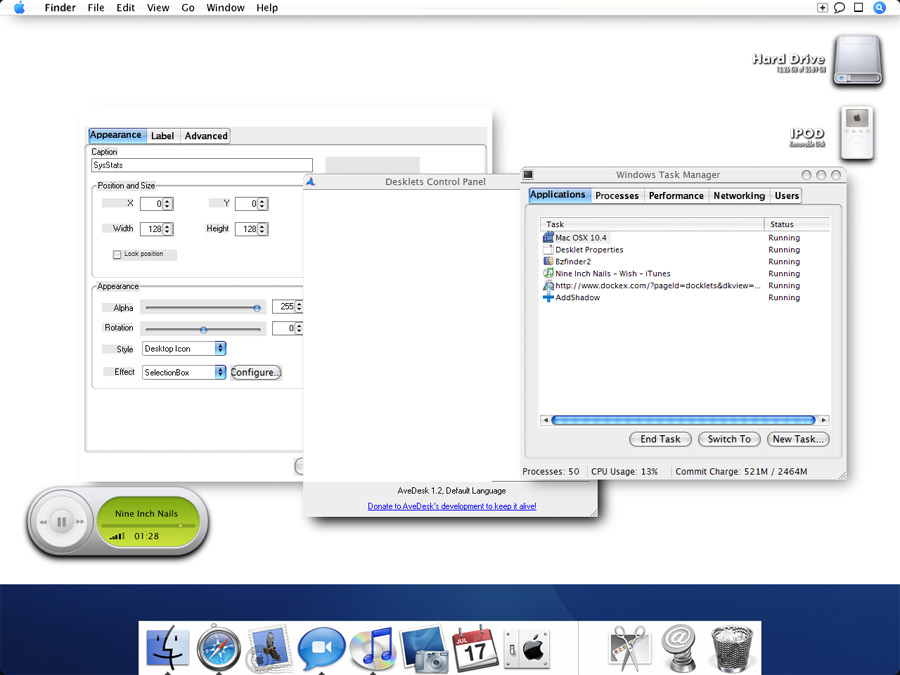
[rel] AveDesk 1.2

There I was waiting for the Tiger skin by Xero which was going to be released today and then I read the release of this much anticipated app on Aqua-softs frontpage :P

Quite an unexpected surprise indeed!

This one is for Wiebeest actually: If you want AveDesk to not save files in %APPDATA%/AveDesk, change the following line in settings_overrides.ini:

thus it will become:

; if true, yes or 1 then themes and settings will not be stored in in

; %APPDATA%/AveDesk/, but in AveDesk's root folder.

NoMultipleUserAwareness=true

That's just great. I appriciate this Andreas. I'm sure I'm not the only one who will be very glad you kept this possible in this new version. and all the other users will be glad this option is still there whenever they re-install windows after they had to a format c:, so now they don't have to re-calliber all their desklets again.

Donating

AveDesk is not freeware, but donation-ware. If you use AveDesk, please considering donating to keep its development alive: SUPPORT AVEDESK BY DONATING

Andreas PM me your bank account and I'll gladly donate you some €'s for this worthy app, because I don't do PayPal.

p.s.: Ik meen het bovenstaande en ook ff in 'the native tongue': goed gedaan man en bedankt dat je mijn verzoek over settings op een andere schijf dan the Xp-schijf onthouden hebt. Tof.

#256602

to all the newbies who are asking basic questions - Ave has updated his 1st post to include the link to my AveDesk 1.1 tutorial. It desn`t cover the new features added but it does cover the basics (drive space, setting drives desklets and such). One difference is that 1.1 had specific desklets for drives/folders/shortcuts and 1.2 has PIDL. However, the settings are very similar.

expect an updated tutorial tomorrow or the day after that. i don`t know if i`ll be able to work through the night, but i`ll try to update it ASAP

AveDesk 1.1 Tutorial

#256604

First, I'd like to thank AV for this great new version...my PayPal donation will be on it's way soon.

(EDIT: Donation sent)

A couple questions about the recycle bin desklet:

1) Any way to get the desklet to produce its effect when you drag a file to it? For instance, I have the bin set to "glow"...is there any way to have it glow when I'm dragging a file to the trash and the mouse (with attached file icon) is over the bin?

2) I think it was pointed out earlier, but the bin acts just as it did in Avedesk 1.1, that is, when you have files from multiple drives/partitions in the bin, it only acts like it has files from a single partition (as far as the sub-label and images act). But when you open the bin, all the files from all drives/partitions are listed. Can this be fixed?

#256609

Still playing around 1hr later ... lol

I remember reading/seeing a while ago about multiple states for each desklet - can anyone shed some light on how to do this - or is this an add-on like the other AveDesklets?

[edit] Also I;m playing around with the drop to desk - convert to desklet thing - it creates the desklets but leaves the file on the desktop too, is there anyway that it deletes / moves the file somewhere else? Or am I just setting it up wrong??

#256610

Thanks Andreas, awesome job, I love it!

One question though, how do I disable the desktop grabber?

Thanks!!! :D

#256613

Quote:

automount is not showing the audio cd I have in the drive is there something I have to set up also on the pidlshortcut the browse button brings up nothing.

Tried that already before I posted

You are the first one then. Using an alternative shell, besides explorer.exe ?

also, just curious as to what the tools menu is to be used for?

Check out the 'Manage Tools' entry in the same menu :)

@Xandaman: try to redownload AveTunes.aveinst ?

@spase: someone already made one, search

is it possible to display the amount of free space in percent as in the drive desklet ?

or do you advice ppl to use the drive desklet for such usage.

Hmm.. no. I'll need to merge the code of the drive desklet into the pidlshortcut for that, if I have time.

In the Recycle Bin Shortcut i have encountered a bug , This occurs only if u have different partitions ,

if i delete a file from my other partion then if i have said avedesk to use the sytem images then it will update the icons (show a full trash bin) but if i am using custom images then it will not update, anyway to fix this issue.

apart from that this a kick ass release. thx ave

Need to recheck this, gimme a day.

I am trying to use the objectdock weather docklet. In 1.1, I could resize the docklet without any problem. But now the default properties doesn't resize it. Is there anyother way to add weather WITHOUT USING SYSSTATS as I want the option of keeping my weather icon collection and switching them without much hassel ??

Can't reproduce it. hmm.. how does it not resize (icon doesn't resize, the editboxes also don't update?)

Civ2Boss: You are absolutely right. I apologize to you and I have taken the the skin out of the package now.

When I set the desklets to "Normal Window" the label disappears when I click a desklet.

Hmm.. I gotta try to run a different shell then to see what's causing it.

There's a little donation waiting for you, Ave.

Thank you! ^_^

Andreas PM me your bank account and I'll gladly donate you some €'s for this worthy app, because I don't do PayPal.

p.s.: Ik meen het bovenstaande en ook ff in 'the native tongue': goed gedaan man en bedankt dat je mijn verzoek over settings op een andere schijf dan the Xp-schijf onthouden hebt. Tof.

Will do, thanks in advance then ^_^:P

1) Any way to get the desklet to produce its effect when you drag a file to it? For instance, I have the bin set to "glow"...is there any way to have it glow when I'm dragging a file to the trash and the mouse (with attached file icon) is over the bin?

Weird, I explicitely added that effects react to drag-'n-drop hovers as mouseover; it works that way here.

2) I think it was pointed out earlier, but the bin acts just as it did in Avedesk 1.1, that is, when you have files from multiple drives/partitions in the bin, it only acts like it has files from a single partition (as far as the sub-label and images act). But when you open the bin, all the files from all drives/partitions are listed. Can this be fixed?

Darn >.< Still the same bug? You people must have a weird config, because it works correctly here. Anyhoo, expect a fix soon then.

#256616

One question though, how do I disable the desktop grabber?

uninstall_modules.png

Hit the 'uninstall' button for the desktopmodule.dll :)

#256620

Great, thanks!

#256622

Sorry to say this but on my system i run into tons of bugs. Back to 1.1....

#256624

Sorry to say this but on my system i run into tons of bugs. Back to 1.1....

It would be helpfull if you said what kind of bugs...

#256626

i got a bug for ya ave. maybe your aware of it. i was in showcase,(f8)mode. and i loaded up systat and went to properties, and it avedesk froze on me.

had to control alt delet and close avedesk donw.

i read there was a problem with systat already but i wasn't sure if this was the same thing as that problem.

attached is what my desk looked like before i closed it down.

post-1591-1108931674_thumb.jpg

Untitled-1.jpg
Untitled-1.jpg

#256627

Sorry to say this but on my system i run into tons of bugs. Back to 1.1....

it would help a lot if u actually listed your bugs and when they occur :slant:

#256628

Quote:

I am trying to use the objectdock weather docklet. In 1.1, I could resize the docklet without any problem. But now the default properties doesn't resize it. Is there anyother way to add weather WITHOUT USING SYSSTATS as I want the option of keeping my weather icon collection and switching them without much hassel ??

Can't reproduce it. hmm.. how does it not resize (icon doesn't resize, the editboxes also don't update?)

The docklet appears. When I double click on it or choose properties, I get the usual dialog box where I can enter zip code yada yada yada. I also right clicked on it in the Avedesk control panel and choose the default properties dialog box which gives me the Apperance tab, in which is changed the icon size.

Nothing happens. The icon doesn't resize, neither does the style or anything else except the label tab. It seems to me I am accessing the global default properties box not the one specific for that docklet.

By the way, I have a suprise in your Paypal account. Thanks for ur hard work.

EDIT - Thanks for the fix. Now it works. I had forgotten about CTRL-Click. ;)

#256629

The docklet appears. When I double click on it or choose properties, I get the usual dialog box where I can enter zip code yada yada yada. I also right clicked on it in the Avedesk control panel and choose the default properties dialog box which gives me the Apperance tab, in which is changed the icon size.

Try to CONTROL+Click it.

By the way, I have a suprise in your Paypal account. Thanks for ur hard work.

THANK YOU ^_^

#256632

Umm I think I have a bug...

When I plug in my camera, AveDesk becomes unresponsive and uses high CPU. The only way to solve this is to kill the process.

-Sony Cyber-shot DSC-P8

-USB 1.1

-Plugging in the camera shows a removable drive in My Computer.

-I don't have a desklet set up for my camera.

-Even after setting up a desklet, it seems like it still does the same thing.

-Computer makes a slight hissing sound when plugged in.

#256636

Quote:

1) Any way to get the desklet to produce its effect when you drag a file to it? For instance, I have the bin set to "glow"...is there any way to have it glow when I'm dragging a file to the trash and the mouse (with attached file icon) is over the bin?

Weird, I explicitely added that effects react to drag-'n-drop hovers as mouseover; it works that way here.

>>>I stopped and restarted Avedesk and now the glow effect works on a "drag and drop"...thanks AV

Quote:

2) I think it was pointed out earlier, but the bin acts just as it did in Avedesk 1.1, that is, when you have files from multiple drives/partitions in the bin, it only acts like it has files from a single partition (as far as the sub-label and images act). But when you open the bin, all the files from all drives/partitions are listed. Can this be fixed?

Darn >.< Still the same bug? You people must have a weird config, because it works correctly here. Anyhoo, expect a fix soon then.

>>>Alas, the restart didn't change this behavior...still acting like it only knows about my C: drive, unless I actually open it - then it shows files from all drives. I'm glad you'll be taking a look at it. If it helps, I have removed the windows recycle bin icon off my desktop using gpedit.msc, User Config/AdministrativeTemplates/Desktop...not sure if that's causing the strange behavior or not...

#256639

Thios is great, althugh i cant figure out this desktop grabber or modules. How do you active or install modules such as the desktop grabber. My Modules sub menu under extras is grayed out.. hmmm?

-bolero

#256641

one more thing.

untill i update the tutorial, for all the help u might need, feel free to IM me on AIM or ICQ.

let`s take some pressure off Ave ;)

Here`s a mini tutprial about installing/uninstalling modules:

1. Double click the DesktopGrabber.aveinstall / drag it over the AveDesk ControlPanel

2. RESTART AveDesk

3. DesktopGrabber should be active

4. To uninstall go to AveDesk Control Panel

5. Extras>Modules

6. Click UNINSTALL

7. RESTART AveDesk

Again, i`m there for all of your questions

#256643

Ave, this is the error I get. I simply try to add a desklet, and this appears.

The box to add them doesn't even get to show, straight to this.

This is on XP sp2, latest updates. AMD64, nVidia 5200 gfx card.

I have the same problem after I installed "The new 1.2-ready version of AveTunes, http://mpj.tomaatnet.nl/AveTunes.aveinst", I switch back to the AveTunes widget (v2.00) I used in v1.1 and everything's fine now.

I appreciate it, Andreas, it's wonderful. Thank you for your hard work.

Too bad the PidlShortcut won't display the percentage of free dirve space in sub caption now, but..I'm getting used to it now.:)

PS: I use SysStats v2.01 with it and works fine.

-cherrysoul

#256647

Fantastic work, Anreas! Everything is working fine for me, the shortcut draging to desktop feature is a dream :)

Thank You !

#256648

In the Recycle Bin Shortcut i have encountered a bug , This occurs only if u have different partitions ,

if i delete a file from my other partion then if i have said avedesk to use the sytem images then it will update the icons (show a full trash bin) but if i am using custom images then it will not update, anyway to fix this issue.

apart from that this a kick ass release. thx ave

I get this issue as well.. it seems to affect fiels from whatever partitions to tell you the truth, whether it is one file or many, the bin always seems empty (and the # of items and total size dont show in the sub label)

ave: i dont meant to post after you already said you would have a look at this bug, but i thought i would shed some light on the rest of the bug (as far as the totals not totaling)

EDIT: ah i think the problem may be that i do not have a "c" drive per se... it is labelled F (not to mention the G and the H). maybe the desklet only looks in C

#256653

@Xandaman: try to redownload AveTunes.aveinst ?

wow...it worked! Perfect. Thanks.

I have a mirror up btw, it was the 1st one, check the 2nd post. :cool:

#256657

Wow. Nice application Ave. Many thanks. But i have this problem...everytime I'n on linux something awsome comes out for windows.... :o

Anyway Nice release. Nice features...Nice resource usage. :D

#256658

Well my initial joy has now turned to disappointment.

After I restart AveDesk all my SysStats desklets are very corrupted and when I check the settings, all the configs are completely messed up - CPU meter trying to show RAM, half the settings disappeared in the weather config etc.

This is only happening with SysStats but it is every single one of them.

I've tried re-configuring them and they are fine until I restart AveDesk then they are corrupt again.

I've tried changing the settings so it saves to the AveDesk program folder and I've tried saving the SysStats configs under different names and also tried replacing them from backups but I'm still not getting anywhere.

I've now had to switch back to AveDesk 1.1 and everything is working fine again (though they were still corrupt when I first ran 1.1 but fine after restarting).

Doesn't seem like anyone else has had this problem though...

I'm using SysStats 2.0.3 by the way.

#256660