[link] Entbloess - Expose clone.

you should just turn off 'update foreground window at regular intervals'

it is really commended if you're working in 9x or win2k enviroment, but not a must in xp.

i did check it out though, and it seems like it's functioning as it should on my system. no random cpu spikes. i watched it for several minutes and it's pretty stable.

#227734

you should just turn off 'update foreground window at regular intervals'

Agreed, there's no reason to have that on if you're running Windows XP. It's designed to have random CPU spikes - at intervals it needs to update the foreground window's preview. That way Entbloess works on 2k.

#227855

okay i tried to get in touch with you over MSN. The problem with the text hasn't been fixed even with the second update of entbloess 2.6 I went to your website forums, looks like you're doing some great work for 2.7, good luck with that! In the meantime take care of yourself and keep up the good work!

#228527

Alright, 2.7 is now released. This isn't the 2.7 with the things I was wanting in it, those will be moved to 2.8, but it's been tested (thanks suleiman) and it seems to be fixed (the text problem that is).

Use Check for Updates.

The demo counter has been reset as well.

#228688

Great work Shane. The boxy text problem is fixed even with desktop background enabled. Fantastic.

#228858

@ShaniakXP,

Your app keeps getting better and better!! Thank you sooo much for implementing such a sharp show desktop feature (v2.7 update) :) I will be purchasing another license when I get home tonight.

Regarding the crash experienced when coming out of my window's xp screen saver, (it is the one that comes standard, with the black background and little windows XP logo that jumps around randomly) I'm sorry I never posted back about that but I have tried to recreate that issue since then and it has yet to crash again. So I did not want to bother you with the anomaly. I suppose though, it could have been that my computer had come out of hybernation or some power save feature. (I am on a laptop: HP zd7188cl)

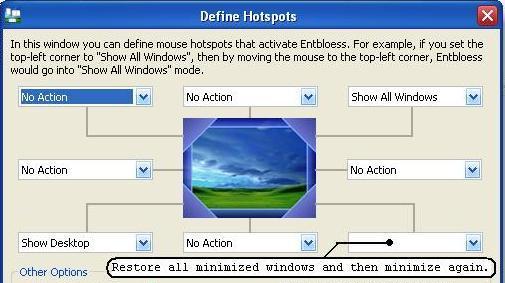
ShaniakXP, I have a feature request, Could you possibly add an option to the "Define Hotspot" settings window?

Please see the attached image for clarification.

attachment.php?attachmentid=4191&stc=1

By allowing the user to tap one corner and reveal all windows currently showing on the screen. Yet have another corner which could be tapped to "Restore all minimized windows and then minimize again." would be an indispensable useability option, i believe.

I really appreciate your dedication to improving and incorporating user requests and features into Entbloess, I have really come to root for this program, ;) regards, fc.

post-20869-1100540838_thumb.jpg

Entbloess Request.JPG

#228862

By allowing the user to tap one corner and reveal all windows currently showing on the screen. Yet have another corner which could be tapped to "Restore all minimized windows and then minimize again." would be an indispensable useability option, i believe.

If I understand you correctly, you want it to restore all the windows, then show all windows in Entbloess, then minimize them again afterwards, right?

#228878

I see I'm going to have to give this another try...sounds ver nice!

#228882

@ShaniakXP,

Thanks for the quick reply :)

I'm sorry, my text description probably confused things more than helped.

Let me try this again..

Whereas now, the user sets the bahavior of how Entbloess will treat minimized windows through the "Minimized Windows" Page of the Settings window, which affects the program "globally."

I was wondering if Entbloess would do something like this:

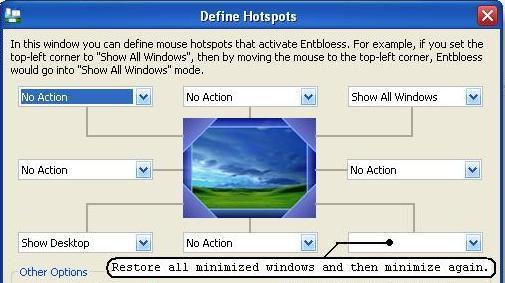
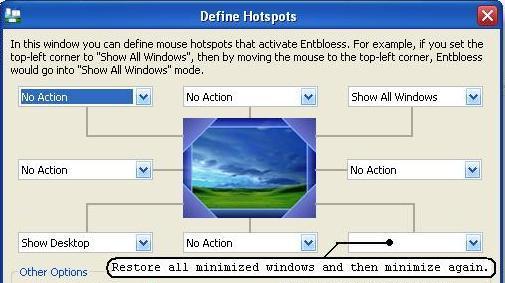
1 Corner could be a hotspot which, when tapped with the mouse, would "expose" only the windows presently on the screen. (Non-minimized windows.) Another Corner, when tapped, would "expose" all windows, including the minimized ones in the manner of: "Restore all minimized windows and then minimize again."

basically, adding additional options to the drop down list of Actions presented in the "Define Hotspots" Settings window.

So, currently, these are the provided options:

~ No Action

~ Show All Windows

~ Show Application Windows

~ Show Desktop

Additional Options could be:

~ No Action

~ Show Desktop Windows - Do not Show minimized windows

~ Show All Windows - Show the minimized Windows' Caption bar only

~ SHow All Windows - Show minimized Windows by Restoring all Minimized Windows and then minimizing them again.

~ SHow All Windows - Show minimized Windows by Restoring all Minimized Windows before Entbloess is initiated.

~ Show Application Windows

~ Show Desktop

Rationale: Sometimes I wish to see every single window open, most of the time I wish to expose, only those windows I am currently working with and are visible on the screen at that given moment.

I hope that this is a little clearer. Please let me know if you could consider this to be an add-able feature. Would it require a major code overhaul? Could it be implemented?

~fc.

post-20869-1100554580_thumb.jpg

Entbloess Request.JPG

#228883

Yep, that could probably be implemented, sounds handy, as I work the same way (I set Entbloess to exclude minimized windows for me and minimize windows that I don't need to use for a while).

#228974

@ShaniackXP,

sounds handy, as I work the same way (I set Entbloess to exclude minimized windows for me and minimize windows that I don't need to use for a while).

yes yes... i can relate.. I have always thought a feature such as the one discussed would be so much more useful than the vanilla "Show application windows" option typically provided with most "expose" clones.

I have a quick question: I just purchased my second license last night and this morning checked my email for the serial key, I found an email from Nipaco Enterprises but i wonder if it is the one I'm looking for. It's titled "Entbloess Serial Key Update" and includes the text: "..We've recently changed our serial key system, and so you've been issued with a new serial key..." with the new serial number.That was the only email I have received from Nipaco since last night.. Am I right to think that this email with the new serial key corresponds to my first purchase, and that I will still be receiving a serial via another email for the second purchase? That is what I'm thinking but I just wanted to clarify if possible. :)

A couple of posts back (or maybe it was @ your forum) i remember someone mentioning an issue where, when his windows were "exposed," a window in the bunch would all of a sudden disappear leaving an empty spot where it once was. I had my first experience of this issue, here is what happened.

1) I tapped my defined hotspot ("show all windows", with "Show the minimized windows' caption bar only" settings)

2) 4 (total # of windows) "exposed" correctly.

3) 1 second later, the top left window (hotmail - logging in) disappears leaving an empty spot where it once was.

4) I click on the empty spot

5) Windows return back to the normal locations with hotmail window on top (see #6)

6) On the very top, there is a "Popup blocked" notification window.

I wonder if this (or something of a similar event) was what the other person was experiencing. I have:

"Always obtain a preview for the foreground window" checked, "Update the foreground window's preview at regular intervals," unchecked, "Enable live previews," checked.

Something fun i discovered: When you enable "Show Desktop" and your windows stack to the side of the screen; if you "Show All Windows" from there, the windows "expose" with animation from the side of the screen.

A precursor to an animated "Show Desktop" ;)

Anyways, "crosses fingers" I look forward to the next suprises you have in store for us

leon

#229059

hehe, nice. seems like more and more people are finding about this program. all you satisfied users out there, help get the word out. shane works very hard to improve and recode his program, lend him a hand by letting more people know about it. =)

#229143

I have a quick question: I just purchased my second license last night and this morning checked my email for the serial key, I found an email from Nipaco Enterprises but i wonder if it is the one I'm looking for. It's titled "Entbloess Serial Key Update" and includes the text: "..We've recently changed our serial key system, and so you've been issued with a new serial key..." with the new serial number.That was the only email I have received from Nipaco since last night.. Am I right to think that this email with the new serial key corresponds to my first purchase, and that I will still be receiving a serial via another email for the second purchase? That is what I'm thinking but I just wanted to clarify if possible.

You are right, that corresponded to your first purchase. You should have got your second serial key by now, but since I was upgrading the serial key server at the time, you may not have. Please send a message to support.nipaco.co.nz.

On the very top, there is a "Popup blocked" notification window.

Oh okay. See you'll notice when you press Alt+Tab that any windows that have a dialog in front of them (i.e. the popup blocked window) do not appear since they are unusable at the time. Entbloess attempts to mimic this behaviour and so does the same. Remember if a window is missing F5 should usually solve the problem, as it may have been replaced by a different window (like in this case).

Something fun i discovered: When you enable "Show Desktop" and your windows stack to the side of the screen; if you "Show All Windows" from there, the windows "expose" with animation from the side of the screen.

Yep, I was thinking it would look pretty cool if they animated from the side and then animated to their original positions afterwards, so I added in that.

#229186

@ShaniackXP,

I just got the 2nd email :) Thanks

#229218

I'm really starting to like this programs as I see its benefit more and more each day. I installed the latest version and its faster than the one I had. That's good news, although I'm not sure just why it happened.

this is good...

#229281

just a suggestion,

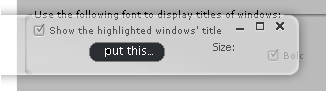
...to really get the customization community on board... provide the means to have &skin a background to the "Highlighted Window's Title" text, which "hovers" over the "exposed" windows.

A skinner could then make skins ("aero-title"s/"aqua-title"s etc..,) you could even, if at all possible taking into consideration eyecandy/performance and programming effort/return benefit on all this, place the close, min/max funtionality there.

just a quaint way for user's to personalize their entbloess experience ;)

post-20869-1100751651_thumb.png

post-51-1100751651_thumb.png

Entbloess WindowTitleTextBG.PNG
Entbloess WindowTitleTextBG2.PNG

#229475

Hi shaniackXP,

Do you think it is possible to make the the Entbloess return from thumbnail to normal windows after a period of time, even though not input from user? This is to protect the Entbloess from generate excess heat. For instance, last nite I accidentally hit the mouse to the hot spot and I don't even notice it so Entbloess remain in the thumbnail for a very long time stressing the cpu to 100% and generated alot of heat (notebook computer) that nearly burn the cpu. So my suggestion is either making the Entbloess 1) Automatic turn off the live view after a period of time in thumbnail or 2) just make the program return to from thumbnail to normal view say after 5 mins?

Thanks. vbmenu_register("postmenu_229186", true);

#230318

Sorry for the delay...

@firecracker6,

Working on that idea at the moment, I think it would increase the community aspect of Entbloess users a lot of there was a possibility to export and import themes, etc.

@chennhui,

Oh, that's not too good about the cpu. Yes I think that would be a good idea, I'll make it optional of course, but I wouldn't want anyone's computer blowing up or their battery running out because of Entbloess.

#230822

This program is awesome, then only thing left is being able to still see things on the desktop (avedesk, objectbar, dock), while exposing. Other than that, Winplosion better watch out, even the price is better!

#230972

i don't necessary agree with the last post. the whole concept behind expose/entbloess is so you will see previews of your "windows". since widgets, docks, etc are really just enhancements to your desktop, why do you need them to be expose'd? besides, how does it make sense to expose and then use your avedesk, objectbar, dock, konfab, etc?

#231193

i don't necessary agree with the last post. the whole concept behind expose/entbloess is so you will see previews of your "windows". since widgets, docks, etc are really just enhancements to your desktop, why do you need them to be expose'd? besides, how does it make sense to expose and then use your avedesk, objectbar, dock, konfab, etc?

I think he meant for the program to show the real desktop icons, widgets and all, instead of just the wallpaper.

I agree that 'exposing' widgets isnt such a good idea, because most of the programs have their own 'expose' functions anyways.

Chris

#231202

It does do that though. As long as the widgets are set to desktop or below (in any widget app, showing the desktop displays them. That is how it's working for me currently.

#231214

Yeah, but Konfab doesn't support the desktop function. You shouldn't be required to take into account Konfab's mistakes, but if you're planning a new version, see if you can fix this.

Thanks!

-NC

P.S: I think I'm going to buy soon!!!

#231372

Entbloess' Show Desktop works fine with widgets, AFAIK. Make sure you're using the latest version thought as it has changed recently. I have Konfabulator running and pressing F11 doesn't hide the widgets.

#231416

Once I get my PayPal account set up with my new debit card I will purchase this. The trial convinced me of its usefulness. Thanks for the hard work!

Edit:

I noticed that about every 3 seconds, when I have this app running my mouse cursor slows down a bit as if my FPS just dropped a bunch. I think it may be a spike in RAM or CPU but it is caused by this app because when I close it, the slowing down stops happening. Is this a bug?

#231418