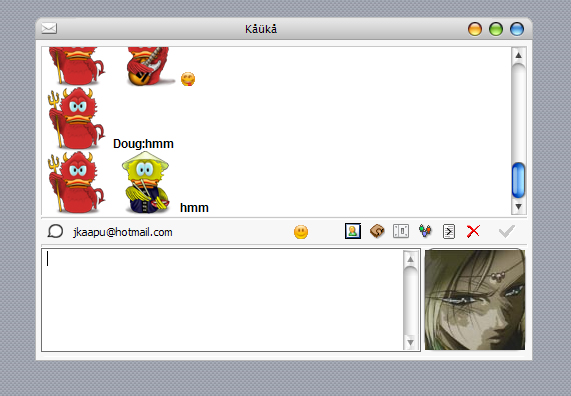
[release] Miranda To Proteus Mod

Originally posted by idicula@Sep 25 2004, 11:53 PM

quick question i'm having trouble connecting to aim

is ti cause I'm behind a D-Link Cable/Dsl router

<{POST_SNAPBACK}>

No, it's just a general problem with Miranda. You can connect, just have to try for a while.

@aashish13, DarkVegeta: You can't fix it fix it, but you can make sure the words you set avatars for are probably never gonna appear in a conversation. For example, I set my avatars to come up when a user name, including the : comes up (i.e. "David:") 'cause it's highly unlikely a person is gonna type David: in a conversation you know? So try to set up your avatars including the :

#216632

Well from a old trick with MSN, does anybody know of a invisible character, that miranda can't display? If so you could rename your contacts and place this invisible character when you rename your contact, so it doesn't show. Then you could put this invisible character into the file which sets the avatars, hence fixing the avatar-to-word problem.

#216633

i dont know... but try this one here!

Alt + 0173

using the numberpad

its a invisible character

greets

---- edit ----

okay

Found a way ;)

ALT + 255

and the contact have no name ;)

hf aashish13

#216637

Originally posted by [holden]@Sep 25 2004, 07:17 PM

No, it's just a general problem with Miranda.  You can connect, just have to try for a while.

@aashish13, DarkVegeta:  You can't fix it fix it, but you can make sure  the words you set avatars for are probably never gonna appear in a conversation.  For example, I set my avatars to come up when a user name, including the : comes up (i.e. "David:")  'cause it's highly unlikely a person is gonna type David: in a conversation you know?  So try to set up your avatars including the :

<{POST_SNAPBACK}>

i fixed it on my end

i had to set my SS name to 1 letter :blink: worked

is it possible to add other icons to use ? or would i have to rehcack the dill file and is it possibale to use a smaller icon

post-1015-1096161107_thumb.jpg

fixed.jpg
fixed.jpg

#216641

I think you could put a path into the file. Like C:\My pictures\me.ico (or whatever extension). Try it! It works with regnessem ;)

#216644

Originally posted by pierrem@Sep 25 2004, 07:50 PM

i dont know... but try this one here!

Alt + 0173

using the numberpad

its a invisible character

greets

---- edit ----

okay

Found a way ;)

ALT + 255

and the contact have no name ;)

hf  aashish13

<{POST_SNAPBACK}>

no clue why but it stopped working ? :blink: :cry: how do i do the Alt + 255 ?

#216646

look at the numberpad on the right of your keyboard. Hold alt and press 255. Then let go, and there is the space. It's the decimal value for space ;)

#216647

Originally posted by aashish13@Sep 26 2004, 02:24 AM

look at the numberpad on the right of your keyboard. Hold alt and press 255. Then let go, and there is the space. It's the decimal value for space ;)

<{POST_SNAPBACK}>

No, it's not. It's the decimal value for ÿ (0x00FF = 255).

Using Alt+255 to represent an alternate space is a hack (basically, you're making use of Windows' conversion to control characters for 3-digit alt-codes)

ASCII/Unicode space is 0x0020 (32); Unicode no-break space is 0x00A0 (160); zero width space is 0x200B; word joiner is 0x2060; ideographic space is 0x3000; zero-width no-break space is 0xFEFF.

Personally, I'd recommend using Alt-0160 (no-break space) rather than Alt-255 - it's more likely to work on a wider range of systems, more consistently.

And yes, I know I'm anal.

For more info on Unicode, peruse the Unicode charts

#216721

I've got a question to ask :P I'd like to know how to turn on the typing notification IN message dialogs, just like you see in Y! messenger, GAIM or trillian. I've been searching around in the options but couldn't find how to do it. Typing notification is by default in the tasbar, which is annoying because you have a lot of conversations in a single windows (tab conversation).

#216740

Originally posted by DarkVageta@Sep 25 2004, 08:11 PM

is it possible to add  other icons to use ?  or would  i have to rehcack the dill file and is it possibale to use a smaller icon

<{POST_SNAPBACK}>

Yes it is easily done.. Just reshack the proteus.dll with smaller icons like 48x48 instead of 64x64

#216747

@ Stevie, thanks for the info ;) . Your reminding me of my digital logic TA :P

#216782

The background link is broken :( Where can I get this image?

#217255

here you go

#217262

Thanks, bro!!! ;)

#217273

Man, you kids broke the links! They are now fixed by the by :)

#217313

Originally posted by aashish13@Sep 25 2004, 10:55 PM

Is there anyway to get the emotions toolbar in the message window to the top of the window, like in the real proteus? I have seen a winbox pc with this configured, if I find the screenie i'll post it.

Well here is the thread, I don't read spanish (remember  >.< ) , but here ya go David: http://www.macthink.net/community/viewtopic.php?t=9203

<{POST_SNAPBACK}>

Do anyone have this mirandamod that was posted at Macthink (see link above), I want to download it but the link seems to be broken! :(

Tanks!

#217865

Originally posted by b.wissing@Sep 30 2004, 04:20 PM

Do anyone have this mirandamod that was posted at Macthink (see link above), I want to download it but the link seems to be broken! :(

Tanks!

<{POST_SNAPBACK}>

Use right click "Save target as...", it's the only way it's gonna work.

#217866

Tanks! :)

#217885

Tanks! :)

Sure thing buddy :)

#217988

is there any way to remove the scrollbar

#220091

is there any way to remove the scrollbar

Not that I know of.

#221424

edit: nm i got it :)

#222232

I cant see the preview shot

#297111

that's because ur bumping a very old thread

#297117

Yeah, no bumping here buddy -_-

#299317