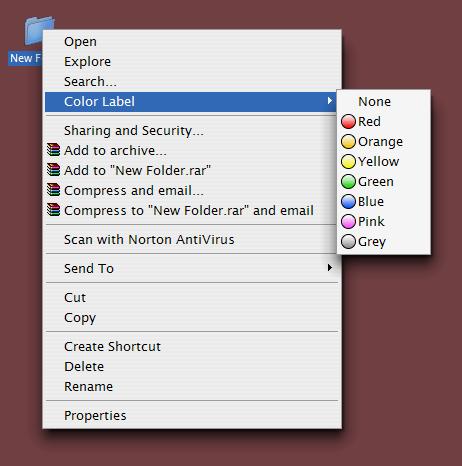
[release] Icolorfolder V0.3

the problem is because your system folder is not on the default c drive. to fix this edit the appropriate .reg file and change the single references from c: to d: - problem solved, and for XanthraX where it says C:\\Windows change it to what u have

side issue... on my system the icons and menu items appeared to be a little jaggy, so i resaved all the icons from magbi9's png and they look wonderful now :lol: . oh for me the menu icons needed to be 15x15px rather than the current 13x13px. with those few changes it looks splendid.

good work

-The Unknown

#150732

Good work man, excellent idea and thanks.

-Aviel.

#150749

would some one be kind enough to post the cleaner version withmagbi9's pngs.

#150762

Yah, the Folder PNG´s look wierd and jaggy (That is, when they are in 72x72 they look okay but when in Tiles view, they look jaggy :/ )

GREAT App, I like it

#150998

Nice, better icons and I'll :6 you!

#151023

Originally posted by theunknown@Apr 26 2004, 01:31 PM

the problem is because your system folder is not on the default c drive. to fix this edit the appropriate .reg file and change the single references from c: to d: - problem solved, and for XanthraX where it says C:\\Windows change it to what u have

side issue... on my system the icons and menu items appeared to be a little jaggy, so i resaved all the icons from magbi9's png and they look wonderful now  :lol: . oh for me the menu icons needed to be 15x15px rather than the current 13x13px. with those few changes it looks splendid.

good work

-The Unknown

Thanks Unknown that was very helpful, :D:D

A request would be mutiple folder changing

What a handy little tool this is ;) Thxs

#151102

Originally posted by theunknown@Apr 26 2004, 01:31 PM

the problem is because your system folder is not on the default c drive. to fix this edit the appropriate .reg file and change the single references from c: to d: - problem solved, and for XanthraX where it says C:\\Windows change it to what u have

Thanks. All problems can be solved verry simple and easy. Now works for me.

#151197

Ok, i'll work on all that ASAP :

-A skin engine

-Work with multiple folder selection

-Betters icons (anti-aliased in all views)

-System icons (like Burn, etc...)

I'm sorry for the C:\Windows\system32 bug, I'll work too on a NSIS installer, so it'll be possible soon to install iColorFolder in any directory.

Just two things :

1/: I'm not a designer or a graphist, so I'm don't really know how I should handle png-> ico convertions for the icons don't look weird. I use iconworkshop, and can convert these PNG to any size, but which size am I supposed to use ? A bit help here will be thankfull :)

2/: I can add some system-folders icons, it's very easy, just add a few more colorID and icons. No problem for the code part. But I should present them ? I thinl the better thing to do would be another menu under the Color menu, labelled, well... System, and with the list of the system icons here. Have a better idea ?

Thanks ! :) :) :)

#151205

for question one... how about i send u the ICONS's i created?

as for question two... why dont u create a little tutorial to show people how to create their own menu's ;) . correct me if in wrong, but it looks like a simple tweak of the .reg and some aditional icons in the .exe file will do the trick. ill have a go to and c what i can come up with.

-The Unknown

#151223

omg...people are requesting a skin engine for this?

you've GOT to be kidding me...

it's a menu, for crying out loud. If people need some other options, let them figure out how to ResHack the DLL instead of being lazy 'gimmegimme' whiners

I say dont worry about it. They get what you give them.

I, for one, thank you for this incredible app and applaud your work. It needs NO improvement.

thank you thank you thank you

and dont let the babies get you down.

#151230

im not sure what can be skinned by an enigine <_< . ive been able to change everything with what we already have been given.

this is my menu ATM

-The Unknown

post-487-1083056165_thumb.jpg

untitled.JPG
untitled.JPG

#151237

Originally posted by Duckie@Apr 27 2004, 08:40 AM

omg...people are requesting a skin engine for this?

you've GOT to be kidding me...

it's a menu, for crying out loud.  If people need some other options, let them figure out how to ResHack the DLL instead of being lazy 'gimmegimme' whiners

I say dont worry about it.  They get what you give them.

I, for one, thank you for this incredible app and applaud your work.  It needs NO improvement.

thank you thank you thank you

and dont let the babies get you down.

Who's whining? To me it looks like a developer who wants feedback on his latest work and people have suggested a easier way to change the icons would be helpful. Not everyone here uses OSX style folders, not everyone here can reshack and not everyone here has the time to spend messing around with changing icons... Sounds like your the one whining to me <_<

Anyway.... kemenaran great work man this is a really good idea! Its so useful cant wait to see what the future holds for this keep it up man its great!

#151254

Nice app, it's great you share the source too.

Merci beaucoup. :D

#151259

Originally posted by Anarchi5t@Apr 27 2004, 05:43 AM

not everyone here can reshack and not everyone here has the time to spend messing around with changing icons...

better find the time then...and learn to do it yourselves...

developers do this for free

they dont exactly have alot of time either, you know?

#151264

I like it alot!, :woot: great app!

Would it be possible to have the menu on shortcuts as well? :unsure:

#151265

Originally posted by Duckie@Apr 27 2004, 05:23 AM

better find the time then...and learn to do it yourselves...

developers do this for free

they dont exactly have alot of time either, you know?

right on duckie;) it took like 3 minutes to reshack. The developers give the framework... now everyone else needs to do something with it...

#151267

Originally posted by Duckie@Apr 27 2004, 10:23 AM

better find the time then...and learn to do it yourselves...

developers do this for free

they dont exactly have alot of time either, you know?

Im not saying anything is stopping them from doing it I was saying that people are merley suggestings improvements which most developers seek and they dont need you running round name calling -_-

#151268

im not entering this argument... but everyone watch what your saying - a little respect goes along way.

-The Unknown

#151284

I don't care what people say but this app is awesome!!!

:woot:

#151299

theunknown I would love to have your icons for the menu if you will part with them

#151305

im assuming this is alright... if not just say so.

Link

just replace the current exe file with that one... it also has the fixed icons -_- .

-The Unknown

#151312

Thank you.....

#151331

Wow! A great application!

I think it's even better than color labels!

#151336

Originally posted by theunknown@Apr 27 2004, 12:53 PM

im assuming this is alright... if not just say so.

Link

just replace the current exe file with that one... it also has the fixed icons  -_-  .

-The Unknown

icons wern't fixed, they still looked jagged in any view other than icon.

#151360

iCF updated to 0.4, very quickly and maybe still bugged, but now skinnable ! :) If you want to skin the soft, just ResHack the external dll and redisrtibute it as you want.

You have to reinstall the soft, obviously, all the files and the .reg too. When you select a new skin (replace dll, basicaly), don't forget to update the iconcache (with tweakUI for example)

Sorry for the other TODOs, I haven't really the time to code now : exams... :(

And some technical infos : as said in the ReadMe, I used a little soft called CMenuExtended to create the context menu, by Revenger, Inc. Google it, it has a nice registry front-end to create your own menus, it's just fantastic :)

#151512