 Aqua-Soft Forums
am I the only one here who doesnt know how to use the 'per application' portion of WB?
there are no buttons or anything there and I cant seem to drag the app into the window either...
anyone?
bueller?
am I the only one here who doesnt know how to use the 'per application' portion of WB?
there are no buttons or anything there and I cant seem to drag the app into the window either...
anyone?
bueller?
hey duckie:
display properties... appearance tab... windowblinds button... perapplication on the left side of the windowblinds window... add perapplication setting... drag target to open firefox window.... select 'use specified skin' in drop box... select skin button.
apply changes.
this is in wb 4.1, should be same above.
edit: with some poorly designed(or purposely, if dealing with a font issue?) skins, options may be missing from wb options window described above. change themes if this is a problem, then revert when you have your preferences set.
If you changed your ms shell dlg fonts in the registry, you have to click one of positions in the per-application list (there should be at least one), then push tab and then space. That should do the trick 
Hey Aquarius... This is AWESOME!!! 
I love the new Prefs window! No need to use your "bugsolutions"
For the glitch with setting the homepage, I just opened "about:config" and edited it there. Works fine.
I haven't found any other bugs so far.
I took a hint from jbgamble and edited about:config to change some settings that the preferences bug was preventing, such as default download directory. For any ****ies out there, just type about:config in the address bar, find the setting (string) you want to modify, right-click, and choose modify.
You can find more information here.It's also possible to edit the preferences normally stored in user.js by entering about:config in the address bar and press Enter. You will see a list of all available preferences in Firefox (many of them are derived from Mozilla and are not used but not yet removed). Double-click on a preference to change its value. The changes you make here will be immediately stored in prefs.js, which is a file automatically generated by Firefox.
Ahhh I totally forgot about... about:config
mmm
digging these since last release..
Tab Font shadows
Dimmed non clickable Back/Forward buttons
bookmark bar mouse overs.
New Pref layout, mmm
GJ!
and yes. about:config let me fix up Download dir and Homepage, all is well now.
Very nice skin! Thanks a lot
But I have a little problem with it... I did everything that was in the instructions, but the shadow thing, and the fresh install, everything seems to go perfectly, but the config window... in fact it works, but doesn't look like yours... the tab images are still on the leftside, not above... did I do anything wrong? Thanks in advance!
pic in attachment
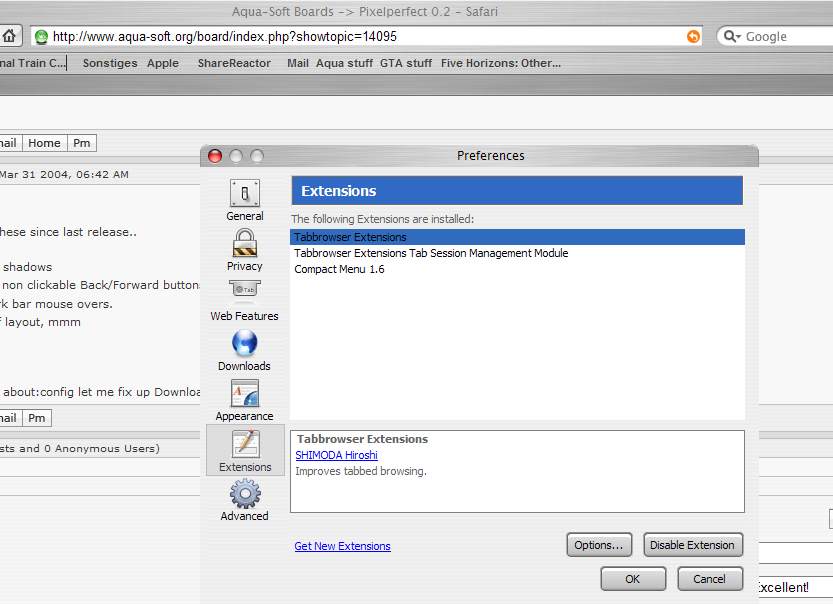

No. U did everything good. It is my fault, that the first pref mod has errors/bugs so I switched back the pref window settigs. That secong version is what u downloaded.
I will fix the xul problem and post a 0.3 update soon. Until that time use 0.2 and enjoy it.
By!
Excellent work dude! This theme just keeps getting better and better!!!
I love how the drop-down menu boxes look in the option menus - just wondering if it's possible to get them showing on websites aswell, as mine looks like on the image attached (box is blank because I replaced my marlett font for a finder wb theme).
Also, would it be possible to skin the browsers buttons to aqua rather than the grey boxy buttons?



Before i begin, I am NOT complaining, dissin, fronting, or in ANY way offending said developer, but these are issues that should be addressed.
My issues:
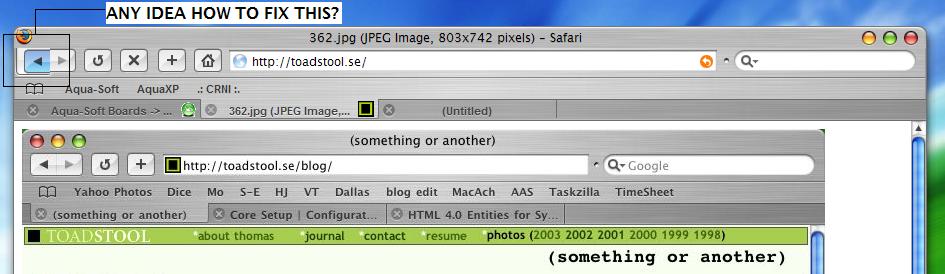
1. The seperator isnt correct or aligned properly
2. Notice the line? This is because when I added the Bokmarks book icon, it made the bookmarks bar wider, which messed up the alignment.
3. My folders are too closely spaced and should be spaced like the links to the left
4. what is that line next to the snapback icon?
5. Scrollbars are ALL messed up. This happens when the window is set to lower than 800px height.
6. (NOT SHOWN) the folders only skin a rectangle, unlike the links which are skinned with rounded edges.
Yes, I installed a NEW copy.
Yes, I followed the directions
Yes, I installed ALL the extensions
Yes, I installed the bugfix
So, anyone want to help with this?
Well I got one small prob with this skin too. Everytime I start firefox I'm unable to write
in any of the text fields that appear (url-bar and search). Besides that this skin rocks.
@Duckie, Yup I had that same prob but re-install actually worked for me. Sorry 
Main error duckie........
The visible bars after the mod is installed are: bookmaksbar, menubar
What u do wrong: bookmarks are stored in the navigation bar, thats why it is too big in height. Read the instructions again. The buttons must be in order as I described.
eLSE: Use the new wb skin for the scrollbars.
Spacing: caused by the bar switch u made, fix the bars and will look good.
Folders: thats correct, I was unable to set the folders as the links, maybe in 0.3
By! :smartass:
hey nice skin dude..
anyway one small question..
in the bookmarks toolbar, why is it that when i hover over a single link, the highlighted shape is an oval-rectangle but when i hover a folder link, it shows a rectangle shape...
err u know what im talking abt??
anyway, is it normally like that in the real safari?
how can i make the hover shape image be the same for both?

Originally posted by matjurong@Apr 1 2004, 08:32 AMhey nice skin dude..
anyway one small question..
in the bookmarks toolbar, why is it that when i hover over a single link, the highlighted shape is an oval-rectangle but when i hover a folder link, it shows a rectangle shape...
err u know what im talking abt??
anyway, is it normally like that in the real safari?
how can i make the hover shape image be the same for both?
Hes just said in the post above yours it cant be fixed.
It was like this in 0.1 you'll have to wait for 0.3 if he can find the problem. I had the same problem just try to live without folders and use the bookmark menu.
Work great here with Brushed 3.5 1px Visual Style. Only pressed button a bit glitch. Anyway its great!
Thanks!

hey can anyone help me out with this??
when i used the first version(ver 0.1) of this mod, i installed a plugin called "user agent switcher"
it worked pretty well and i had the choice of choosing the browser identity to surf a particular site
but since i tried installing it again after i tried this mod(ver 0.2)... the menu comes out like this..

instead of like this...(image taken straight from the plugin site.)

i tried a fresh install and repeat the same procedure quite a number of times including deleting my profile folder and such and then reinstalling the plug in but it is still the same..
anyone can help me?
my browser doesn't start if i replace the pref file with aquarius' pref file, but if i use my own everything is fine, only that i don't get to use your settings.
anyone have a solution?
by the way this update is awesome, thanx for spending the time to do it.
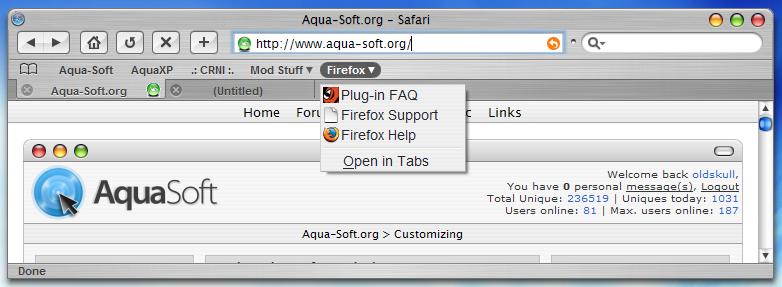
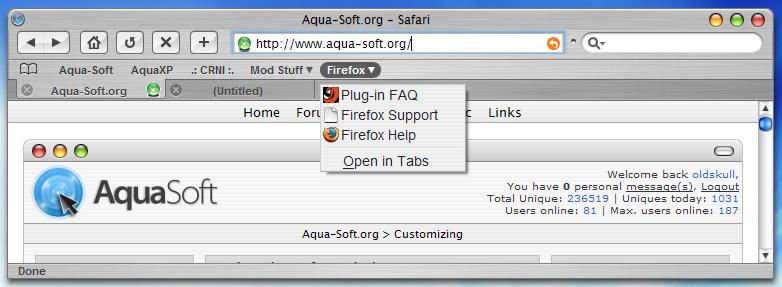
I have fix some issue with bookmarks folder hover, as shown in de screenshot I hope thats look beter now. Also I did some fix on toolbar button margin and change some other things like status bar size, status bar icon resize, fonts change to Arial and some others changes in classic.jar
P/S: This fix/changes work fine with 1280x1024 res, and Brushed 3.5 1px Visual Style.
Anyone else seeing this problem... I set a page to be the default start page and then the next time I start the browser it defaults to the original firefox default startpage.
Also, I don't have the userchrome.css file... only a userchrome-example.css file, are they the same (and by extensions should I then treat them the same when modding?)
Help .... sorry to sound here. I had downloaded bugfix file, there is 3 different files extract from the pack, where should i placed that files? maybe it is a stupid question, but I really want to get from help here, thanks