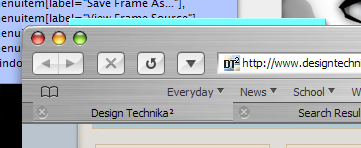
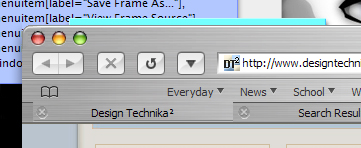
Reincarnation Of Firebird :)

Few notes if I may :rolleyes:

You should tighten up spacing betweeen toolbar buttons a bit and between search and adress bar

Bookmarks toolbar text should be farther appart from icon

Also your chevron arrow is smaller then should be

You overstreched search bar a little more then you should...

And you should remove 'Mozilla Firebird' from the title bar ....

... other then that great work , your tabs are perfect :rule:

screenshot-10222.jpg

#111246

You should tighten up spacing betweeen toolbar buttons a bit and between search and adress bar

Yes I'd like to, but i don't know how :rolleyes:

I tried to adjust it in browser.css bot only got poor results...

Bookmarks toolbar text should be farther appart from icon

your right, fixed that

You overstreched search bar a little more then you should...

I like it this way on my 1400px Display - your's too short (compared to my OSX-Screenshot) :P

And you should ditched firebird from title bar

No I wont do that - firebird is opensource and everyone shall see what this kind of software is capable of :who's your daddy:

#111247

Well don't ask me - I moded mine while ago and I'm not goin' in there again :)

If you want - PM me and I can send you my browser.css , maybe you can work something out...

#111248

hey rstockm, sorry i my email didn't make it to you, i just saw your pm, looks like you solved it anyways(any you have nicer scrollbar buttons than mine). You need to add highlights to the bottom of your toolbar gyphs(close/minimize/etc.) to make them look sunken.

We need to add highlights underneath the firebird toolbar buttons to make them look sunken too.

to change the toolbar button spacing i went into browser.css and just added this at the start of it:

  #reload-button {

margin-left: -4px !important;

margin-right: -4px !important; }

for all the #button types i wanted to change, just play around with the margins and you will get it(dif. values needed for a couple).

i used the dimple for a go button as it seemed most appropriate given its location and changed the positioning to make it like safari's(crni's comment on url/dimple/search spacing) by:

#go-button,

#go-container {

  -moz-appearance: none !important;

  background-color: transparent;

  margin-left: -3px;

  margin-right: -9px;

  border: medium none;

  padding: 0px;

  min-width: 0;

  list-style-image: url('chrome://browser/skin/go-large.png');

  -moz-image-region: rect(0px 26px 21px 0px) !important

}

you have to adjust the hover and active states too. i think you used the dimple for compactmenu, so i assume you can adjust the compactmenu settings with similar margin shifts.

Also, to get the space to the left of your first open tab(like in safari as seen at the http://www.apple.com/safari/ page), add a space using the tabbrowserextension option, and then change your tabextensions.css to:

/* blank spaces in the tab bar */

tabbrowser[makeblankspace=true] tabs>hbox {               

  margin-left: 0.9em;

  margin-right: 0.9em;

}

tabbrowser[makeblankspace=true] tabs>.tabs-left,

tabbrowser[makeblankspace=true] tabs>.tabs-right

{

min-width: 0.9em;

}

i did this to the right of the last tab button too, though i don't know if that is safari style.

you can also adjust the 'open bookmarks sidebar' bookmark icon so that it lines up with the dividing line between forward and backward buttons, but i can't remember where that was. Also, you can change the default 'spacer' width so that after adjusting all these spacings you can further finetune them a bit easier to your own liking.

and i agree with you on the search box, as in safari it is resizable anyways i assume, so there shouldn't really be an ideal size. Anyways, its more functional at a larger size anyways, being that it isn't dynamically resizable in firebird. If anyone wants to change it, just edit your x.png to make it smaller and change your searchbox width settings in browser.css.

i like the new brushed texture by the way (Y) , much nicer.

#111250

Well here's what I've done so far

Crni, If you could, send me that browser.css this way

#111311

Kej0, how close are you to being able to release that Milk firebird theme?

#111319

I would say with a few more tweaks, I'm trying to get as close as possible I would say 5 or 6 days at most.

There are some bugs that are killing me

Like when you click the snapback, the nav-bar gets distorted

When entering text like this text box, some weird flicker happens, I NEED to get rid of these, or I'll go crazy

#111322

hmmm maybe I will release mine. The thing is I wasnt going to directily mimic safari, I have used some of my own style. I will post screenies when I come back and you guys can judge if its release worthy or "Josh you have bad taste" quality.

#111334

glad to say that the text input error I've been talking about is due to my actual theme, and not my Firebird mod.

Does anyone have a better......err version (for lack of better words) of Guipod?

#111378

A question.Look this picture.

post-8-1076253515.png

#111458

how do i enable the drop down arrows on safari-besides the bookmabrk icon??

#111488

Just use folders instead of single links. ;)

#111496

are these going to work with the new 0.8 that's coming out tomorrow?

#111499

Originally posted by Panther@Feb 8 2004, 03:18 PM

A question.Look this picture.

post-8-1076253515.png

Nobady knows about it? :cry:

#111500

Originally posted by dreamz@Feb 8 2004, 05:10 PM

are these going to work with the new 0.8 that's coming out tomorrow?

just try it tomorrow and see how broken it gets :6 :P

probably just a couple of things that'll need to get fixed.. i hope.

#111510

Panther,

try EDIT userChrome.css ;)

for example

/*Font color of All */

* {

font: 12px LucidaGrande, sans-serif !important;

color: black !important;

}

like this.

sorry, i can't description in English...

i'm Japanese.

#111791

I recently installed firefox (formaly known as firebird, formaly known as phoenix) 0.8 - and almost everything is messed up badly :rant:

- no forward/backward buttons

- tabextension not working

- compactmenu not working

- no scrollbars at all

- searchbar messed up

and that was just a first glance...

Dammit, I got REALY close yesterday on my 0.7 :cry:

#111900

For me evrything worked correctly now on 0.8.Try reinstalling it.In apge 2 or 3 of this thread there are instructions to make saf-p working with 0.8

#111917

Yet aother one:

- I "sunk" all Icons

- fixed all spacings

- did some font-adjustment

rstockm2b.jpg

- Right now I will port it to 0.8 - this may take some time (I plan to rebuild it "from scretch" to get rid of all the useless entrys...)

- I have to get those close-buttons - but thats a tough job...

#111950

Rstocklm That is AWESOME! lighten the bookmarks a smige and it'd be almost 1:1

#112041

Originally posted by Bicet@Feb 9 2004, 07:08 PM

For me evrything worked correctly now on 0.8.Try reinstalling it.In apge 2 or 3 of this thread there are instructions to make saf-p working with 0.8

i chat find it.. could you link me ?

#112045

Well, I installed FireFox, and tried to upgrade my theme................it flugged up very bad, and I lost the theme altogether. Now I will have to start all over, unless someone can find me the first 0.7 release

#112071

You can find on mozzilla ftp they have all releases

#112148

hey rstockm, i finally got the close buttons in the tabs and on the left! by accident!

i'm doing a 0.7 to 0.8 conversion, and for some reason got the tab scrollbar 'bug',

so i tried bicet's post from page 7 of this thread, and that made my close buttons appear(but didn't fix my scrollbar, i did that by editing tabextension.css)!

If your using tabextension extension, it really takes over your close button commands. It was overriding changes(even though it doesn't address the same functions) anywhere in the theme jar. So far i've got the close button positioned correctly(on the left of the tab) by editing tabextensions.css (in tabextensions.jar/content/tabextensions/tabextensions.css AND tabextensions.jar/skin/classic/tabextensions/buttons.css) with a margin added in like this:

tabbrowser tab[showclosebox=true] toolbarbutton.tabs-closebutton.close-button

{

display: -moz-box;

margin-left: -376px !important;

padding: 0;

}

this is with a spacer on each end of the safari bar, so if you don't have that, it will be different. Also, for it to maintain its position related to the left side of the tab, you have to fix the tab width from the tabbrowserext. options(i did mine at 200pxls which is 'around' safari width).

this seems kinda sloppy workaround, but it worked for me... i just have to readjust text margins/limits to get it finished up. There is probably another way to do it too maybe. all i need now is to do this tab text and see if its possible to 'scroll' tabs into view when you get alot of tabs, without having a scrollbar visible.

and on a final note, thanks gab and sultanoswing for the advice a few pages back, worked for everything, except search bar, so...

:banging: :banging: WE NEED TO UNBORK THE SEARCH BAR :banging: :banging:

#112418

just an update... i got the text solved. testing with userchrome:

/* change the font size and type of tab text */

  .tab-text {

    margin-right: 5px  !important;

    margin-left: 5px  !important;

    max-width: 160px !important;

    }

and that meant that the previous margin shifts for closebuttons should be reduced to around -185px

How is it going rstockm? i'm just posting this stuff if it helps you, so you can release the mod as your own.. you did the original post lynch stuff, and your wba is spot on. :canadian:

Also... can somebody(seph? :rolleyes: ) post the safari process icons from the right sides of the tabs(ie. is that yellow exclamation mark a stopped/broken loading, and is there a loading symbol?). Also, it would be nice to see the options panel for icon reference and button style.

heres my progress, before i edit the close button image:

post-2262-1076461500_thumb.jpg

progress.jpg
progress.jpg

#112512