 Aqua-Soft Forums
Originally posted by mimeryme@Jan 24 2004, 03:11 AMTell me, if you like it as shown, or should I try to improve it. .
I absolutely love the image you posted. Please release that, in its current form 
Originally posted by mimeryme@Jan 24 2004, 03:11 AMTell me, if you like it as shown, or should I try to improve it. .
I absolutely love the image you posted. Please release that, in its current form
Guys, can anybody using a Mac help me out with screenies of VLC 0.7.0?
I need:
- thorough explanations on all the buttons' functions and behavior (are there any mouseovers, other effects/pics/states);
- PNG, TIFF or PDF screenshots of the playlist window (it's not brushed, if I remember correctly?) - active and inactive;
- PNG, TIFF or PDF screenshot of the brushed controls window. I have all the buttons, just need the brushed BG - possibly transparent PNG  And please, don't tell me to use ones from Safari, iTunes or Quicktime... They are slightly different.
My email is on the first page of this thread.
I would ask Max himself but he's way too busy with ShapeShifter stuff.
So...
Goku? cmove? Anyone?
Originally posted by XP_2003@Jan 25 2004, 05:34 PMdownload THIS for the official Mac VLC skin resources unzip it and go to the Extras\MacOSX\Resources folder
(Y)
Hope it helps!
Ooh, I could have really used that. Well, I guess I still can; I'll see if I can improve the buttons in the skin.
Did you guys want mouseover effects? The code is already done as are the graphics as shown previously for the Milk version, but perhaps I needlessly included the mouseover.
Well, in any case, I hope I sent the e-mail to the right person; and as miSka said, Max is busy, so I hope you guys can wait till I get permission to release the skin.
@miSka, have you done all the code? AFAICT, there are no mouseover images in the original and the functions of the buttons should be pretty self-explanatory. Well, except for the Rwd and Fwd buttons near the Stop button. There are no matching funtions available to skinners as of right now.
Also, since I am "done" w/ the Milk version, it's not relatively hard for me to port the Brushed version; but if you'd like to do it, I'll not start on it. I could try to help you w/ the background (though I have yet to get a similar look).
@ mimeryme
hey ! that's great you should be releasing it by now! as for it, it looks very good. we will used all resources..
we will support you all the way..
Originally posted by XP_2003@Jan 26 2004, 07:55 AMNo mouseover effects please! >.<
How's the skin comming??
@XP_2003I already have two XML files (one w/ and one w/o mouseovers).
@miSka, what's the word on the Brushed version? Will you be making it?
---
I am still waiting for permission to release this. What's the best way to do this, btw? (I've e-mailed Max Rudberg when I first started on the project, but I probably should e-mail him again with the finished version.)
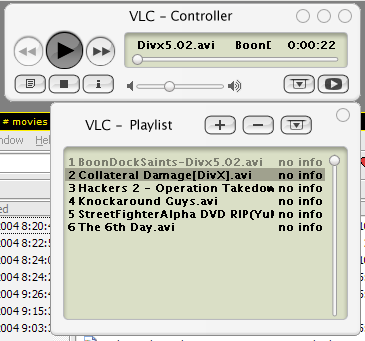
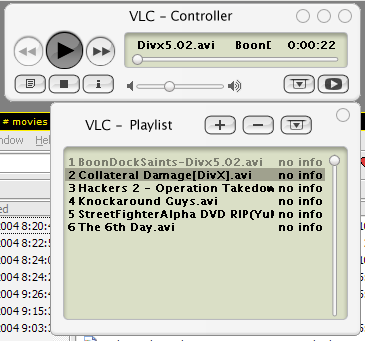
However, I am finished as such (note the pressed button states, not blue; should I have it blue?):
Originally posted by derek@Jan 27 2004, 06:01 AMsounds great (Y)
one question:
how can i activate skins in vlc? :shy:
On the latest version (0.7.0), you can right-click on the interface (except the menu) and there should be an entry on the pop-up menu for Skin Interface. Select Skins.
If it's not there, you may have to enable it in Preferences>General Settings>Interface>Skinnable Interface.
thx 
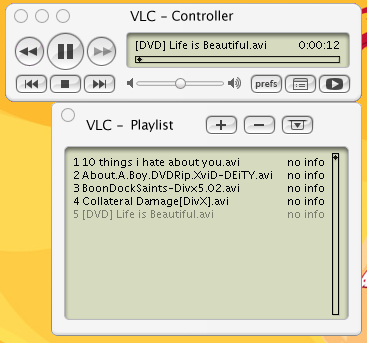
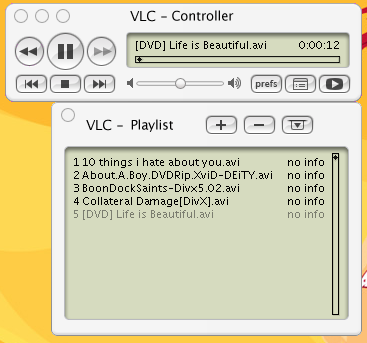
I've made a few changes since the previous screenshot. Max Rudberg, kindly, gave me some sources which allowed me to implement the same exact buttons used in the Mac OS X version of VLC.
You'll also notice that I changed the progress bar, as well as the playlist scrollbar. Any dissenters? It's a case of fashion over function. (Well, it's hard for me to drag the little widget.)
How do you like the "prefs" button? Max's sources included this "prefs" button, so I decided to use the available space. I also vertically centered the volume bar to match a mockup PSD file Max included. I think it looks better this way. What say you?
As of now, there's only the Milk theme w/ left/right widgets and blue/graphite pressed buttons (courtesy of Max).
I will wait for some feedback on the changes and barring any drastic requirements, the Milk version should be posted @ the Finished Skins section by the end of the day.
Also, there will be no mouseover versions. However, the minMaxClose widgets will have mouseovers. If that is still unwanted, easy fixes can be done to the XML file.
@mimeryme: The word is... either just wait a bit, or release your own brushed version. I'm creating some neat GetRight skins first =)
Originally posted by XP_2003@Jan 12 2004, 10:52 AMthe white one looks both cool and original to me!
But I like to have the close, min and max buttons on the right side >.<
oh...you're one of THOSE people
TRAITOR!!!
Originally posted by Duckie@Jan 27 2004, 09:22 PMoh...you're one of THOSE people
TRAITOR!!!
Don't you have other things to do?
