 Aqua-Soft Forums
[release] Panther Style Alt+tab
Originally posted by Mr. Finch@Nov 4 2003, 11:04 PMIt dosn't work...
WinXP Pro SPI .NET1.1 ?!?!
same 4 me <_< .
-The Unknown
@pack, .Net Framework developers dont control memory directly. we can't control how much ram it uses. the minimum usual is 16mb. .Net always reserves that amount. but don't worry. all the memory that a .Net program reserves can and will be freed in case some other program needs it.
i agree with pack on the ini part 
so... when will this work for me? LOL
good luck dude!
Yeah man, it looks sweet as all get out, but the .ini is just not effecient, and it doesn't work for me 
But whatever you do, don't get discouraged, and never say die! We neeeed this.
(Y) (Y)
Well, after so much talk about it not working, I had to try for myself.
And I concur, it doesn't come up at all, just the default windows task switcher.
Even played with the .ini file and added every last thing I have open to it, reloaded it, rebooted windows and had it load as a service. Still nothing. I give up.
Looks pretty neat though, if it'd work.
For those who are having trouble getting it to work, try this:
1 Open up Control Panel and choose "Add or Remove Programs." If you have the "Alt-Tab Task Switcher Powertoy" installed, remove it and reboot (you MUST reboot).
2 Make sure you have the .Net framework installed from Windows Update.
3 Start up Switcher.
4 Open an Internet Explorer window, then open a Command Prompt. Make sure the Command Prompt is the active window. (Just like with the regular Alt-Tab, this program won't show anything unless you have at least two running apps. for it to switch between. For some reason it seems to show up more often if the active window is a Command Prompt.)
5 Hold down Alt a few seconds, then also start holding down Tab. You should see it.
* My wish list for a future version *
- Scale down the icons as needed (right now you can only see 7 running tasks and part of an eighth icon)
- Show an icon for every running task, not just those in the INI file
- Fix the transparency of the non-selected icons (it's especially noticeable on the shadows); give those icons a black background if necessary
- Be able to choose the vertical display position (if you want it to appear further down on the screen, for example)
- Have a control panel where you can browse for the program files and their PNG's
One bug I noticed is that it doesn't seem to like Internet Explorer. I had two browser windows open and it only showed an icon for one. I opened a third browser window and no matter which of the two displayed icons I selected it would only switch to the third window.
Although this utility isn't very useful right now, I think it's a good idea that should be developed further.
(Let me know if the above steps got it working for you.)
Yes!! thanx mate!!
Holding alt b4 pressing tab did the trick for me, otherwise itll run and load windows alt tab...
(Y)
Looks really nice!!
Actually it works!
Thank you mad_mike for the lil tip of booting .. 
-------------------------
There is no need to hold "Alt" for too long just as long as you have at least two of the apps running - i think it depends on how fast your machine is, but thats still negligable.
What I also liked is the fact that it took over the windows "alt+tab" switcher, which is a bless :harp:
FEAT - INCREDIBLE, i'll be looking forward to an update for this one!
I managed to get it to work, thanks Mad_Mike!
Unfortunately it's still being way too akward for me to actually use on a day to day basis. For me, it *doesn't* take over the original alt+tab, but works on top of it. You can see the original one underneath it. This only happens when I don't wait long enough with the "alt" key, but it's still a nuisance becuase it's not as immediate as a task switcher might best be.
Also, it seems to be behaving rather selectively regarding which programs from the ini file it will/will not show. For instance: Will show gimp, will show savanna, iTunes and explorer, will not show mail, notepad, and the command prompt. All the filenames are correct, in any event.
edit: apparently, I seem to be whining about why this doesn't work more than I'm providing constructive feedback. But I have a Polish grandmother, she spoils me, I have a good excuse! 
Png transparency really does looks a little akward on unhighlighted objects, but I'm sure this is just a simple issue, so I won't go on about it.
Entering all your progrgams into an ini file is tedious, but it's great to be able to have control over the icon and the caption text. Perhaps this app can be set to search for the icon/caption via the ini file, first, and it finds no exsisting entry, it should just produce the running application's dedfault icon and default caption.
Keep up the great work!
@Liron
Have you tried puting the name of the running process in the ini? it differs in some cases from the main executable...
Hope it helps
Seph
Seph - I don't follow. Could you please send me an email/pm about what you're talking about?
I did what you said mad mike but it isn't working... :banging:
try adding the font recommended, the one @ iceman's website. And reboot your computer. At first it gave me a code erorr about and wanted to debug. But i added the font and rebooted, not it works for me.
thanks for the tip mad_mike - i'm going to be trying that one out on my next reboot - i think this prog has some pretty good potential, and I personally would like to see some people start posting their custom applicationsList.ini's
if i can get this thing going i'll be sure to post mine!
Mines working now, except explorer doesnt show up. 
worked for me on my first try too, but I have the same suggestions as Mad_Mike. Promising! Update us with news! 
Hi everyone,
In this month I don't have a free time for coding and releasing a new version of Switcher.
I would like to build a new version with some requested features in the begining of December.

I don't like having to uninstall the powertoy just to get it to work. I really wanted to try this app because it looks very nice. I guess I'll wait for the next release.
is there any new release planing for this app?
to Mefistus:
Yes.
I hope, next week I'll have enough free time for developing and coding the new build.
I'll inform you in time.
Please be patience.
Originally posted by FeAt@Nov 30 2003, 11:12 PMto Mefistus:
Yes.
I hope, next week I'll have enough free time for developing and coding the new build.
I'll inform you in time.
Please be patience.
:cry: fEAT dude any news? coz it still does not work for me 
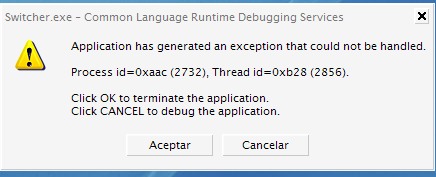

i got the same error on launching...
waiting for news :bow: :bow: :bow: :bow: :bow: :bow: :bow:


This is amazing!! The only thing it needs now is an exclusion list. Other than that, it is perfect. Nice job.